
TranceAddict Forums (www.tranceaddict.com/forums)
- Production Studio
-- Building a new Studio computer. Need a sanity check.
Pages (2): « 1 [2]
nah what you did say was that it only utilises the 2nd core, you said it never uses the 3rd and 4th, i actually was there when you said it
for common knowledge its amazing how the story just changed
| quote: |
| Originally posted by echosystm I never said that. I've said it once... I will say it again. FL Studio will only run thread safe VST instruments on other cores. Everyone knows this. V |
You must have misunderstood me.
Regardless, this argument fails. There are too many variables for anyone to "win"... I quit.
To summarise:
- 4 slower cores are better than two faster cores IF your DAW supports it well
- Quad core may or may not run like crap under XP

| quote: |
| Originally posted by echosystm You must have misunderstood me. Regardless, this argument fails. There are too many variables for anyone to "win"... I quit. To summarise: - 4 slower cores are better than two faster cores IF your DAW supports it well - Quad core may or may not run like crap under XP |
For a production machine I like to get the passive, quiet parts, but if that doesn't suit your fancy, then otherwise I'd say you're fine. If you're going to have a dedicated system disk, you might want to get one of the 10K RPM ones like the Raptor - they can actually improve boot times and overall performance by a fair bit. You can even get one of the tiny 36 gig ones - it's just the OS after all.
| quote: |
| Originally posted by DigiNut For a production machine I like to get the passive, quiet parts, but if that doesn't suit your fancy, then otherwise I'd say you're fine. If you're going to have a dedicated system disk, you might want to get one of the 10K RPM ones like the Raptor - they can actually improve boot times and overall performance by a fair bit. You can even get one of the tiny 36 gig ones - it's just the OS after all. |
Just depends on what you consider a problem.
Here's what I did to keep mine as quiet as possible:
1. Get a passive mobo (looks like you've done this - I personally used the P5B Deluxe).
2. Get a passive video card. This you haven't done, and video cards can generate a lot of heat and be very noisy. Mine is a Gigabyte GeForce 8600 (I forget the exact model, but there's only one passive version). This will not have great gaming performance, but you definitely don't need anything fancy for music production.
3. Get a lower-wattage PSU. Most home PCs don't even push the 200 W mark. I have a 420 W PSU in mine and I never, ever come close to maxing it. Normally you'd only need tons of power if you're running super-high-end video cards with SLI/CrossFire, but if you think you might really need 520 W, check it with a $10 watt-meter.
4. I used the P182 case, which is pretty similar to the P180. I think it comes with slightly better materials for the hard drive damping and such, but this was several months ago, they may have improved the P180 since then.
5. Stuck a Ninja heatsink on the CPU and threw out the stock fan. Runs cool enough even on a Prime95 test, and obviously makes no noise.
6. Used only two fans (excluding the PSU fan), both the huge 120mm ones. One on the top of the case, one near the hard drives.
Bottom line is, you can power the PC up and literally hear nothing. If it wasn't for the LEDs, you wouldn't know it was on. So I was a bit obsessive about that and you may not care as much.
I also used a 73 gig Raptor, but I needed a bit more space for a dual boot. I expected it to be a little noisy, but it's actually surprisingly quiet. It's more of a "whir" than an actual "click", and because it's just the system disk, it doesn't spin up much during a production session.
I'd suggest at least looking into a passive video card and CPU heatsink. But I'm just saying look at them, not go out and buy them now; they may or may not be for you.
| quote: |
| Originally posted by DigiNut 2. Get a passive video card. This you haven't done, and video cards can generate a lot of heat and be very noisy. Mine is a Gigabyte GeForce 8600 (I forget the exact model, but there's only one passive version). This will not have great gaming performance, but you definitely don't need anything fancy for music production. |
I'm not really up to date on motherboards, but P965 is what I've got. Aren't they old by now? I heard Asus aren't manufacturing the P5B line anymore (distributors might hold stock still).
Anyway, seriously follow what DigiNut said. The Scythe Ninja is the main part. Sounds like we have pretty similar setups.
As far as I am aware, the P180 etc. are identical on the inside to the SOLO. However, when I bought my SOLO, the P180s were shipping with these retarded rubber hard drive elastics that frayed and snapped over time. In the the SOLOs, these were replaced with stronger material elastics, like the ones in your underpants haha. Double check if the P180s have this now, otherwise you DO NOT want to be using those rubber elastics. They will eventually break and your hard drives will die.
I took 2 photos quick to show you how to set things up...
Hard drives:

Fan:

Whatever you do, don't put the fan on the actual heatsink. Put it on the rear case exhaust. That way you cool the heatsink and make air pressure in the case at the same time. If you just put it on the heatsink, a lot the hot air will stay inside the case, because only the PSU is pushing air out.
| quote: |
| Originally posted by Fledz I don't think this will be a problem. The GPU will hardly be working when doing music production and so likely won't generate much heat or noise. It's the fans that make most of the noise and that's usually when the GPU is at full load (ie gaming). |
i have 3 computers set up outside the DAW room. I think they make enough heat to substitute for the heaters. Well i will find out this winter. THe room housing the computers sounds like a wind tunnel.
| quote: |
| Originally posted by DigiNut [FONT=Tahoma][COLOR=#99CCEE] 5. Stuck a Ninja heatsink on the CPU and threw out the stock fan. Runs cool enough even on a Prime95 test, and obviously makes no noise. |
| quote: |
| Originally posted by DigiNut [FONT=Tahoma][COLOR=#99CCEE] 6. Used only two fans (excluding the PSU fan), both the huge 120mm ones. One on the top of the case, one near the hard drives. |
Correct on both counts, but the heatsink I used is not a Ninja Mini, it's a Ninja. The Ninja Mini looks - well - smaller. My guess is that the regular Ninja is overkill anyway, but again, dabbling with passive cooling as a bit like dabbling with OC; you have to test it carefully before assuming it'll be OK. Oh, incidentally, nothing in my box is OC'ed; I know that the Core Duo/Quads OC really well, but I'm not about to mess around with OC *and* passive cooling.
I actually forget the exact physical locations of parts inside the box now, but I'm pretty sure that the PSU lies directly across from the lower hard drive cage, so I have one fan blowing the hot air from the hard drive area into the PSU area, and the PSU fan takes care of the rest. It doesn't sound like it would work, but it's been running as cool as my old system did, for several months now. Maybe even a little cooler, because the Core Duo uses less power than the old Athlon 64 did.
| quote: |
| Originally posted by DigiNut [FONT=Tahoma][COLOR=#99CCEE]I'm pretty sure that the PSU lies directly across from the lower hard drive cage |


OK, thanks echosystem, thats what I thought. There was nothing in the description that described the model name as Ninja, but that seems like what I was looking for.
I am certain that in the Antec P180 case that the PSU is at the bottom of the case, so hopefully that wont cause a problem from a heat standpoint.
I'm only planning on having one disk in the box at the moment and the most I can envision being in the box is 2 if I decide to do with a RAID 0 configuration, but that seems kind of redundant anyway if all I'm doing is mirroring the OS drive.
I'm certainly not planning on overclocking anything. I simply do not trust doing that kind of self modification as I do not have the expertise to do it right and I'd rather buy what I need instead of trying to modify the parts to do things they were not indended to do. I know some people like doing this type of modification, but it seems entirely too big a risk for me.
It seems like the current list of what I have (including the heatsink) should satisfy my needs, so thanks for the advice everyone, you've been very helpful!
Echo: It's definitely at the bottom. Keep in mind that this is a "super mid tower", so you don't have things jammed together quite as closely. There are also 3 divided sections, so it's really very hard for the PSU heat to rise up to where the expansion cards go. I found this picture:
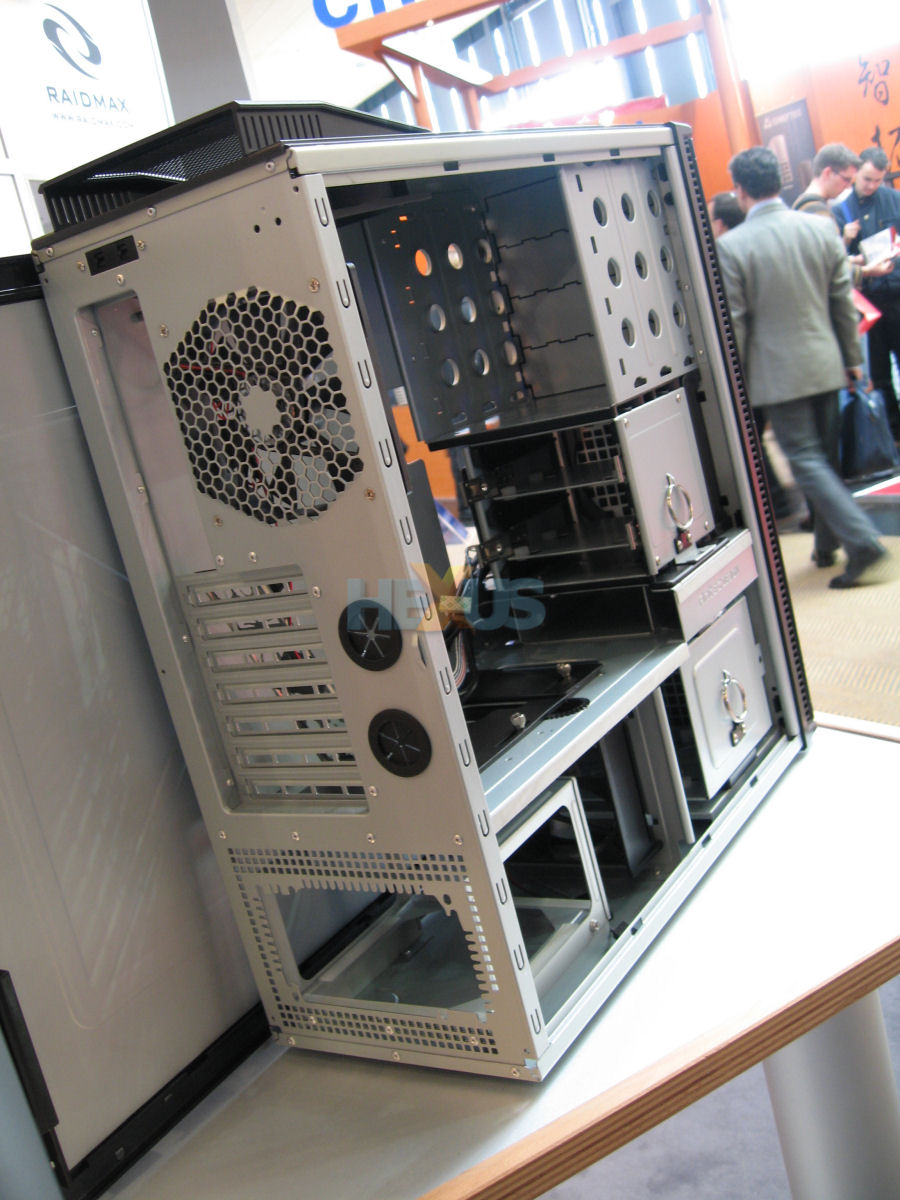
You can see where the PSU is, and you can also see the dividers separating it from anything above. Trust me, very little heat escapes up there. Mind you, PSUs usually don't run that hot anyway if they're reasonably efficient.
I yanked out the rear fan and just kept the top. The rear is usually blowing (almost) directly into a wall anyway, the top one is going into wide open space. Funny thing is, the air coming out of it is average temperature, even under load. Maybe the passive video card isn't as much of a pig as the fancy gaming cards. I'm actually considering buying the same one for an HTPC later on.
Also, I'm sure nobody cares, but I had to pull out the middle drive cage to make room for the stupid oversize Powercore, haha.
Eric: I personally would not waste any time on SATA RAID. Proper SCSI RAID is great on servers, but every desktop version I've ever experienced is garbage. RAID 0 is also risky; you're effectively doubling your changes of data loss.
ah! yeah.. if theres a big sheet of metal between them, i can only assume that would stop problems somewhat hahah. if the psu was in the same area as the rest though, that would be bad news!

Powered by: vBulletin
Copyright © 2000-2021, Jelsoft Enterprises Ltd.