
TranceAddict Forums (www.tranceaddict.com/forums)
- Production Studio
-- Templates
Pages (3): « 1 [2] 3 »
The Template I use fore Cubase5;
Synth Group
Sylenth 1
Sylenth 2
Vanguard 1
Vanguard 2
Virus 1
Virus 2
Virus 3
ION
Sidechain Group
Side Synth
Side Bass
Side Rest
Bassline Group
Sylenth 3
Sylenth 4
Vanguard 3
V-Station
Virus 4
Bassdrum Group
Kick High
Kick Mid
Kick Low
HH
Drum`s Group
Clap 1
Clap 2
Clap revurp
Snare 1
Snare 2
HH O
HH O
HH O
HH C
HH C
HH C
Cymbal 1
Cymbal 2
Crash 1
Crash 2
Percussion Group
Perc. 1
Perc. 2
Perc. 3
Perc. 4
Perc. 5
Loop 1
Loop 2
Sample / FX Group
Sample 1
Sample 2
Sample 3
Sample 4
Sample 5
Noise Mono 1
Noise Mono 2
Noise Mono 3
Noise Stereo 1
Noise Stereo 2
Noise Stereo 3
Group Track
Synth
Bassline
Kick
Drum`s
Percussion
Drum`s and Percussion
Sample FX
Effect Group
MPX 1 send 1
MPX 1 send 2
Room 1
Room 2
Hall 1
Hall 2
Side Revurp
Delay 1
Delay 2
Side Delay 1
Side Delay 2
I got no samples pre-loaded and the prestes on the synth`s are INIT/Start. Everything is routed.
On the Synth track`s the all got a bit highpass and have a pre-sidechain. I only have to go to the Side Synth and send sound to the synth for the ducking effect. On the send effect`s I have some routing`s to different revurp`s and delay`s. I only have to send it.
Basslines, the High pass is bypass, the LPF is on. Sidechian`s are on, just like the synth`s. I route them outside throug the Mixmaster.
Kick, the High and Mid are 12 o`clock Highpass. The low one is Lowpass on 12 o`clock. I only have to put the sample one the track and whit a little bit tweaking I got the right sound.
Drum`s; Every drum track is highpassed and just like the synth`s the have a couple of differend send`s to revurp. The Clap revurp is route to Side Revurp and hous already sidechaining.
Percussion is like the drum`s.
FX/Sample also like drum`s and the noise are already pre-EQ.
On every Track group I got bypass HPF and LPF.
On al the track`s I got pre-edit event. I only have to paint it, no searching.
The Template I use fore Cubase5;
Synth Group
Sylenth 1
Sylenth 2
Vanguard 1
Vanguard 2
Virus 1
Virus 2
Virus 3
ION
Sidechain Group
Side Synth
Side Bass
Side Rest
Bassline Group
Sylenth 3
Sylenth 4
Vanguard 3
V-Station
Virus 4
Bassdrum Group
Kick High
Kick Mid
Kick Low
HH
Drum`s Group
Clap 1
Clap 2
Clap revurp
Snare 1
Snare 2
HH O
HH O
HH O
HH C
HH C
HH C
Cymbal 1
Cymbal 2
Crash 1
Crash 2
Percussion Group
Perc. 1
Perc. 2
Perc. 3
Perc. 4
Perc. 5
Loop 1
Loop 2
Sample / FX Group
Sample 1
Sample 2
Sample 3
Sample 4
Sample 5
Noise Mono 1
Noise Mono 2
Noise Mono 3
Noise Stereo 1
Noise Stereo 2
Noise Stereo 3
Group Track
Synth
Bassline
Kick
Drum`s
Percussion
Drum`s and Percussion
Sample FX
Effect Group
MPX 1 send 1
MPX 1 send 2
Room 1
Room 2
Hall 1
Hall 2
Side Revurp
Delay 1
Delay 2
Side Delay 1
Side Delay 2
I got no samples pre-loaded and the prestes on the synth`s are INIT/Start. Everything is routed.
On the Synth track`s the all got a bit highpass and have a pre-sidechain. I only have to go to the Side Synth and send sound to the synth for the ducking effect. On the send effect`s I have some routing`s to different revurp`s and delay`s. I only have to send it.
Basslines, the High pass is bypass, the LPF is on. Sidechian`s are on, just like the synth`s. I route them outside throug the Mixmaster.
Kick, the High and Mid are 12 o`clock Highpass. The low one is Lowpass on 12 o`clock. I only have to put the sample one the track and whit a little bit tweaking I got the right sound.
Drum`s; Every drum track is highpassed and just like the synth`s the have a couple of differend send`s to revurp. The Clap revurp is route to Side Revurp and hous already sidechaining.
Percussion is like the drum`s.
FX/Sample also like drum`s and the noise are already pre-EQ.
On every Track group I got bypass HPF and LPF.
On al the track`s I got pre-edit event. I only have to paint it, no searching.
Sorry for the huge bump. I saw this topic on another forum and I thought it was still interesting. So maybe some more would post.
The last couple of days I finally had some time again to spend on music production. I noticed there's a new beta out of the sequencer I user (Renoise) with some really great new features. I took some time to build a template song.
What it has is the following:
1. Virus KC input track (with midi mapped controllers so I can control the sequencer with my synth and vice versa)
2. Nord Rack 2 input track, also midi mapped.
It has no other intrument tracks than these. Of course when I start I'll create a couple of new tracks straight away for the drums.
Furthermore it has 8 send tracks which are there for subgroup mixing (stems) all going through the Liquid Mix for a bit of colour and hardware compression emulation set for minimum impact (inspired by a youtube video posted here earlier, and my next door neighbour's studio with his couple of 1000s$ compressors  - jealous). I haven't yet found a combination of compression and eq that works best for me but it is working quite well already in my opinion.
| quote: |
| Originally posted by Storyteller Sorry for the huge bump. I saw this topic on another forum and I thought it was still interesting. So maybe some more would post. The last couple of days I finally had some time again to spend on music production. I noticed there's a new beta out of the sequencer I user (Renoise) with some really great new features. I took some time to build a template song. What it has is the following: 1. Virus KC input track (with midi mapped controllers so I can control the sequencer with my synth and vice versa) 2. Nord Rack 2 input track, also midi mapped. It has no other intrument tracks than these. Of course when I start I'll create a couple of new tracks straight away for the drums. Furthermore it has 8 send tracks which are there for subgroup mixing (stems) all going through the Liquid Mix for a bit of colour and hardware compression emulation set for minimum impact (inspired by a youtube video posted here earlier, and my next door neighbour's studio with his couple of 1000s$ compressors - jealous). I haven't yet found a combination of compression and eq that works best for me but it is working quite well already in my opinion. |


I find templates very useful too.
It started with just my setup mapped out ready to use and much like others have posted, i soon decided to add things to it.
Like my personal drum kit and common used fx.
Before it used to kill my creativity having to set things up and add the same old drum patterns over and over.
Dont get me wrong though, those template drum patterns do get changed both sample and pattern wise over the course of the track.
By the end of it i doubt anyone would ever know.
Just curious.. Does anyone here go one step further and have full arrangements as templates? I think some pros who put out large numbers of tracks often do this actually
| quote: |
| Originally posted by Falck I use a template every time, it taks too much time setting up reverbs, sidechain channels etc. every time one feels like making a new tune ... |
I don't use a template for any song because that's how you get into the habit of making everything you finish sound the same. You never learn and your sound never progresses.
| quote: |
| Originally posted by alanzo I don't use a template for any song because that's how you get into the habit of making everything you finish sound the same. You never learn and your sound never progresses. |
my new orchestral based template loads 14 gigs of ram. It takes about 10 minutes to load!
| quote: |
| Originally posted by alanzo I don't use a template for any song because that's how you get into the habit of making everything you finish sound the same. You never learn and your sound never progresses. |
I could understand that if you had to make a track every day and speed was of essence but how much time would it take you ? Do you load every synth ? Or only certain synths. If the later , then it perhaps unwittingly affecting the composition in that you will gravitate towards the tool already loaded rather than a tool that might be better for the job or less obvious.
I think the program used can play a big part in whether templates are used or not. I use Ableton and the only thing i have templated is a Kick channel with an empty Simpler, and a midi clip on it loaded with the 4x4, 2 sends with reverbs on them (one small, one big), and an EQ on the main rolling off low lows and high highs that take up unnecessary space. Ableton is very tuned to drag-n-drop so its very easy to just open the program and go in seconds. FL is pretty much the same way, but for Reason, Cubase, Sonar, Logic, etc. I can understand the reasoning for more advanced templating.
I've noticed that a lot of people don't use busses, but for those of us who do (I use a LOT of busses in my tracks), it's much easier to start with a template that already has a good basic setup. Same thing goes for track folders/groups - I like to keep my projects clean and easy to navigate, so having some structure (i.e., in the form of Drum, Bass, Synths, Vocals, Guitars, etc. folders) for my tracks in advance helps out tremendously there. Also, I like to have a lot of control over my drums, including having every pad of my drum VSTs (Battery, Maschine) routed to its own audio track, and each of those tracks routed to a drum and/or percussion buss(es) (depends on the template). That can get pretty tedious and you have the potential to accidentally route two pads to the same audio track, or route one of the audio tracks to the wrong buss (or directly to the soundcard, bypassing the busses/master), etc. Using a template that is already set up correctly simply minimizes the potential for that error and saves a lot of time. It doesn't lock me into anything - I'm free to change them at any point in the song creation and I usually do. This is particulalry true for busses.
I those regards it makes sense. But the people that mentioned how they load specific synths and what have you makes it seem like tin pan alley.
| quote: |
| Originally posted by cryophonik I've noticed that a lot of people don't use busses, |


But in all seriousness what DAve says does make snse.
| quote: |
| Originally posted by alanzo I don't use a template for any song because that's how you get into the habit of making everything you finish sound the same. |
God I feel so fucking stupid.
Definitely going to spend tomorrow setting up a template because I see it's costing me a ton of my production time at the moment; and i'm already short on that in the first place.
I tried the template thing out for a bit, but I kept changing everything.
I think it may be interesting, as an experiment, to limit yourself to a template that uses the same synth patches/drum kits/samples/fx for an EP to see how different the tracks turn out. Of course you'd be able to tweak everything, but I think sometimes limiting yourself can lead to a sort of forced creativity.
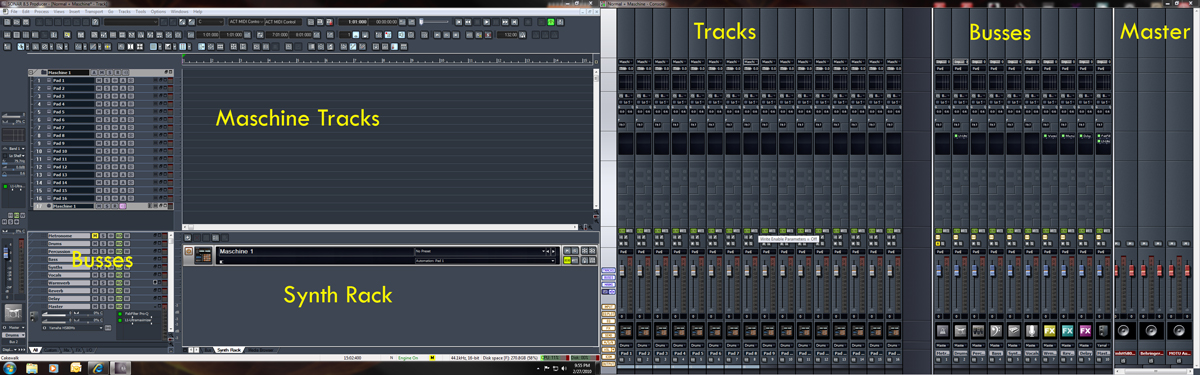
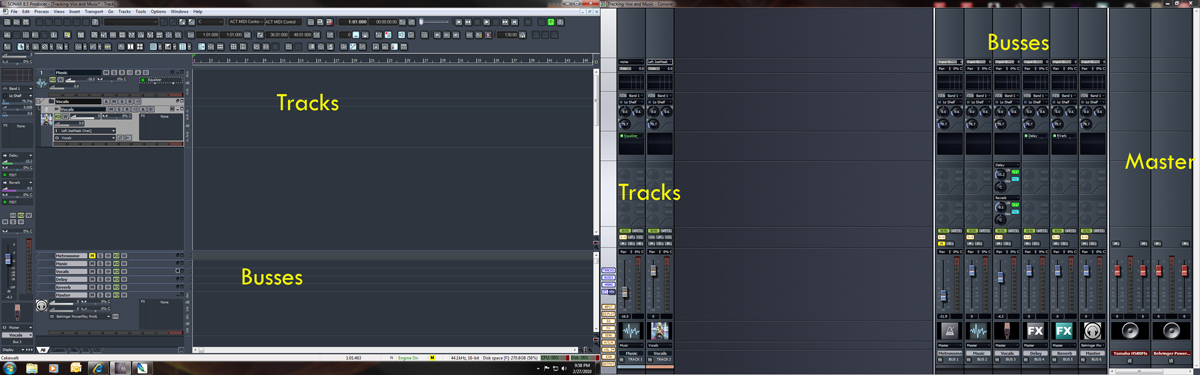
Here are screenshots of two of my Sonar templates. Both of them are showing the combined width of the views in both of my monitors. In these examples, the track and buss views are on the lefthand side, and the Console (mixer) view is on the righthand side.
The first one is my "Normal with Maschine" template that I use when starting a lot of my new projects. As you can see, it has a blank instance of Maschine inserted and ready to go with all pads routed to their own audio track, and each audio track routed to the Drums buss. I can expand or collapse the entire instrument with one mouse click or keystroke - very convenient. My most common busses are already inserted and routed and I have a few blank effects plugins already inserted as send effects on busses. My metronome is set up the way I want it for this type of project and is easily adjustable because it's routed to its own buss for quickly muting/unmuting, changing the level or panning, etc. I have a Master buss set up (far righthand side of the Busses section in the Console view and at the bottom of the Busses section in the Busses view) - all tracks or busses get routed through that before going to the Master output section (far righthand side of image). This master buss has a limiter on it set at -0.1/-0.1dB to catch any peaks and my room compensation EQ that I turn off/on as needed. As you can see, there's nothing here that would adversely affect my creativity - it's just a good starting point that literally saves me a half-hour or so every time I start a new project. I have several other similar templates set up with different drum plugins, a few synths in place, etc.
The second template here is the one that I use for tracking vocals. It's much simpler because it only has two tracks to start with: one for the guide track that the singer sings along with, and the initial vocal track. I always have the singer sing to a guide track, rather than the full project, so I can keep the latency at a minimum (critical for her headphone monitoring. I also have fewer and some different busses set up. My metronome setup is usually different for tracking vocals. The reverb/delay are only used for monitoring because singers usually want a little of both IME, and I have the effects set up as sends from the Vocals buss, rather than individual tracks, so that I only need to change them from one point (i.e., the buss), rather than on each vocal track when necessary. And, most importantly, my microphone input is already assigned to my mic pre, everything is routed through busses and out to the master buss output to my headphone distribution amp, and all levels are already roughed in, so it's nearly ready to go as soon as I open a new project and import the guide track. That saves me 15-20 minutes each recording session and minimizes trouble-shooting.
| quote: |
| Originally posted by cryophonik Here are screenshots of two of my Sonar templates. |
this was a good read thanks guys. Definitely something im going to consider once I become more familiar with Logic..,
thanks
What happened to the pics Cryo?
For my setup it would be an enormous PITA to configure everything for each new project
| quote: |
| Originally posted by meriter What happened to the pics Cryo? |

| quote: |
| Originally posted by meriter What happened to the pics Cryo? For my setup it would be an enormous PITA to configure everything for each new project |

Powered by: vBulletin
Copyright © 2000-2021, Jelsoft Enterprises Ltd.