
TranceAddict Forums (www.tranceaddict.com/forums)
- DJ Booth
-- DJ setup explained...by AVB
Pages (3): « 1 [2] 3 »
I think he must mean using fader start vs. pressing play.
It does seem odd to use the fader up to start the track before it's beat-matched, as you would hear it until he corrected the mix using the platter.
I couldn't tell if he has the two extra mixer faders that aren't actually used for audio from each deck, but are merely acting starts for the timecode and audio decks. That would make perfect sense. Basically using 2 channels on the mixer as play buttons.
| quote: |
| Originally posted by Ryan0751 I think he must mean using fader start vs. pressing play. |
| quote: |
| Originally posted by Ryan0751 It does seem odd to use the fader up to start the track before it's beat-matched, as you would hear it until he corrected the mix using the platter. |
| quote: |
| Originally posted by Ryan0751 I couldn't tell if he has the two extra mixer faders that aren't actually used for audio from each deck, but are merely acting starts for the timecode and audio decks. That would make perfect sense. Basically using 2 channels on the mixer as play buttons. |
Well that's all fine, but even if he has the incoming track beatmatched, he throws the fader, it starts playing live... you still usually have to correct the pitch using the platter before you really want the audience to hear the next track, or you might want to wait a minute before you start mixing it in... that would really commit you to "the audience is going to hear this, and now".
I know he uses a Y-cable for the fader starts, why not just connect those to say the outer 2 faders on the DJM-2000. You slide that fader up, the SMPTE and the Audio CDJ-2000's start in unison, but the INNER channel faders are what mix in the audio. Then, raising the outer fader is exactly like hitting "play" on both decks, and then using the inner fader would be cueing and mixing as usual.
You could start the decks with the inner fader down, so the audience can't hear it yet.
Make sense?
| quote: |
| Originally posted by DJ RANN Well, that's kind of a given; whether you use fader start or press play, they both do the same thing, and there's always a tactile timing issue - I have a cdj100 and a cdj800 and they both have different response times when hitting play - annoying, but kind of good in a way as it keeps you thinking and given me the ability to adjust to CD decks I'm not used to when playing out. I think he gets the beatmatch down on the cans, cues it up, then when he's ready to bring it in, he uses the fader start. No, he has a custom made cable that is a 3.5mm (1/8th) mono jack to 2 x 3.5mm (1/8th) mono jack (usually called y-cable or dub cable) - this allows the fader start signal from one channel on the mixer to go to two decks simultaneously. That way, both the audio track and SMTPE start at the same time so the visuals and the music are in perfect sync. The only thing he has to make sure of is that once he's beatmatched the track, he sets the SMPTE deck to exactly the same speed with the pitch slider. I think the two other faders are redundant or he I suppose he could use them for other input sources like more decks, but he's really a two deck guy. |
| quote: |
| Originally posted by Ryan0751 Well that's all fine, but even if he has the incoming track beatmatched, he throws the fader, it starts playing live... you still usually have to correct the pitch using the platter before you really want the audience to hear the next track, or you might want to wait a minute before you start mixing it in... that would really commit you to "the audience is going to hear this, and now". |
| quote: |
| Originally posted by Ryan0751 I know he uses a Y-cable for the fader starts, why not just connect those to say the outer 2 faders on the DJM-2000. You slide that fader up, the SMPTE and the Audio CDJ-2000's start in unison, but the INNER channel faders are what mix in the audio. Then, raising the outer fader is exactly like hitting "play" on both decks, and then using the inner fader would be cueing and mixing as usual. You could start the decks with the inner fader down, so the audience can't hear it yet. Make sense? |
i don't know what i wrote yesterday, it was late. But even if you turn up the volume just a tiny bit seems a bit unprofessional what he is doing. I've seen him a few months ago and the mixing was pretty flawless so i think i can't blame him.
Oh hang on Ryan, I think what you were suggesting is to just have the fader start (to 2 x decks: smpte and audio) on the outer faders and have the actual audio CDJ output routed in to the inner fadre channel inputs to control the volume. That way you can "press play" with the fader start for the two decks (SMPTE & Audio) and then have discrete control over when and what level you bring in as a mix.
AFAIK, that won't work as I think you have to have the audio cables connected in some form to the same channel that you're using the fader start function on. I have no idea why pioneer does it like this and it may not be the case with the DJM 2000 but I know DJM800 and previous models fader start wouldn't work unless you has both the control cable and the audio cables connected up at the same time going to and from the same thing.
I'm sure there would be a workaround (i.e. you might get away with phono terminators) but I sure would make it easier if the fader start could be activated with just the control cable.
Rodri, you don't even need fader starts to do that. I've matched in cans and cued up on turntables with the fader down and been able to push off on the record and throw the fader and have it match. You just gotta be on top of everything and be ready to make any sort of minor adjustments if you do notice things are off.
It is hard to do, and you really have to know your tracks (and often its not a spur of the moment decision) but it can be done with practice, even on totally analog systems.
| quote: |
| Originally posted by Joss Weatherby Rodri, you don't even need fader starts to do that. I've matched in cans and cued up on turntables with the fader down and been able to push off on the record and throw the fader and have it match. You just gotta be on top of everything and be ready to make any sort of minor adjustments if you do notice things are off. It is hard to do, and you really have to know your tracks (and often its not a spur of the moment decision) but it can be done with practice, even on totally analog systems. |

| quote: |
| Originally posted by Ryan0751 Yes but even if you can do this well, you don't always want to just mix RIGHT THEN. Sometimes you want to bring in the track a little, take it out, you change your mind, etc. Doesn't make sense... As for the fader starts... I can't say I've used them on my Pio's. I had tried them out a long time ago on Denons, and fader start was essentially just an on/off switch on the mini-jack cable. I suppose I could try it out, but I'm too lazy to hook it up |
| quote: |
| Originally posted by Joss Weatherby Rodri, you don't even need fader starts to do that. I've matched in cans and cued up on turntables with the fader down and been able to push off on the record and throw the fader and have it match. You just gotta be on top of everything and be ready to make any sort of minor adjustments if you do notice things are off. It is hard to do, and you really have to know your tracks (and often its not a spur of the moment decision) but it can be done with practice, even on totally analog systems. |
| quote: |
| Originally posted by Ryan0751 Yes but even if you can do this well, you don't always want to just mix RIGHT THEN. Sometimes you want to bring in the track a little, take it out, you change your mind, etc. Doesn't make sense... As for the fader starts... I can't say I've used them on my Pio's. I had tried them out a long time ago on Denons, and fader start was essentially just an on/off switch on the mini-jack cable. I suppose I could try it out, but I'm too lazy to hook it up |
| quote: |
| Originally posted by DJ RANN But if you're only bringing it in a couple of mm, then you wouldn't hear it yet on the PA, then you can check the cans and bring it in (fadre further up) as you like. Of course, the easiest thing would be to check if the fader start works without the audio being connected to that same channel. If it does work with just having the control cable plugged in (and the audio output from the other CDJ going to another fader on the mixer) then problem all solved - you've got one "dual start fader" and one fader to then control the audio. I just checked the video though, and it seems he does just use the same channel for fader start and audio volume control - he's not routing the CDJ to the other fader for discrete volume control. Weird. |
| quote: |
| Originally posted by Ryan0751 Even if the mixer requires this, hey just hookup the analog out of the CDJ to the fader start channel, and digital out to the audio channel. Turn the gain down on the fader start channel to 0. |
| quote: |
| Originally posted by DJ RANN I take it you mean "digital out of the CDJ to the digital input on the volume fader" (not the fader start channel). That should certainly work but it seems he's not doing that, especially as according to the video he has the SMPTE on the other fader. It seems he's just bringing in that one fader for both start and volume. |
don't really get the point of smpte unless it is already planned or you have one master out. The system overall is pretty ghetto considering the performer. I mean an 8700 GX or wholehog would do this without the mess of pointless protocol that relies on a dj who will fuck up. And maybe i didn't pay attention but are they actually using an akai to trigger visuals from a laptop. Fucking ridiculous.
| quote: |
| Originally posted by Looney4Clooney don't really get the point of smpte unless it is already planned or you have one master out. The system overall is pretty ghetto considering the performer. I mean an 8700 GX or wholehog would do this without the mess of pointless protocol that relies on a dj who will fuck up. And maybe i didn't pay attention but are they actually using an akai to trigger visuals from a laptop. Fucking ridiculous. |
just seems really really ghetto for someone that is paid quite a bit. I was assuming he was controlling lights as well.
As far as the smpte, why not just send both on the audio ones and then mix them at the lighting console.
I don't know. It just seems kinda uninspired.
| quote: |
| Originally posted by Looney4Clooney just seems really really ghetto for someone that is paid quite a bit. I was assuming he was controlling lights as well. As far as the smpte, why not just send both on the audio ones and then mix them at the lighting console. I don't know. It just seems kinda uninspired. |
i mean the video / light guy. Surely he can do more than sequence video to the tracks. You would never see this sort of set up with say an actual pop act with a real tour manager and real problems.
What i don't get is why you need 2 extra devices to send the smpte signal that would be sent from the ones playin the audio in the first place. Then use a broadcast switcher.
I will level that i really didn't pay too much attention to the video. But what i gather, he has certain tracks where the time code lines up with coded video so that they sync for lyrics. So it isn't just a mater of sending a master clock.
I just find the setup really limiting. Using a laptop to me seems like a bad idea for big tours. And I agree with the lyrics on the screen. But i have a feeling there are many minutes with no drums where people need something to flail to.
I bet there are far more elegant solutions to combine vdj'ing and mixing, in different screen ratios, without using smtpe and players that cost the equivalent of a year and a half of gas. For someone who's been using Mixmeister to make his radio shows, he sure seems to have a hard time letting go of the "good old" cdj's, insteading of spearheading the inevitable transition to digital. But I guess that is the folly of trance - forever ten years behind. But it's been a good run, even though the last five year has mostly been for show. What's left are forced riffs and shitty chord progressions, and rehashes of old ideas. ALl the good melodies are already taken. But dunkelfuck van buren, like his hair due, is out of style. And like in South Africa, only a few torpid dutch men still stand their ground while outside the comfort of their gated community they are yelling "Kill the epic cheeser". He has indeed built himself a fine armada. It's just a shame building ships out of wood went out of style a long time ago, so when matched up against the metallic clang of industrial techno, there's little but a few scared sailors helplessly holding on to the driftwood that once was The Great Armada, a shimmer of acceptance that this is the end in their eyes. Goodbye brave sailor, it's time to cast loss.
I really like CDJs. I feel a lot more in control of cueing and also jogging the tracks BPM up or down slightly to correct any small timing errors. If I ever DJ live I wouldn't want to use a laptop, but that is just a personal preference. I don't think that is living in the past the same way playing dated music is. Rather, I think it is the same as someone who prefers hardware to digital synths.
Also, I prefer creating riffs and melodies on a midi controller rather than with a mouse on a piano roll. The mere act of using the keys gives the feel of more control over the velocity of the notes, the rhythm and the length of the notes. I can more quickly try new ideas. When I find one I like, I then plot the notes on the piano roll. If I had the money, I would use as much hardware as possible to control FL Studio physically with knobs and such.
I'm back to computerless DJ�ng
using my 900's and Prolink
started with the 900's in HID mode in traktor, but laptop lid closed and 1 64GB USB stick is so much more fun.
[IMG] 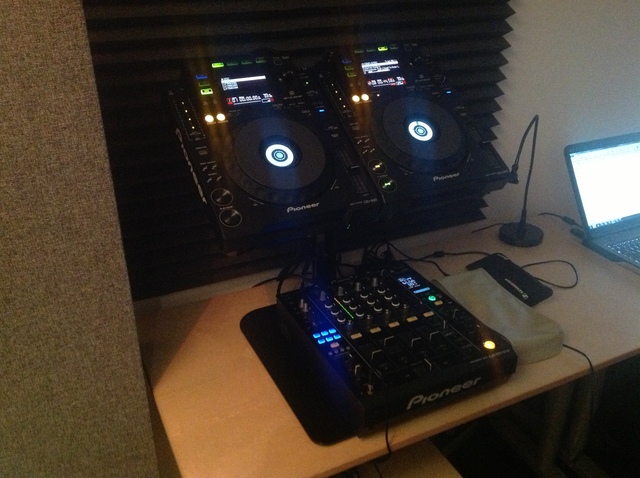 [/IMG]
| quote: |
| Originally posted by Raphie I'm back to computerless DJ�ng using my 900's and Prolink started with the 900's in HID mode in traktor, but laptop lid closed and 1 64GB USB stick is so much more fun. [IMG] [/IMG] |
There's a slight flaw (or inconvenience) with the technique he's using here...
Fader start will only *start* his SMPTE signal at the same time as the track he's playing, it won't actually keep it in time... at 7:20, he adjusts the audio deck, but not the SMPTE deck - so the SMPTE deck will be slightly out of time. The more he has to adjust, the further out it'll be...
Of course he could adjust the SMPTE one at the same time, but the only cue he's got of whether it's in sync or not is the time display.
Yes, that's true. Guess you wait for a non-vocal track to pitch up the mix

Powered by: vBulletin
Copyright © 2000-2021, Jelsoft Enterprises Ltd.