
TranceAddict Forums (www.tranceaddict.com/forums)
- Frequently Asked Questions / Tutorials / How do I?
-- CUE file tutorial
Pages (8): « 1 2 3 4 5 [6] 7 8 »
k, now i've got a problem, i get cue files for sets and when i try to load them onto cdrwin it doesn't work coz it's not a cue or txt file. how do i solve this?
Hey, I accidently closed mp3cue for winamp, and now I can't get it back open ... there's no button for it, there's no menu option, when I load a track with a cue sheet it doesn't open, I tried re-installing --> nothing, I even restarted my computer, ideas?
Also I did a "Write cue to file" when the .cue sheet had two FILE lines, and I think it fucked up the mp3. Any way to undo this or get around it?
have you triend ALT-N or right click and select "MP3cue"
Like I said it wasn't a menu-option for me, Alt-N works, but I didn't know that.
I just went to the plugings menu and found it in there and changed the options to: "Always show even if cue file not present" (or something like that), it brought mp3cue back out of hiding (even though there were cue files present to begin with).
And anyways, I can't figure out how to get this mp3 to work again, its pissing me off. What do I do?
| quote: |
| Originally posted by trance85 Like I said it wasn't a menu-option for me, Alt-N works, but I didn't know that. I just went to the plugings menu and found it in there and changed the options to: "Always show even if cue file not present" (or something like that), it brought mp3cue back out of hiding (even though there were cue files present to begin with). And anyways, I can't figure out how to get this mp3 to work again, its pissing me off. What do I do? |
| quote: |
PERFORMER "Dj Dukes" TITLE "Europa" FILE "Dukes_Trance_Vol_24.mp3" wave TRACK 01 AUDIO TITLE "From Dark To Light (Lange mix)" PERFORMER "Empyreal Sun and Elles de Graaf" INDEX 01 00:00:00 TRACK 02 AUDIO TITLE "New Life" PERFORMER "The Thrillseekers" INDEX 01 08:37:00 TRACK 03 AUDIO TITLE "M (Above and Beyond Instrumental Mix)" PERFORMER "Ayu" INDEX 01 15:09:00 TRACK 04 AUDIO TITLE "Burned With Desire (Ronski Speed Dub)" PERFORMER "Armin van Buuren" INDEX 01 20:46:00 TRACK 05 AUDIO TITLE "Connected (dub mix)" PERFORM5R "Matt Hardwick vs Smith and Pledger" INDEX 01 25:40:00 TRACK 06 AUDIO TITLE "Cream (Evolution Mix)" PERFORMER "Blank and Jones" INDEX 01 31:58:00 TRACK 07 AUDIO TITLE "Venus (Meant To Be Your Lover) (Tiesto Remix)" PERFORMER "Dj Cor Fijneman feat. Jan Johnston" INDEX 01 38:29:00 TRACK 08 AUDIO TITLE "Scatterbomb" PERFORMER "Sneaker" INDEX 01 45:33:00 TRACK 09 AUDIO TITLE "Air Traffic" PERFORMER "AR52" INDEX 01 51:34:00 TRACK 10 AUDIO TITLE "Im Not Fooled (Johns Tranced Out Mix)" PERFORMER "John 00 Fleming" INDEX 01 57:43:00 TRACK 11 AUDIO TITLE "Carte Blanches" PERFORMER "Veracocha" INDEX 01 65:05:00 |
i got a stupid question.
exaclty HOW do you burn your CUES using Nero?
i've tried before, only to end up with either the CUE file, or the audio and the CUE file, but never an audio file split up into single tracks. i did read the tutorial before every single trial, and i've read different sources, but none has been completely didactic or direct as to exactly what file to burn or in what order. or maybe i'm just not reading right. and, yes, i'm a total CUE n00b. any help, though.
cheers
| quote: |
| Originally posted by dukes nero recons there is a problem with line 3.... the file is called "Dukes_Trance_Vol_24.mp3" i would love to get this to work just once! is it just being shit or is there a problem here? and yes ive read all this through and a million other sites but yet i still cant get the damn things working. ive heard some people say nero works and others say it dont. if it dont does blindwrite? or is there a DECENT burning prog that does.... DECENT! chears for any help... |
| quote: |
| FILE "Dukes_Trance_Vol_24.mp3" MP3 |
| quote: |
| Originally posted by fitom tiel i got a stupid question. exaclty HOW do you burn your CUES using Nero? i've tried before, only to end up with either the CUE file, or the audio and the CUE file, but never an audio file split up into single tracks. i did read the tutorial before every single trial, and i've read different sources, but none has been completely didactic or direct as to exactly what file to burn or in what order. or maybe i'm just not reading right. and, yes, i'm a total CUE n00b. any help, though. cheers |
code:
FILE "mix.mp3" MP3
| quote: |
| Originally posted by Disney Same problem here... Reinstalled my comp so I also had to reinstall winamp and the mp3cue plugin. It doesn't show like it hasn't been installed but the files are in the winamp plugin dir. I had this problem before and solved it, but I can't remember how. If I do, I'll let you know! |
Hello 
I eventually pulled my head out of the pint glass, and decided to contribute once again to all yee trancelovers that make cuesheets.
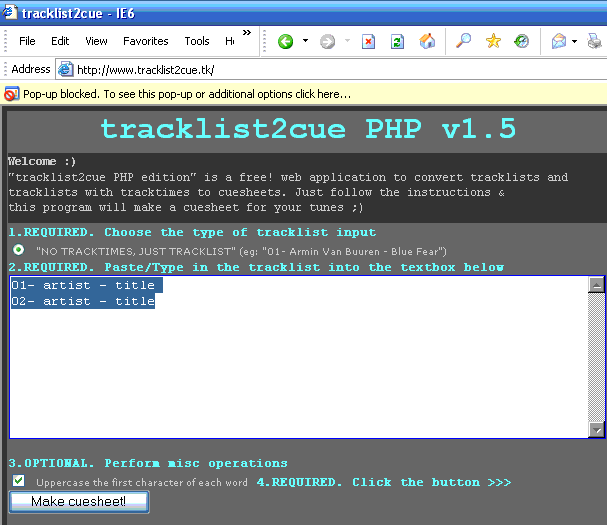
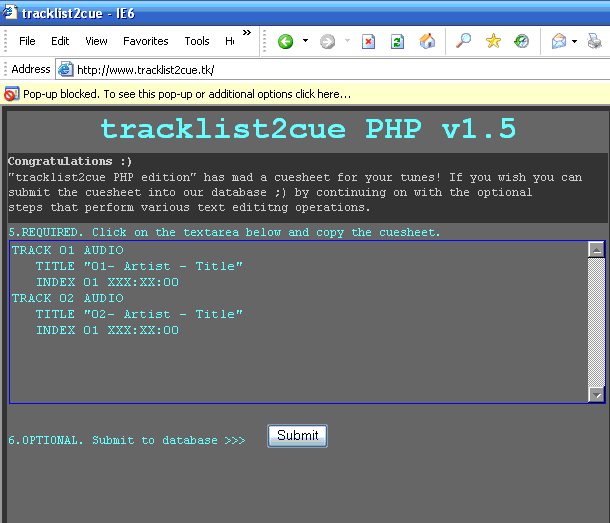
so here i took most of the code from tracklist2cue v1.2 (C version) and made a PHP version which is alot more user friendly!
you can access the script at the address below
http://www.tracklist2cue.tk
the old C version (a More powerfull standalone tool) of the program is still available at ]http://www.tracklist2cue.tk
happy converting!
its still a bit buggy at the moment but dont worry im working on it,
i had to disable tracklist support for tracklists with tracktimes as i got an unexpected error when running of the free server 
also the submit to database is disabled untill i get a cusheet database up and running
| quote: |
| Originally posted by dj_lane Ack!!! my cue sheet must be messed up, it wont load in nero, or cdr-win ================================ PERFORMER DJ Lane TITLE Dad's Birthday 04 FILE C:\Documents and Settings\Owner\Desktop\CD\DJ_Lane_-_A_Little_More_Laid_Back_Than_Usual_(07-11-04).wav WAVE TRACK 01 AUDIO TITLE Sahara (Original Mix) PERFORMER Solid Globe INDEX 01 00:00:00 TRACK 02 AUDIO TITLE Monkey Forest (Greg Murray Remix) PERFORMER Midway INDEX 00 07:36:00 INDEX 01 07:36:00 TRACK 03 AUDIO TITLE E.O.S. (Positive Ways Mix) PERFORMER Ronski Speed INDEX 00 15:05:00 INDEX 01 15:05:00 TRACK 04 AUDIO TITLE Clear Blue (Original Mix) PERFORMER Markus Schulz INDEX 00 20:12:00 INDEX 01 20:12:00 etc.. ================================== the error message cdrwin says is: Error: Invalid CUE SHEET command at line 5 illegal filetype specified. i dont know what is up :/ someone please help |
| quote: |
| Originally posted by 3xx3r7 You forgot to put titles and performers in quotes. |
new version of tracklist2cue
you can access the script at the address below
http://www.tracklist2cue.tk
happy converting!
STEP 1
type in liveset name and paste in the tracklist

STEP 2
fill in the tracktimes as you are listening to set
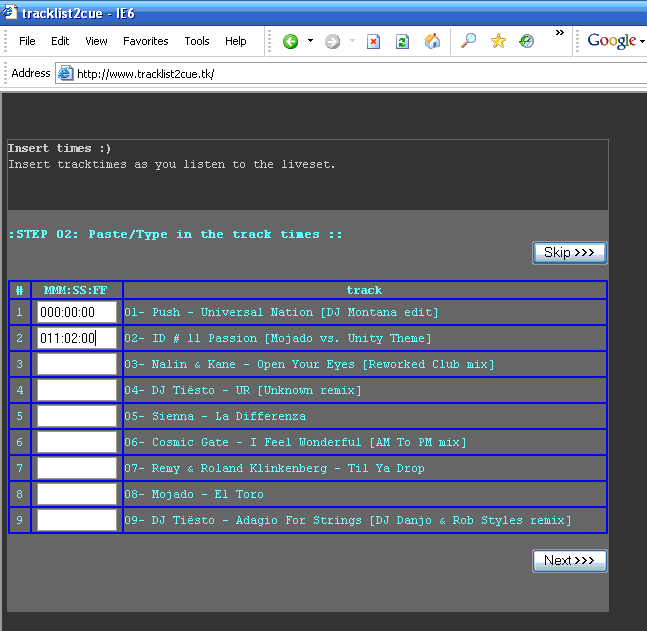
STEP 3
your cuesheet is made (also optioanaly a file_id.diz file)

I have a question.
Currently I am using "mp3 cue" the plug-in for Winamp.
But when it generates the cue file, instead of having "01" beside the "INDEX" it gives a longer number.
example
TRACK 04 AUDIO
TITLE "2day"
PERFORMER "Ronski Speed"
INDEX 0541803329 18:57:00
Does anyone know why this happens, and what it means?
Thanks.
i used to have this program which splits up livesets into smaller individual mp3s through a .cue file, but i changed my comp recently and forgot which program is that does anyone know? i dont want to burn the liveset, just want to split it into smaller files
I think the program you're talking about is "MP3 DirectCut 1.33."
It's a pretty straight foreward program and gets the job done fast.
you can download it here: http://www.tranceaddict.com/software.shtml
Cheers,
I have an album broken into 20 MP3 files. Is there a program that can combine these into a single file and generate a cue file? I also noticed that when mp3 files are combined, a very very small gap is still audible.
| quote: |
| Originally posted by Feador i used to have this program which splits up livesets into smaller individual mp3s through a .cue file, but i changed my comp recently and forgot which program is that does anyone know? i dont want to burn the liveset, just want to split it into smaller files |
| quote: |
| Originally posted by dopeuser8 Now open Nero 6, at the top click 'Recorder', then 'Burn Image', then find your .cue file and open it. It should only take a few seconds to open it. Now burn it! It only took about 5 min to convert the mp3 to a wav, 10 more seconds to start up Nero and load the cue, and another 10 minutes to burn it. Im sure there might be better, l33ter ways of doing it, but this worked pretty good for me so hope this helps someone else. |
for a mix that exceeds 70 mins, say one that goes for 124mins...
anyone got an easy way to split the one file into two files (part 1 and part 2) with seperate cue sheets (so they can be burnt to cd)? first part is a piece of cake coz the times already start with zero.
it's a pain trying to adjust the times on the second cue sheet to start from zero. just wondering if there's a quick way of doing it.
you don't adjust the times. erase everthing prior so that the star point starts, say for example 90 mins.
In order to rid the world of all this cue sheet ignorance, I started a WiKi article on cue sheets. hopefully, people with more knowledge than me will go on and add to and edit the article. i can sympathize with everyone out there trying to learn how to make cue sheets. so check out this article on the Wikipedia:
http://en.wikipedia.org/wiki/Cue_sheet
| quote: |
| Originally posted by Eleazar \ ... http://en.wikipedia.org/wiki/Cue_sheet |
thanks thanks!
please add to it! thats the glory of the wikipedia. and maybe even translate it!?!?


Powered by: vBulletin
Copyright © 2000-2021, Jelsoft Enterprises Ltd.