
TranceAddict Forums (www.tranceaddict.com/forums)
- Chill Out Room
-- help me with a photochop pls:)
Pages (2): [1] 2 »
 help me with a photochop pls:)
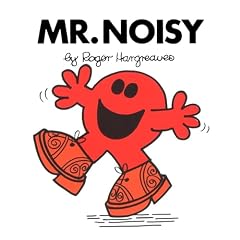
I want to make a MR. Men Character as Mr. Air Guitar 
can someone help me as I do not have photoshop!?
thanks
obviously the text would need to be changed as well....here are some images to work with
thanks in advance everyone


you called me stern, no!
| quote: |
| Originally posted by stren you called me stern, no! |

Thing is, their hands are too close to their face that you wouldn't be able to put a guitar in without covering the face.
| quote: |
| Originally posted by Frenchie Thing is, their hands are too close to their face that you wouldn't be able to put a guitar in without covering the face. |
maybe a mic in one hand and a guitar in the other??
| quote: |
| Originally posted by dallastar maybe a mic in one hand and a guitar in the other?? |
| quote: |
| Originally posted by Frenchie That's cool. I'll work on some later. |
pleaseeeeeeeee
Not quite a 'photochop', but...
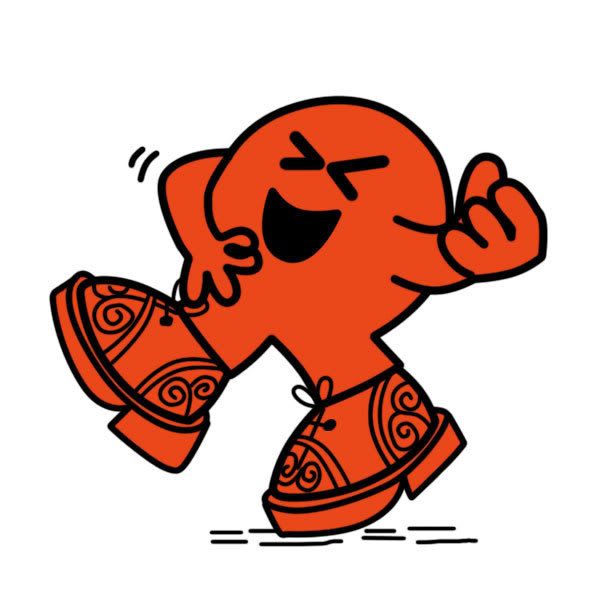
My apologies to the original artist(s).
god i want a cigarette
I see what you did there.
frenchie?!!!!!!!!!!
Did I miss something?
| quote: |
| Originally posted by dallastar frenchie?!!!!!!!!!! |
Let me know if you want it in a different color.

EDIT: avatarhax

| quote: |
| Originally posted by Frenchie Let me know if you want it in a different color. EDIT: avatarhax |
hehehe
Well what the damn! 
Dear AnomalyConcept:
Nice job on the ch0p! Excellent work and thanks for helping out! Hope you don't mind being totally ignored by the threadstarter for your fantastic work! Yeah.
hehe. Doesn't really matter to me. =)
EDIT: it's not really a chop, though. Upscale + redraw, changed the arms a bit. The right hand's fingers are not as fat as the left. Oh well. =D
/mumbles some excuse invoking perspective
| quote: |
| Originally posted by AnomalyConcept hehe. Doesn't really matter to me. =) EDIT: it's not really a chop, though. Upscale + redraw, changed the arms a bit. The right hand's fingers are not as fat as the left. Oh well. =D /mumbles some excuse invoking perspective |

| quote: |
| Originally posted by Ygrene Well what the damn! Dear AnomalyConcept: Nice job on the ch0p! Excellent work and thanks for helping out! Hope you don't mind being totally ignored by the threadstarter for your fantastic work! Yeah. |
| quote: |
| Originally posted by AnomalyConcept Not quite a 'photochop', but... My apologies to the original artist(s). |
i am so sorry and thank you
| quote: |
| Originally posted by Ygrene Did you redraw with a mouse? I can't make lines that clean. |
| quote: |
| Originally posted by AnomalyConcept Yeah, pen tool to create a path, then stroke with the brush (no pressure simulation). Here's a rough explaination: 1. use pen tool to create points along an edge. 2. click-hold the pen tool in the tools palette, change to 'add anchor point' tool (pen tool with a + next to it). 3. use the 'add anchor point' tool to add points roughly in the middle of the line segments bounded by the points created in step 1. 4. drag newly created anchor point to fit curve. Adjust the bars on either side to suit. You can use it to create a selection around an object or use it to draw and such. I'll make a graphical tutorial sometime. Been meaning to do it for a while now. =) |
Okay, so an HTML tutorial was taking way too long and too much effort (haha, I'm lazy), so I just recorded some video in Photoshop. (Just realized I probably could have just recorded an action in Photoshop... oh well.)
I've created three different parts:
1. Pen Tool Usage (general overview)
2. using the pen tool to trace things
3. using the pen tool to create selections/mask objects
The above links are to Photobucket, which converted the videos to flv (flash video format), which are universally compatible (provided the user has Flash installed). It also down-sampled the video, so it may be a bit small. The original videos (avi, encoded with xvid) are also available.

Powered by: vBulletin
Copyright © 2000-2021, Jelsoft Enterprises Ltd.