
TranceAddict Forums (www.tranceaddict.com/forums)
- DJ Booth
-- Using Traktor 3 with an External mixer
Pages (2): [1] 2 »
Using Traktor 3 with an External mixer
Just want to know if anyone here uses Traktor with an external mixer like a Pioneer DJM 800 etc and how you go about setting things up. If you have an external soundcard does everything plug in through there? I have traktor and want to use it for a party but am not sure how or what i need to do to use a mixer. Thanks.
you need a soundcard which does have multiple outputs...
then you look into the hardware -> audio preferences in traktor (or something like that)
and select external mixer/output
then you just setup which deck should go to which of your outputs and connect them to the mixer.
Ok thanks., yeah thats what i was thinking at first. Any reccomendations on a good external soundcard to get.? $100 max is prolly the most i can afford at the moment.
I currently use this one with my laptop
I've used it with Traktor and a DJM 800 to play at a gig and had no problems (everything was set up as BOOsTER described)
That model doesnt have multiple outputs does it though. Where would the external mixer plug in to that??
| quote: |
| Originally posted by Armada_hk That model doesnt have multiple outputs does it though. Where would the external mixer plug in to that?? |
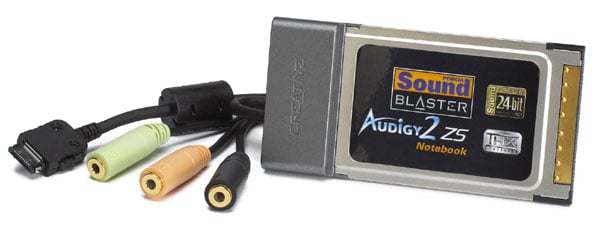

Would this model do the same thing? Does this have the correct ouputs to work with an external mixer?
Philips Aurilium
Yeah, the Audigy ZS card has multichannel outputs, similar to a desktop computer sound card, probably 4 stereo outs plus a subwoofer, and maybe more. You connect to the various outputs using that cable dongle thing.
I use a similar Echo Indigo DJ card, it has 2 stereo outputs. One has a volume control and is normally used with headphones but it can also be used at the max volume setting as your second stereo output, to drive a 2 channel mixer.
Both the above cards use the laptop PCMCIA "cardbus" slot which is available on many laptops built in 2006 or earler. Newer laptops mostly don't have that type of slot, some have ExpressBus which is the new version of that type of slot.
So that probably means you will want to check out USB or FireWire audio cards, there are many available such as from M-Audio, check older threads here.
I'm running a Vestax PCV-275 with Traktor 2.6 using my built in sound card.
The card pretty much has to be built for 4 speakers (5.1) and you should be set with the proper cables.
| quote: |
| Originally posted by 4clubber yes, it does have multiple outputs - take a look to each of those 3 you can connect one of these and they plug right into the mixer of your choice hope this clears things up |
yes miamitranceman, that's exactly what i've done with this before...except you'll of course need a separate Y (mini-stereo to RCA) cable for each ableton/traktor channel
| quote: |
| Originally posted by Armada_hk Would this model do the same thing? Does this have the correct ouputs to work with an external mixer? Philips Aurilium |
 because i was going to use it with traktor anyway
| quote: |
| Originally posted by 4clubber yes miamitranceman, that's exactly what i've done with this before...except you'll of course need a separate Y (mini-stereo to RCA) cable for each ableton/traktor channel |
| quote: |
| Originally posted by stan229 i currently have that soundcard that i use just for regular listening and its great compared to my other POS.. and it does have multiple outputs and even digital and coax out so now im thinkin of maybe picking myself up a real mixer instead of a midi controller because i was going to use it with traktor anywayedit: wouldnt one also need a midi controller too? to do fine pitch adjustments and what not or was it possible to rock a set with a mouse/touchpad? |
The mixer in Traktor might have more features than an external mixer being used. It would pay to use the Midi controller with Traktor's mixer, rather than using a external mixer with less features...
Which Midi Controllers would you guys suggest are the best to use instead of a regular external mixer?
Which Midi Controllers would you guys suggest are the best to use instead of a regular external mixer?
I have an Emu X-Board 49 keyboard...it has 16 knobs + pitch bend and modulation wheel...
which is quite fair for ableton (if you can do your mapping effectively)...I've tried mixing in traktor with it and it was ok too...you just have to think about it...
and btw...I love having 49 keys...for example I use 12 for triggering loops and the other for improvising synthlines over my set or something...sometimes I use them for the effects bypass switch etc...
I don't know...if you're into producing you might be better off getting a keyboard like me...
if you aren't then anything with as much knobs/sliders possible is the best
Also the feel of the controls is kinda important... :-)
| quote: |
| Originally posted by llavoe The mixer in Traktor might have more features than an external mixer being used. It would pay to use the Midi controller with Traktor's mixer, rather than using a external mixer with less features... |

To reiterate and add on to what tvmann and BOOsTER said, you should get a controller with as much knobs and sliders as possible (don't worry about it having buttons - you already have a whole laptop keyboard for that) but also depending on your preferences, you should carefully consider the layout as well. I started out with the m-audio x-session pro:

and it served me very well as my first controller for traktor, until I mastered the basic skills of beatmatching/eq-ing.
Now as I start thinking about adding more layers of sophistication to my mixes, an x-session like tvmann's would be of more use to me, but only if I combine it with a real mixer to give me that classic layout. Otherwise, it is still possible to DJ with only an x-session even though its layout is not that of a classic mixer, but you have to be good at coming up with a control mapping that you will be comfortable with and remember easily.
Or, you can try to get both the x-session and the x-session pro
...which raises the question - does anyone know / has anyone tried using 2 or more MIDI controllers simultaneously with Traktor/Ableton??
haven't tried to use 2 yet, but it is in the works, I am going to have a buddy of mine bring over a second x-session to mine and see if I can get them both working.
| quote: |
| |
I think using two controllers should not be a problem at all...that's what midi was built for...(sort of)
| quote: |
| Originally posted by llavoe do you use and external hdd with that setup? |
I took the advice from this thread and purchased the Creative Audigy soundcard the other day. I plan to use it with a regular external mixer (Pioneer DJM series) and need some info on how and where everything plugs in and what configurations i need to change in the Traktor programme. If anyone has any photographs of a similar setup that would be much appreciated.
Secondly, when recording a mix on Traktor how do I go about converting the mix into Mp3 format so that i can play it in Itunes etc??
Thanks guys for all the advice in this thread!

Powered by: vBulletin
Copyright © 2000-2021, Jelsoft Enterprises Ltd.