
TranceAddict Forums (www.tranceaddict.com/forums)
- Chill Out Room
-- Google Earth Flight Simulator
Google Earth Flight Simulator
Has anyone noticed this with the latest version of GE?
Seems Google have done one of their unpublicized updates they're becoming well-known for.
What I'm talking about is a flight simulator embedded within GE. Sounds awesome, doesn't it? If the thought amazes you as much as it did me, then might have run off and tried it for yourself. But there's a problem. Remember what I said above - it's a hidden feature!
First of all you'll have to install the latest version of GE. Once you've started it all up, explored Google Sky a bit, then all you have to do is hit Ctrl+Alt+A (if you're running OS X it's Command+Option+A). If all goes as planned the following dialog should pop up:

As you can see from the screenshot there are only two aircraft to choose from at this stage. The F16 I find is much more enjoyable for a quick stint as it goes much faster than the SR22. Try both though as they're quite different flights. Then you get to pick a start position. The default option of Kathmandu runway gives you in the following scene:
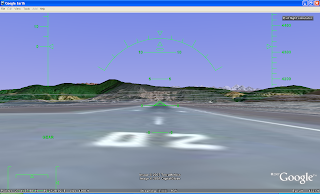
Before going wild pressing random keys like I did, have a look at the controls. (http://earth.google.com/intl/en/use...tsim/index.html) Sidetracking a bit, you'll notice that the top of that page gives proof that Google purposefully hid this feature:
Once you have entered flight simulator mode for the first time, you can re-enter the mode by choosing Tools > Enter Flight Simulator.
Moving on though, you can get a quick start by holding Page Up for a few seconds to increase to maximum thrust (thrust meter is the left bar of the lower-left meters). Once you've accelerated to a sufficient velocity use the arrow keys to take-off. The keys are in reverse as one would expect with any flight simulator, so use the down arrow to take-off. When you've gained enough altitude then stabalise the aircraft to a straight flight path.
It can be rather tricky to get the hang of as the controls are quite sensitive. However, the same can be said of any reasonable flight simulator as that's the nature of flying. After a little fiddling around and once you're stable you should see a nice view of the Himalayas out on the horizon:

Overall, I think they've done a good job considering (assuming?) this is their first release. There are several things missing though. A major thing is that you don't get a view of the aircraft at all. It would be nice if they could add several views, including a view from within the cockpit with full controls, etc. The controls are covered well. It works with joysticks, however I couldn't find one to test with. The mouse control is very effective although switching between mouse and keyboard I found a little poor as it would jerk the aircraft.
Unfortunately with poor bandwidth in South Africa most of the scenes didn't get a chance to fully load before going out of view. I'm sure this won't be an issue with a decent line. Even without it loading in full it was still very usable, which is a big plus!
The airports are covered fairly well, with almost all major airports included in the list. Perhaps a search option could be added to search for airports, since all the data should already be available as it's displayed in the main Google Earth view. However, the locations might not have sufficient precision. I think the aircraft selection needs to be improved drastically before this is fully launched.
All-in-all I think it's a great feature Google has added to one of their top products. I still remember the days when Microsoft Flight Simulator was considered so cool and that you had to pay for! With a bit more work this has lots of potential to greatly surpass other flight simulators.
Source can be found http://marco-za.blogspot.com/2007/08/google-earth-flight-simulator.html
oh man that looks awesome, will have to give it a try.
Doesnt work for me, even with the latest version 
Make sure the text search box doesn't have the cursor in it. It "AA" before I got it right.

Powered by: vBulletin
Copyright © 2000-2021, Jelsoft Enterprises Ltd.