
TranceAddict Forums (www.tranceaddict.com/forums)
- DJ Booth
-- Connecting a Mixer to PC Speakers
 Connecting a Mixer to PC Speakers
Hey,
Before Im buying my setup Id like to know how can I
set-up a connection from a mixer to the soundcard so I could hear from my pc speakers.
I saw this thread but I didnt quite understand, Do I need to connect a Twin Phono to 3.5mm Stereo Jack Lead to one of the two Line-In Inputs? 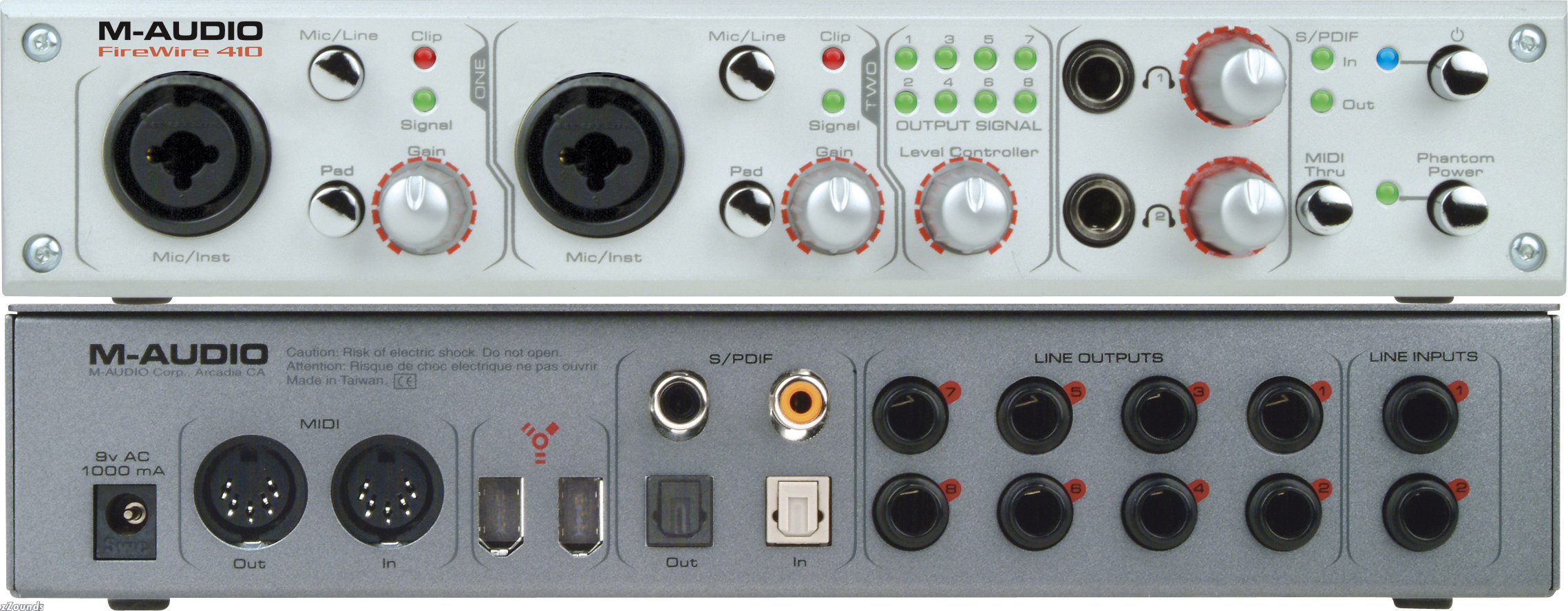 , Will I be able to listen simultaneously both from my pc and mixer?
thanks.
Do the speakers themselves have a 3.5mm input? If so, it might be easier just to go straight from the mixer to the speakers. [unless you wanted to record it or something.]
Yeah, I do wanna record, and its a 5.1 speaker system.
Your mixer will be the input to the interface. Your speakers will be the output. The interface will connect via USB (or Firewire) to your computer.
What kind of speakers are you trying to hook up... a standard PC 5.1 set - green cord plugged into the back of your computer?
I'd recommend getting a decent set of monitors/speakers to hook up, especially if you are going to record.
| quote: |
| Originally posted by Ray_Chappell What kind of speakers are you trying to hook up... a standard PC 5.1 set - green cord plugged into the back of your computer? |
| quote: |
| Originally posted by zagury creative inspire T5900 5.1, its quite decent until ill buy two seperate speakers. It has green,black & orange cords. Now, where do I plug these three? in any of the line-outputs? How can I configure the center,front & rear channels so I could be able to use it as a 5.1 system? |
set up the card to output 5.1 analog (as 5.1 stereo). then you'll need:
5 3.5-2.5 adapters
2 male-female 2.5 cables (or 2 male-male & 2 couplers)
green-coupler/female 2.5-3.5 adapters-1/2
orange-coupler/female 2.5-3.5 adapters-3/4
black-3.5 adapter-5
| quote: |
| Originally posted by inconspicuous set up the card to output 5.1 analog (as 5.1 stereo). then you'll need: 5 3.5-2.5 adapters 2 male-female 2.5 cables (or 2 male-male & 2 couplers) green-coupler/female 2.5-3.5 adapters-1/2 orange-coupler/female 2.5-3.5 adapters-3/4 black-3.5 adapter-5 |
only one problem. 2.5 is not the same as rca.
Why don't you just wire the two RCA's from the mixer to the computer input (RCA to 1/8" inch), and plug the speakers in like normal (green to green on the back of your computer)?
Select the input as the default device on your computer for recording and go...
Or you could buy a soundcard like the one you showed.
| quote: |
| Originally posted by Ray_Chappell Why don't you just wire the two RCA's from the mixer to the computer input (RCA to 1/8" inch), and plug the speakers in like normal (green to green on the back of your computer)? Select the input as the default device on your computer for recording and go... Or you could buy a soundcard like the one you showed. |

Powered by: vBulletin
Copyright © 2000-2021, Jelsoft Enterprises Ltd.