
TranceAddict Forums (www.tranceaddict.com/forums)
- DJ Booth
-- Recording a Mix
Pages (2): [1] 2 »
Recording a Mix
Hey guys just a quick question: How would i go about recording a live mix from the phono outputs on my mixer?
Cheers
rca cable going from the mixer to your pc like this.

some sound cards dont have 2 rca inputs so just buy a rca cable that looks like this
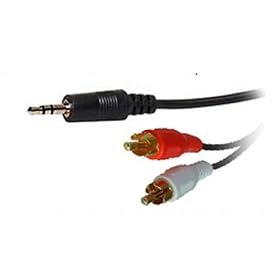
Use the cables above and Audacity (It's free)
Yes, just make sure you have the quality set at a reasonable level or you'll keep crashing(Like I did  )
)

If you have a shit PC/laptop like myself consider the Gemini I-key
You can get one cheap off Ebay and it does what its supposed to its just not the prettiest piece of equipment
| quote: |
| Originally posted by a spoon If you have a shit PC/laptop like myself consider the Gemini I-key You can get one cheap off Ebay and it does what its supposed to its just not the prettiest piece of equipment |
| quote: |
| Originally posted by skip it also doesn't have the best sound quality (from what i've heard). if you want to record your mixes only at home i suggest getting a good sound card. if you want the record at gigs too, then i recommend getting something like the gemini, but maybe something better... |
There are tons of USB/Firewire sound cards available.
They tend to be about $200-300 for a decent one (multi-channel, headphone preamps, MIDI, etc.) but there are some cheapies as well. Check out M-Audio, Edirol, Presonus, Motu, etc.
If you want a really nice simple solution, check out the Samson Zoom H2. This is what I currently use. It's a flash based recorder, much nicer than the Gemini suggested above. It's portable (easy to use at gigs), doesn't require you to run any software (good if you're using your laptop for a DVS or other DJ app), has fantastic sound quality, and is under $200.
| quote: |
| Originally posted by Dj Dizzy what would be a sound card with rca inputs that would make really good recordings that doesn't cost a fortune? also do they make comparable sound cards that are usb for laptops or are you really stuck using a desktop and getting a pci sound card? |
| quote: |
| Originally posted by Ryan0751 There are tons of USB/Firewire sound cards available. They tend to be about $200-300 for a decent one (multi-channel, headphone preamps, MIDI, etc.) but there are some cheapies as well. Check out M-Audio, Edirol, Presonus, Motu, etc. If you want a really nice simple solution, check out the Samson Zoom H2. This is what I currently use. It's a flash based recorder, much nicer than the Gemini suggested above. It's portable (easy to use at gigs), doesn't require you to run any software (good if you're using your laptop for a DVS or other DJ app), has fantastic sound quality, and is under $200. |
Wuh? That makes no sense 
A 1/8" (or 1/4") jack can be either mono OR stereo. If it has 3 rings, it's stereo, they just share a common ground wire.
| quote: |
| Originally posted by Dj Dizzy that's only in mono though right? because it uses either usb or a miniplug. if i used usb to a laptop then i'd have to physically use an rca-to-miniplug (stereo to mono) to connect it to the laptop |
| quote: |
| Originally posted by Ryan0751 Wuh? That makes no sense A 1/8" (or 1/4") jack can be either mono OR stereo. If it has 3 rings, it's stereo, they just share a common ground wire. |
What's a good (prof)program to record it with?
Just use Audacity, it's decent and free.
If you want "pro":
Windows - Adobe Audition
Mac - Bias Peak
| quote: |
| Originally posted by ISOS What's a good (prof)program to record it with? |
I think that I don't have a line in ! (2 lines Only a Mic and speaker connection )What do I need to buy then so I can record ?
| quote: |
| Originally posted by ISOS I think that I don't have a line in ! (2 lines Only a Mic and speaker connection )What do I need to buy then so I can record ? |

any suggestions for a notebook?
| quote: |
| Originally posted by ISOS any suggestions for a notebook? |
hello
ive tried searching the other threads but this was as close as i could find.
im having trouble recording w/ audacity. im running vista and just installed the drivers from m-audios website. i have a m-audio mobile pre USB interface, and the rca to stero cable. i can see in the preferences in audacity that it's recognized the mobile pre, but when i try to record, the wave file is flat and no sound records.
any ideas what the problem might be?
any help would be greatly appreciated!
| quote: |
| Originally posted by bigsnail hello ive tried searching the other threads but this was as close as i could find. im having trouble recording w/ audacity. im running vista and just installed the drivers from m-audios website. i have a m-audio mobile pre USB interface, and the rca to stero cable. i can see in the preferences in audacity that it's recognized the mobile pre, but when i try to record, the wave file is flat and no sound records. any ideas what the problem might be? any help would be greatly appreciated! |
| quote: |
| Originally posted by ISOS I think that I don't have a line in ! (2 lines Only a Mic and speaker connection )What do I need to buy then so I can record ? |
| quote: |
| Originally posted by Existo22 Did you try checking your levels? |
If you don't want to go through the comp then just record it using a CD recorder. I got the Tascam CD-RW900SL and have been happy it with it ever since.
| quote: |
| Originally posted by DJ Blitzkrieg If you don't want to go through the comp then just record it using a CD recorder. I got the Tascam CD-RW900SL and have been happy it with it ever since. |
I didn't have any line-in interface to my laptop, so I bought a cheap external soundcard - Creative Soundblaster Connect (http://www.ciao.co.uk/Creative_Soun...onnect__6592340).
Cost only $40 and works like a charm for recording mixes at home
| quote: |
| Originally posted by Jeremy H I didn't have any line-in interface to my laptop, so I bought a cheap external soundcard - Creative Soundblaster Connect (http://www.ciao.co.uk/Creative_Soun...onnect__6592340). Cost only $40 and works like a charm for recording mixes at home |

Powered by: vBulletin
Copyright © 2000-2021, Jelsoft Enterprises Ltd.