
TranceAddict Forums (www.tranceaddict.com/forums)
- Production Studio
-- Cubase question
Pages (2): [1] 2 »
Cubase question
I have a firewire 410, novation remote sl 37 and cubase 4.0 and I am trying to set all of these up. Currently I am having a problem getting sound when I use the keyboard. When I hit the keys on the keyboard, I get movement from the red meter showing that it is being received, but there is no sound. Also, I am able to use the play, stop, etc buttons on the keyboard and they link up fine. When I hit play I am able to hear the metronome through the speakers so I believe the soundcard is set up correctly. The steps I've taken to set up the midi instrument are as follows:
F11 to get a midi instrument
choose the VST instrument
assign all midi inputs and the output to the vst
when I do this, a blue meter on the mixer lights up, but there is no sound. It's as if the mixer isn't routed to the speakers, but I am not sure how to fix that.
Hopefully someone can help thanks.
this is a bug in the h20 version. you probably better buy it.
Have you armed the record button on he vst?
have you hit f4 and set the outputs
echo - I did buy cubase. I looked through the manual but couldn't find anything that targeted this problem.
ry - I hit both the record button and monitor button, but it didn't work.
myst - I will have to check this.
thanks for the replies.

That red button has to be highlighted, also make sure u use midi channel 1 as some Instruments only works on that channel by default.
| quote: |
| Originally posted by trancypantzzz assign all midi inputs and the output to the vst |
| quote: |
| Originally posted by trancypantzzz echo - I did buy cubase. I looked through the manual but couldn't find anything that targeted this problem. |
he is using cubase 4
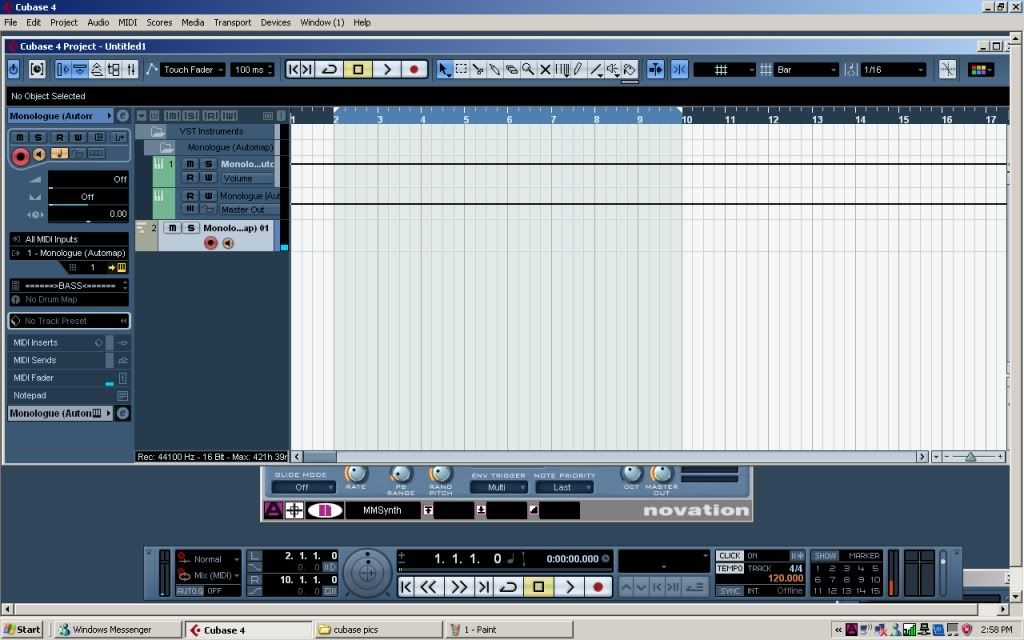
Ok so I opened up cubase and started an empty project. I pressed F11 to setup a VST. It asked me to make a midi track and I clicked yes. My setup looks like that screenshot above. I have the monologue loaded with input setting set to ALL MIDI INPUTS and output setting set to the MONOLOGUE VST. I have the red button pushed as well as the monitor button. The channel is set to 1.
When I hit F4 and go into the audio settings. My output settings are Stereo out > M-AUDIO FIREWIRE ASIO > FW 410 ANALOG OUT 1/2 R & L. When I go into the device setup and go to VST Audio System my settings are as follows. M-AUDIO FW ASIO with Analog out 1/2 R & L as the only 2 active outputs. In the VST system link menu I have active checked, ASIO Input is set to not connected and ASIO Output is set to FW 410 ANALOG OUT 1/2 R.
When I hit the keys on the keyboard I get a blue meter in the mixer as well as the MIDI fader, but I guess this just means that the signal is going through.
Did you plug in the midi and then start C4 or vice versa?
I had the controller plugged in and then I turned on the computer. Then I opened cubase. Then I just unplugged the keyboard and plugged it in and I could still use the play and stop buttons, but the keys weren't recognized. Lastly when I opened cubase and then plugged in the keyboard, the keyboard wouldn't work at all.
Yea that's what I mean, often a midi keyboard has to be plugged in and recognised by the OS before you start your sequencer (make sure you don't unplug it once it is). If you did that and it still isn't working then I don't know, could be a driver issue or maybe the keys are busted. Can you try it in another sequencer?
I don't think I have any other programs to try it in besides Traktor which it seems to work with. Maybe I can download Fruityloops demo or something and try it.
Grab the demo of Ableton Live. It's less than 100mb.
I got the demo for ableton live, but I can't get the keyboard to work with that either.
scratch that, i was able to get it working with ableton. i watched a video on youtube that says it has to be setup on port 2 so maybe if i try that in cubase it will work.
I'm not sure what is causing that. Also I would highly recommend asking this question on the Steinberg Cubase forums.
Ok I will try there as well as novation and m-audio.
dood,
if you are still having problems with this contact me on msn as it will be easier for me to fix it in real time.
all the best,
Mark
MSN - [email protected]
PS i am always "appear offline" so just send me a message and i will reply
I'm on now and I tried IMing but i don't think it went through. I added you to my contact list - free54000 hotmail com



go into ur sound card control panel and make sure its turned up?
| quote: |
| Originally posted by mysticalninja go into ur sound card control panel and make sure its turned up? |
you dont need system link active
and deactivate all the ins/outs that you dont use, saves on confusion!
I am still reachable on msn, happy to access machine remotely for you and sort this issue out.
ok I will try to contact you soon.

Powered by: vBulletin
Copyright © 2000-2021, Jelsoft Enterprises Ltd.