
TranceAddict Forums (www.tranceaddict.com/forums)
- Production Studio
-- The PC Build
The PC Build
hey fokes, its been a month or so since i posted been working my way home from my holiday. hope everyone is well.
Ok after much deliberation i have decided to build a PC instead of getting a Mac!
First my question is after a fair bit of reading on chipsets and motherboards etc does anyone see the benefits of using the i7 intel. Considering the earlier models of intel's range of quad cores and others.I know some of you have your own PC's and i assume that you have build them.
I am overwhelmed with the amount of products that are around and due to this it has made it really tuff for me to decide what parts i should actually get.
I am looking so far at the intel Q9650 with the Asus P5Q SE motherboard. Now with ram I beleive that i need up to Four DDR2's. I have also been considering the velociraptor 300GB 10.000rpm HDD plus, one 500GB SATA for internal drives. I will also be looking at an external drive as well. Now, in addition, I would like to use the Noctura NH12p cooling system (one of many available). Also a Tagan 600w power supply. And, im not sure on a graphics card but one with dual monitor support.
i know this is one of many setups that you could have. my question is can someone who has extencive experience with PC's comment on what would be an ideal build. Now I plan to use cubase 5 as well, of course running multiple VST's etc. I am looking at windows prof XP until W7 becomes more stable and more functional. besides what I have said can anyone comment on a specific build if they were to do it themselves.
any information appreciated. ah and one more thing, is it worth going 64bit over 32bit?
thanks heaps fokes
shawn
Gigabyte > Asus.
Asus was great in the past, but quality is slipping and you get a far better deal with Gigabyte. Everything from the chipsets to the capacitors is better. For the record, both of my current computers have Asus motherboards and video cards, so I am saying this without bias.
Re: The PC Build
| quote: |
| Originally posted by Energy_3 I am looking at windows prof XP until W7 becomes more stable and more functional. besides what I have said can anyone comment on a specific build if they were to do it themselves. any information appreciated. ah and one more thing, is it worth going 64bit over 32bit? |
 .
.
I was looking at setting myself up a PC as follows (even though I'm mac primarily):
Asus P6T Deluxe V2
Intel Core i7 965 extreme
6gig of DDR3 2000 (not sure which brand?)
undecided on case/power supply too as those are quite critical.
@echosystem yeah gigabyte seems like a good option, all the reviews i have read seem promising as well. Most VST's I am interested in after looking at there sites seem to support windows seven as well as to 64bit Vs 32bit platforms.
@John27 yeah its a good option i think, I mean like Mac to, but i would really enjoy building my PC when it happen as well. Antec make some good cases you can even look at ther rack mount cases around 300us i think and yes a good supply of power is recommended. depending on which case you buy some do come with a good unit, tho some dont come with one at all.
I was looking into the i7 core but the cost seems a little too much considering as to whether its ability is actually going to out-perform an earlier model of intel's previous cores given the performance is considerably on par It would seem.
I really really want some answers/support on this one as i am very close to making the start on buying the parts to start putting it together so any information is really appreciated. As i dont want to F&%K this up for obvious reasons
@storyteller windows 7 looks very promising as well from what i have read and from what i can tell most bugs have been ironed out already though im sure ther is much to be done as well. The main reason i was considering xp is that most software support this, and given windows 7 is premature i have chosen this option.
| quote: |
| Originally posted by Energy_3 @storyteller windows 7 looks very promising as well from what i have read and from what i can tell most bugs have been ironed out already though im sure ther is much to be done as well. The main reason i was considering xp is that most software support this, and given windows 7 is premature i have chosen this option. |
| quote: |
| Originally posted by Storyteller I agree. I just gave it a go out of curiosity. I think full support wont take long since a lot of vista compatible drivers work for W7 as well, and, everybody seems to be quite positive about this product unlike it's predecessor. |
Re: The PC Build
| quote: |
| Originally posted by Energy_3 instead of getting a Mac! |

Re: Re: The PC Build
| quote: |
| Originally posted by SDM |
I recently did the same thing.
Here are my specs:
Motherboard:
1 x ASUS P6T LGA 1366 Intel X58 ATX Intel Motherboard
Processor:
1 x Intel Core i7-920 Bloomfield 2.66GHz LGA 1366 130W Quad-Core Processor Model BX80601920
(currently over-clocked and stable at 3.8GHz)
RAM:
1 x CORSAIR XMS3 12GB (6 x 2GB) 240-Pin DDR3 SDRAM DDR3 1600 (PC3 12800)
Power Supply:
1 x CORSAIR CMPSU-1000HX 1000W ATX12V 2.2 / EPS12V 2.91
Hard Drives:
2 x Western Digital VelociRaptor WD1500HLFS 150GB 10000 RPM
1 x Western Digital Caviar Green WD10EADS 1TB
Cooling systems:
1 x Swiftech Apogee GTZ Ci7 Extreme Duty CPU Water-block for Intel Core i7 processors
2 x COOLER MASTER RL-ACL-NNUG-GP Water Coolant
1 x CORSAIR CMXAF1 Fans (a RAM cooler)
3 x Scythe SY1225SL12SH 120mm "Slipstream" Case Fan (attached to water cooling radiator)
1 x Scythe KM02-BK 5.25" Bay Fan Controller
Operating System:
Microsoft Windows 7 Ultimate Full - Retail (64 bit)
(I have a friend at MS that got me a copy for 50 bucks)
DAW:
Cubase 5
Graphics/Display:
2 x SAMSUNG TOC T240 Rose Black 24" 5ms HDMI Widescreen LCD Monitor
1 x HIS H489FT1GP Radeon HD 4890 1GB 256-bit GDDR5
Other:
The cables, hoses, radiator and reservoir, and various other parts and pieces I had lying around and didn't include into the specs above, however I picked up this case for free.
Final thoughts?
The system is fucking amazing. It can handle ANYTHING, ANYTHING I throw at it. The only thing crippling me is my Firewire audio interfaces. However, I can run a massive amount of plug-ins with a buffer of 64 samples. That gives me a bout 1-2ms of latency. It's amazing to load Native Instruments Acoustik Piano and play it like it was really in your hands.
Cons:
This system is unbelievably loud when the fans are cranked to their maximum rpm (do yourself a favor, buy a fan controller). Loud enough that when recording clients/friends I have to mic them in another room (which you should do anyway).
However, when the fans are toned down, I can't hear them over the speakers/headphones so it's fine for personal production.
This might be a little extreme, depending on your budget, but trust me, having a cutting edge system removes the tears and anguish of a clunky CPU spiking box.
PICS:

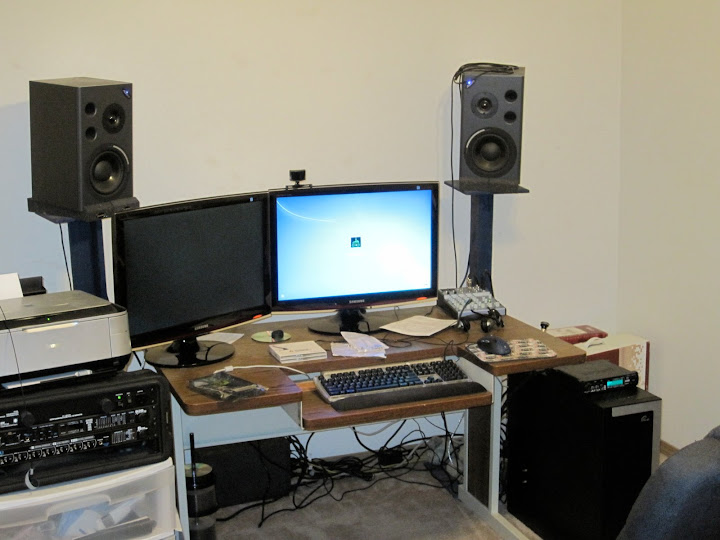


shit what are u doing on your computer? video-editing and games at the same time?
| quote: |
| Originally posted by SDM shit what are u doing on your computer? video-editing and games at the same time? |
| quote: |
| Originally posted by Energy_3 @storyteller windows 7 looks very promising as well from what i have read and from what i can tell most bugs have been ironed out already though im sure ther is much to be done as well. The main reason i was considering xp is that most software support this, and given windows 7 is premature i have chosen this option. |
| quote: |
| Originally posted by wrzonance I recently did the same thing. Here are my specs: Motherboard: 1 x ASUS P6T LGA 1366 Intel X58 ATX Intel Motherboard Processor: 1 x Intel Core i7-920 Bloomfield 2.66GHz LGA 1366 130W Quad-Core Processor Model BX80601920 (currently over-clocked and stable at 3.8GHz) RAM: 1 x CORSAIR XMS3 12GB (6 x 2GB) 240-Pin DDR3 SDRAM DDR3 1600 (PC3 12800) Power Supply: 1 x CORSAIR CMPSU-1000HX 1000W ATX12V 2.2 / EPS12V 2.91 Hard Drives: 2 x Western Digital VelociRaptor WD1500HLFS 150GB 10000 RPM 1 x Western Digital Caviar Green WD10EADS 1TB Cooling systems: 1 x Swiftech Apogee GTZ Ci7 Extreme Duty CPU Water-block for Intel Core i7 processors 2 x COOLER MASTER RL-ACL-NNUG-GP Water Coolant 1 x CORSAIR CMXAF1 Fans (a RAM cooler) 3 x Scythe SY1225SL12SH 120mm "Slipstream" Case Fan (attached to water cooling radiator) 1 x Scythe KM02-BK 5.25" Bay Fan Controller Operating System: Microsoft Windows 7 Ultimate Full - Retail (64 bit) (I have a friend at MS that got me a copy for 50 bucks) DAW: Cubase 5 Graphics/Display: 2 x SAMSUNG TOC T240 Rose Black 24" 5ms HDMI Widescreen LCD Monitor 1 x HIS H489FT1GP Radeon HD 4890 1GB 256-bit GDDR5 Other: The cables, hoses, radiator and reservoir, and various other parts and pieces I had lying around and didn't include into the specs above, however I picked up this case for free. Final thoughts? The system is fucking amazing. It can handle ANYTHING, ANYTHING I throw at it. The only thing crippling me is my Firewire audio interfaces. However, I can run a massive amount of plug-ins with a buffer of 64 samples. That gives me a bout 1-2ms of latency. It's amazing to load Native Instruments Acoustik Piano and play it like it was really in your hands. Cons: This system is unbelievably loud when the fans are cranked to their maximum rpm (do yourself a favor, buy a fan controller). Loud enough that when recording clients/friends I have to mic them in another room (which you should do anyway). However, when the fans are toned down, I can't hear them over the speakers/headphones so it's fine for personal production. This might be a little extreme, depending on your budget, but trust me, having a cutting edge system removes the tears and anguish of a clunky CPU spiking box. PICS: |
 ) When you mean fan controller, you mean something that literally allows you the ability to regulate fan speed. like one for a home ceiling fan etc.
Skinny:
MOTU devices work this way on PCs,
1. You can have multiple devices daisy-chained, or on one firewire card with multiple connections
2. Even though you can do all these, they have a hard time keeping their clocks synced. So basically you can't use the full potential of having 3 MOTU firewire devices. I still haven't figured out how to resolve this.
3. On Windows 7/Vista you need to downgrade your firewire card's drivers to "Legacy" drivers
MOTU Devices work this way on MACs,
1. You can have multiple devices daisy-chained, or on one firewire card with multiple connections.
2. Rather than Cubase being able to see the MOTU devices as a combined device by default, you have to create an aggregate device in Audio MIDI Setup in order to use all 3 at the same time. This creates a good amount of latency, so you'll need to either run at higher buffers, or lower sample rates.
Conclusion,
On MACs, firewire audio devices seem to run smoother, but you need to create an aggregate device to access them all easily.
On PCs, firewire works just fine, as long as you only use one MOTU firewire device at a time.
Just some of my experiences, if any of you on here are using multiple MOTU Firewire devices with Windows and NOT getting pop/clicks clock de-sync issues. Let me know!
---Adam
ok, sounds good. yeah i figured that was the case. I stil am not certain on what audio / midi interface to use yet though motu was my preferred choice, amongst others like RME.
but thanks for the info really helpful. hopefully some others add their 2cents worth to this.

Powered by: vBulletin
Copyright © 2000-2021, Jelsoft Enterprises Ltd.