
TranceAddict Forums (www.tranceaddict.com/forums)
- DJ Booth
-- Trouble getting fader start to work
Trouble getting fader start to work
Hey all, having a little trouble getting the fader start function to work on my DJM800 and CDJ800.
I bought the CDJ's used, but these are the cables it came with:

I press number 1 for channel one on the fader start on the mixer, it lights up. Now the channel selector is set to A, CDJ A is cued up. I move the cross fader from side B to side A, it gets over there, nothing happens.
I watched a few tutorials on youtube and I can't see what I an doing wrong.
Can anyone help me with this?
Update. After messing around a little bit. When channel 1 fader start is turned ON, the channel selector is set to A and the music is playing, if I move the CROSS FADER to side A, nothing happens(like it should)but when I move the CROSS FADER back to side B, the music stops and returns to the cue point?
Lolwut?
from what i'm reading on your update, it sounds like it's doing what it is supposed to.
when you have fader start on, having the cross fader 100% on side A should have deck A playing. once you start moving the cross fader towards side B, deck B should start playing and A should continue playing. once you reach all the way to side B, deck B should be playing and A should have stopped.
edit: and I believe if the cross fader is turned off (by setting it to "thru"), then fader start is activated with the channel faders. the moment you move the fader up from the 0 position, the track should start playing. when the fader goes back down to 0, the track should stop and go back to the cue point.
Let me make a video real quick...
i'm going to bed, upload the video though as i'm sure someone will stroll through here that can answer... if not i'll try and help tomorrow.
Thanks man, I appreciate it. Sleep tight, don't let the bed bugs bite. lol
Here is the video,
http://www.youtube.com/watch?v=5Wo41l-5afA
Hmmmm, I use the channel faders in conjunction with the fader start, not the cross fader. Although I don't own my 800 anymore, and I never really used the fader start anyway - seems to be a bit of a waste of time to me.
Try leaving your cross fader in the middle, and using channel 1's upfader to start the track. You've got far more control that way anyway, no one uses cross faders anymore!
Oh, and before anyone else mentions it: get your levels out of the red!
| quote: |
| Originally posted by Jarvmeister Hmmmm, I use the channel faders in conjunction with the fader start, not the cross fader. Although I don't own my 800 anymore, and I never really used the fader start anyway - seems to be a bit of a waste of time to me. Try leaving your cross fader in the middle, and using channel 1's upfader to start the track. You've got far more control that way anyway, no one uses cross faders anymore! Oh, and before anyone else mentions it: get your levels out of the red! |
Only thing else I can think of is the cord I am using isn't the right one.
The one I am using only has one notch on the jack, you can kind of see it in this photo:
The one pictured here has 2,
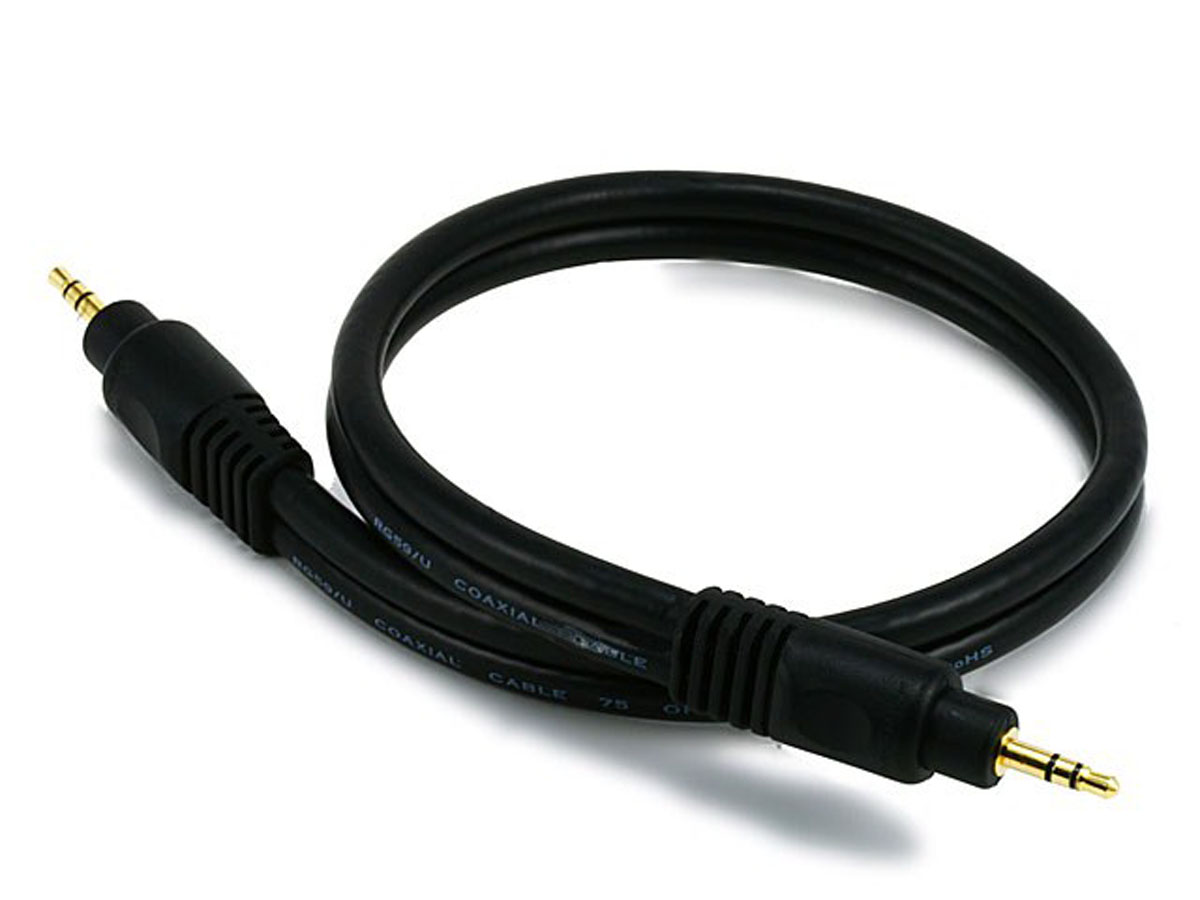
Am I just using the wrong cable?(I bought these used and not sure if these are the correct cables that came with it)
at work and can't check out the youtube, but I'm fairly certain the crossfader needs to be set to "thru" in order for fader start to work with the channel faders?
like jarv said, you get more control not using the fader start, so i never used it myself.
The cables only having one notch should really matter. Just means each cable is a mono cable instead of a balanced stereo one.
I think each of those cables represents left and right so no real need to have them as stereo ones anyway.
I could be completely wrong with that assumption 
| quote: |
| Originally posted by JD8180 at work and can't check out the youtube, but I'm fairly certain the crossfader needs to be set to "thru" in order for fader start to work with the channel faders? like jarv said, you get more control not using the fader start, so i never used it myself. |
Bit of a mystery this one....... 
I had the djm 400 which was only 2 channels, as opposed to your four. from what it looks like in your video, do you have channels 1, 2, and 3 set to A and channel 4 set to B?
try setting just channel 1 to A and channel 4 to B. put channels 2 and 3 set to thru I guess.
also I have no idea if it makes any difference, but try with B set to fader start as well (channel 4). don't know if it matters that you only have one set to fader start.
Andrew, try a mono 1/8" cable. Or if you don't have one handy at the moment, pull both connections out a bit. In other words only make a half connection. Some fader starts are controlled through a mono signal not stereo, the cables you have are stereo or Tip Ring Sleeve. I would say try a mono cable first. You can get one at any music store. If that doesn't work, than it could be something wrong with your mixer.
I agree with the others, I would recommend not using fader start.
| quote: |
| Originally posted by djkatmaus Andrew, try a mono 1/8" cable. Or if you don't have one handy at the moment, pull both connections out a bit. In other words only make a half connection. Some fader starts are controlled through a mono signal not stereo, the cables you have are stereo or Tip Ring Sleeve. I would say try a mono cable first. You can get one at any music store. If that doesn't work, than it could be something wrong with your mixer. I agree with the others, I would recommend not using fader start. |
| quote: |
| Originally posted by n3lly He says the 1/8" cables he has are only mono (one ring) so not sure if the above applies.. ?? |

Powered by: vBulletin
Copyright © 2000-2021, Jelsoft Enterprises Ltd.