
TranceAddict Forums (www.tranceaddict.com/forums)
- Production Studio
-- Does multiple monitors ( screens ) affect performance
Pages (2): [1] 2 »
Does multiple monitors ( screens ) affect performance
Just wondering how using say both heads as apposed to just 1 or adding a second card and running 4 monitors and how it might impact performance. Running osx mac pro.
I've found that even rotating screens seems to change performance. maybe it is in my head. I can't really find a definitive answer.
Wh
FPS yes if your card can't handle it, but I don't think you should have any issues with the sound.
When you rotate your screen, does it effect the sound or FPS?
just overall performance. Some apps won't work as they assume your width is your max resolution like you had a horizontal monitor.
So is it safe to say there is no computer overhead ? In that if your card can handle it, which to be honest i'm not sure what that means. If it supports a resolution, and has dual heads, does that mean the cards take care of all the processing ? Surely the cpu must take a bit of a hit. I mean if I were to add another card and have 4 monitors, this would not impact the cpu at all ?
With Mac Pros - it doesn't dent performance at all.
The cards do all the processing and the only strain for the computer is on the PCI bus, which the motherboards have more than enough bandwidth to handle on Mac Pro.
At the studio one PTHD Host has two different cards, running 3 monitors and one giant display screen. We even had to fudge the outputs as each monitor uses a different digital output format.
Simply put, don't sweat it.
However It's a completely different scenario with integrated graphics (GPU's) as found on macbooks etc.
worth noting that it eats a significant amount of extra RAM on some computers, specifically when using expos�, spaces, but knowing you, you must have like 16 gigs minimum so that shouldn't be an issue.
the issue i'm having is that i don't really want to invest in a hardware video reference solution so i'm using a 3rd monitor for one of my mac pros as a display reference but having a full picture even if the resolution is reduced seems to make the system go slower. Would i really need to get a quadro for that type of stuff ? Right now, i'm just running 2 stock video cards.
weird, and you got 8gb or more RAM right?
Think you'll need a simply better card for 4 screens. Maybe not a quadro, but one with more VRAM. Is that the culprit? Might be...
each card has 512 ram. It is only the full video running which starts to make things clunky.
| quote: |
| Originally posted by Looney4Clooney each card has 512 ram. It is only the full video running which starts to make things clunky. |
Videos can be extremely heavy on both the GPU and CPU. I assumed you were just running production programs, not ones with video included.
In that case, you may need to opt for a better GPU.
Re: Wh
| quote: |
| Originally posted by Fledz FPS yes if your card can't handle it, but I don't think you should have any issues with the sound. When you rotate your screen, does it effect the sound or FPS? |

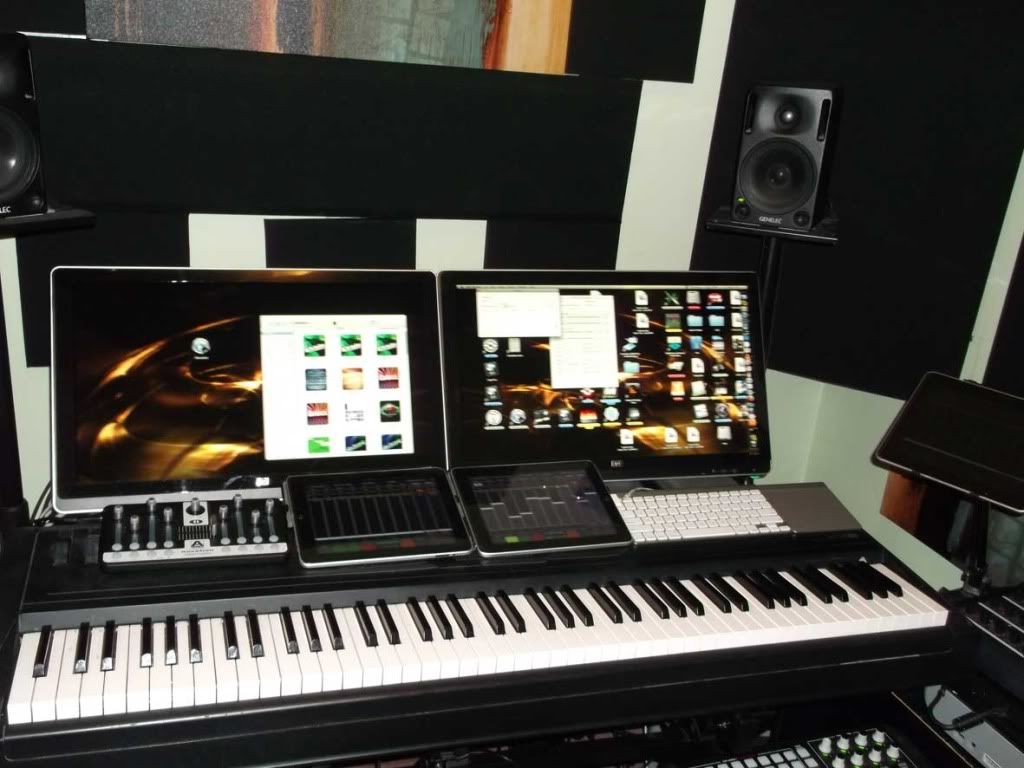


Re: Re: Wh
| quote: |
| Originally posted by Looney4Clooney Been doing some moving around, THe first pic is when i had both computers in the same room but now , I have one room for production and the other room with the vertical screens for composition. 2 ipads on the leyboard one, on a stand to the right. Using touch osc. |
lol um most professionals would put this in the realm of small home project studio. I suppose your idea of a studio is a laptop with some headphones, dr dre headphones right ?
Not really sure what you could possibly consider unnecessary. There is no hardware to speak of. This is where I do my prep work and pre production/mix. The entire setup screams workflow. There is absolutely nothing to gawk at.
| quote: |
| Originally posted by DJ RANN However It's a completely different scenario with integrated graphics (GPU's) as found on macbooks etc. |
we were talking about mac pros. Feel free not to include yourself in any dialogue between me and djRann.
| quote: |
| Originally posted by Looney4Clooney we were talking about mac pros. Feel free not to include yourself in any dialogue between me and djRann. |
4 screens were vertical for composition as scores are just easier to read. Horizontal monitors don't work well when doing traditional scoring stuff, And the fact that they are different monitors makes splitting simpler. One page per monitor.
im running 4 displays all across extended desktops and love having all of them. it def helps workflow no question. i run Reason on 2 screens, Ableton Live on the other, and Wavelab and other apps like internet explorer etc on my 32in tv thru hdmi connection. my computer system is dual wielding 2 video cards and actually have the potential to run a total of 10 displays!!! so i highly recommend you running at least 2 displays if you have the money n hardware and are serious about music production. i started with a crappy computer and a crappy small monitor and now have built my room up to an entire studio with all my time and money. its my dojo and domain and totally worth it 
| quote: |
| Originally posted by Looney4Clooney 4 screens were vertical for composition as scores are just easier to read. Horizontal monitors don't work well when doing traditional scoring stuff, And the fact that they are different monitors makes splitting simpler. One page per monitor. |
its just not the same. Having different screens forces certain elements to certain monitors which is bad in some cases but for this good. I can maximize say a page in sibelius and it will only take up that screen. Not to mention I started off with 2, then 3 then 4. But having 1 big screen would not be good for traditional scoring. At least for me.I learned on these and my workflow is just built around this setup. Think of it as pages. Each screen is one page. And the computer i'm trying to sync a video lcd is the production one as the other setup is really just pure scoring or orchestration. Hit points would be done on the production setup then back and forth. It works. I think i'm just going to by a cheap pc and use that as the video card selection is huge. Just need something that can accept sync info so the frames line up.
And these particular monitors are great as they allow you to bend them as you can see in the pic so that you don't suffer neck strain despite the vertical height. That is one thing the giant mac display won't do. Well i mean you can always get a stand.
For the production side, i just have 2 normal lcds horizontal.
Can't any performance issues be resolved with a GPU upgrade?
i think the best solution honestly is to just use another computer for the video. I've thought it thru. I actually have an older pc which i will get a video card for.
| quote: |
| Originally posted by Looney4Clooney its just not the same. Having different screens forces certain elements to certain monitors which is bad in some cases but for this good. I can maximize say a page in sibelius and it will only take up that screen. Not to mention I started off with 2, then 3 then 4. But having 1 big screen would not be good for traditional scoring. At least for me.And these particular monitors are great as they allow you to bend them as you can see in the pic so that you don't suffer neck strain despite the vertical height. That is one thing the giant mac display won't do. Well i mean you can always get a stand. For the production side, i just have 2 normal lcds horizontal. |
at one time, 2 computers shared the 4 monitors. So couldn't really use 1 display. But now the composition rig uses all 4. That computer is working fine. It is the production one, the second setup you see that requires a video reference.
What is the biggest mac display ? Pretty sure my setup has alot more surface and it fits manuscript paper perfectly.
MAC just has awful choice in video cards. It is ridiculous actually.
What you need is an Eyefinity dedicated AMD card, but good luck trying to get one for a Mac.
EDIT - Seems it's a driver issue (or lack of). I guess if you booted into Win7 you could use them, but then that defeats the purpose of buying a Mac.

Powered by: vBulletin
Copyright © 2000-2021, Jelsoft Enterprises Ltd.