Become a part of the TranceAddict community!Frequently Asked Questions - Please read this if you haven'tSearch the forums
TranceAddict Forums > DJing / Production / Promotion > DJ Booth > Question to set up Mixer to my PC.
  Last Thread   Next Thread
Share
Author
Thread    Post A Reply
italianboy7
tranceaddict in training


Registered: Dec 2005
Location: Staten Island, New York
Question to set up Mixer to my PC.

What is the cable that i need to hook up my mixer to my pc..i want to use my speakers on my pc untill i purchase seperate speakers for my dj equipment. Thanks!

Old Post Nov-10-2007 19:32  United States
Click Here to See the Profile for italianboy7 Click here to Send italianboy7 a Private Message Add italianboy7 to your buddy list Report this Post Reply w/Quote Edit/Delete Message
djdk
Nutritional Overachiever


Registered: Jul 2003
Location: London

usually twin phono to 3.5mm mini jack


___________________

Dave King - Tales Of The Future [Trance]
Dave King - Personal Classics
MIX ARCHIVE!!!

Old Post Nov-10-2007 20:12  United Kingdom
Click Here to See the Profile for djdk Click here to Send djdk a Private Message Visit djdk's homepage! Add djdk to your buddy list Report this Post Reply w/Quote Edit/Delete Message
the_gamemaster
Supreme tranceaddict


Registered: Apr 2006
Location: Derby/Nottingham, UK

It depends how new your PC is. New multimedia PCs often have the left and right channels seperate, ie. red and white, but with older ones you might need to use a splitter to use a stereo jack.

Old Post Nov-12-2007 21:19  United Kingdom
Click Here to See the Profile for the_gamemaster Click here to Send the_gamemaster a Private Message Add the_gamemaster to your buddy list Report this Post Reply w/Quote Edit/Delete Message
British
Junior tranceaddict


Registered: Oct 2007
Location: Northern N.S.W, Autralia

what sound card set up do you have?
like djdk said. two female RCA to male 1/8" cable will do the trick for most basic onboard and third party sound cards.
looks like this
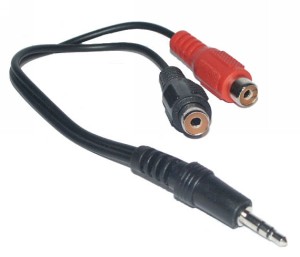

from here

British

Old Post Nov-13-2007 11:42  Australia
Click Here to See the Profile for British Click here to Send British a Private Message Add British to your buddy list Report this Post Reply w/Quote Edit/Delete Message
Rick D
Resident London Hater


Registered: Sep 2003
Location: In The Chillout Room!

quote:
Originally posted by British
what sound card set up do you have?
like djdk said. two female RCA to male 1/8" cable will do the trick for most basic onboard and third party sound cards.
looks like this


from here

British


that wouldnt work, you'll need the male phono jacks, otherwise you'll need to buy another phono cable separate


___________________
Check out my latest production work

Check out my latest mixes

Old Post Nov-13-2007 23:35 
Click Here to See the Profile for Rick D Click here to Send Rick D a Private Message Visit Rick D's homepage! Add Rick D to your buddy list Report this Post Reply w/Quote Edit/Delete Message
British
Junior tranceaddict


Registered: Oct 2007
Location: Northern N.S.W, Autralia

I know what you mean. but if you have used the mixer previously then you would already have that other phono cable.

Here is a link to some of the cables mentioned above.

Old Post Nov-15-2007 04:03  Australia
Click Here to See the Profile for British Click here to Send British a Private Message Add British to your buddy list Report this Post Reply w/Quote Edit/Delete Message
Orbital32
Revolution


Registered: Jul 2004
Location: LaTa #32°

you will probably also need a ground loop isolator as well.

Old Post Nov-17-2007 21:03  United States
Click Here to See the Profile for Orbital32 Click here to Send Orbital32 a Private Message Visit Orbital32's homepage! Add Orbital32 to your buddy list Report this Post Reply w/Quote Edit/Delete Message
SwerV
Junior tranceaddict


Registered: Nov 2007
Location: Los Angeles

You should not need a ground loop isolator. If you get any distortion or feedback then its something else.


To plug in you will need a male RCA to standard balanced headphone jack male. Depending on if you have a line in input on your pc or not you might be able to plug into your mic. Just make sure on your sound card you set it correctly.


___________________

Old Post Nov-19-2007 05:48  United States
Click Here to See the Profile for SwerV Click here to Send SwerV a Private Message Visit SwerV's homepage! Add SwerV to your buddy list Report this Post Reply w/Quote Edit/Delete Message

TranceAddict Forums > DJing / Production / Promotion > DJ Booth > Question to set up Mixer to my PC.
Post New Thread    Post A Reply

 
Last Thread   Next Thread
Click here to listen to the sample!Pause playbackElectro track from recent Kazell set [2008] [0]

Click here to listen to the sample!Pause playbackGoldenscan - Sunrise [2002]

Show Printable Version | Subscribe to this Thread
Forum Jump:

All times are GMT. The time now is 06:06.

Forum Rules:
You may not post new threads
You may not post replies
You may not edit your posts
HTML code is ON
vB code is ON
[IMG] code is ON
 
Search this Thread:

 
Contact Us - return to tranceaddict

Powered by: Trance Music & vBulletin Forums
Copyright ©2000-2026, Jelsoft Enterprises Ltd.
Privacy Statement / DMCA
Support TA!