|
Attention DJs: Please tag your MP3s?
I don't know if anyone else gets annoyed by this, but it is driving me crazy lately.
90% of the time I download a set that a DJ has posted, it's meta data is completely empty. Artist? Unknown. Album? Unknown. Contributing Artists? Unknown.
Then I throw this into my zune sync software, and there's no way to find that set intelligently, except through 'recently added'--so anyone who hasn't tagged their MP3 in my collection from a few months ago is now no longer findable. Lost in an abyss of unknown MP3s.
So now, I tag all the mp3s as I download them using MP3 tag. But really, I'm a pretentious bastard, and don't believe I should have to.
DJS: if you are going to post a set to the internet, fill in the @#%$@# meta data. You can do it NATIVELY using Windows Vista (ie, no software installed, just go to the properties of the MP3). You can even attach pretty little pictures using software to further your brand recognition.
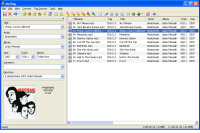
Here's some great FREE windows software that allows you to update an MP3s meta data, even en masse:
http://www.mp3tag.de/en/
And THANK you to all those DJs out there that take the time to fill in the details so our iPods and our Zunes seamlessly synch and file your mp3s away so we can look them up anytime we want. For the love of all that is holy in house music world: THANK YOU.
/end rant.
Return to your normally scheduled programming.
(p.s., just downloaded a few of Chris Ink's sets and they are all tagged. Nice.  ) )
|





