Become a part of the TranceAddict community!Frequently Asked Questions - Please read this if you haven'tSearch the forums
TranceAddict Forums > DJing / Production / Promotion > Production Studio > What do I need to upgrade to two monitors?
Pages (2): [1] 2 »   Last Thread   Next Thread
Share
Author
Thread    Post A Reply
MessiahProject
Supreme tranceaddict


Registered: Nov 2004
Location: Manchester, England
What do I need to upgrade to two monitors?

I currently have 1 19" monitor, but would like to get myself another as part of a re-vamp.
Can you tell me what I need -
Will I need a new graphics card?
Will I need a special lead?
How does it work?

Thanks guys,

TMP


___________________

Old Post Jun-15-2007 08:49  United Kingdom
Click Here to See the Profile for MessiahProject Click here to Send MessiahProject a Private Message Visit MessiahProject's homepage! Add MessiahProject to your buddy list Report this Post Reply w/Quote Edit/Delete Message
DJ RANN
Supreme tranceaddict


Registered: May 2001
Location: Hollywood....

Hi TMP, you'll need a dual head video card (known as dual output) and another lead to connect it.

Firstly, is the 19" monitor you have at the moment DVI or VGA?
Many can actually take a VGA input even if they have a DVI socket but this will depend on the spec/compatibilty of your monitor. I won't go in to specialist converter cables until you've figured out what you need though.

You can then buy another monitor, preferably with the same type of connection, and simply plug from the second output on the video card to the monitor.

The layout is software configurable; clone (two matching sceens) or extended desktop (where the second monitor is a continuation of the first - you want to select this one). There are other setting but these are more or less variations of these two.

I recommend the ATI cards as they don't run cpu heavy background tasks and the software is very intuative.

Let me know if you need more in depth info as I used to do this sort of thing to pay the rent......

Old Post Jun-15-2007 09:03 
Click Here to See the Profile for DJ RANN Click here to Send DJ RANN a Private Message Add DJ RANN to your buddy list Report this Post Reply w/Quote Edit/Delete Message
MessiahProject
Supreme tranceaddict


Registered: Nov 2004
Location: Manchester, England

Thanks for replying so sharpish!
How do I know whether its a VGA or DVi? - The one I have (and im going to buy an identical one) is an ACER AL1916s LIKE THIS

I was thinking of buying a 128MB graphics card - will this be ok?


___________________

Old Post Jun-15-2007 09:27  United Kingdom
Click Here to See the Profile for MessiahProject Click here to Send MessiahProject a Private Message Visit MessiahProject's homepage! Add MessiahProject to your buddy list Report this Post Reply w/Quote Edit/Delete Message
DJ RANN
Supreme tranceaddict


Registered: May 2001
Location: Hollywood....

on the description for video input it says analogue d-sub which is a 15 pin HD D-sub also known as..........VGA!

128 will be fine. There is little to no benefit for going higher on DAWs as you won't be rendering advanced grpahics or really need shit hot 3d capability, it's just to display your audio software which doesn't really tax even the average video card.

Old Post Jun-15-2007 09:41 
Click Here to See the Profile for DJ RANN Click here to Send DJ RANN a Private Message Add DJ RANN to your buddy list Report this Post Reply w/Quote Edit/Delete Message
DeZmA
Synth Addict


Registered: Jun 2001
Location: Lalaland

A lot of cards (like mine) have vga and dvi so you can connect 2 displays without making other investments.


___________________
www.dezma.be

Myspace: http://www.myspace.com/dezmamusic

Old Post Jun-15-2007 10:00  Belgium
Click Here to See the Profile for DeZmA Click here to Send DeZmA a Private Message Visit DeZmA's homepage! Add DeZmA to your buddy list Report this Post Reply w/Quote Edit/Delete Message
MessiahProject
Supreme tranceaddict


Registered: Nov 2004
Location: Manchester, England

I already have a NVidea GeForce FX5200 graphics card - im assuming you dont always need 2 outputs on the card - so would this card already support 2 monitors?


TMP


___________________

Old Post Jun-15-2007 10:52  United Kingdom
Click Here to See the Profile for MessiahProject Click here to Send MessiahProject a Private Message Visit MessiahProject's homepage! Add MessiahProject to your buddy list Report this Post Reply w/Quote Edit/Delete Message
Eldritch
Eldritch Project


Registered: Nov 2005
Location: Sweden

quote:
Originally posted by MessiahProject
Thanks for replying so sharpish!
How do I know whether its a VGA or DVi? - The one I have (and im going to buy an identical one) is an ACER AL1916s LIKE THIS

I was thinking of buying a 128MB graphics card - will this be ok?


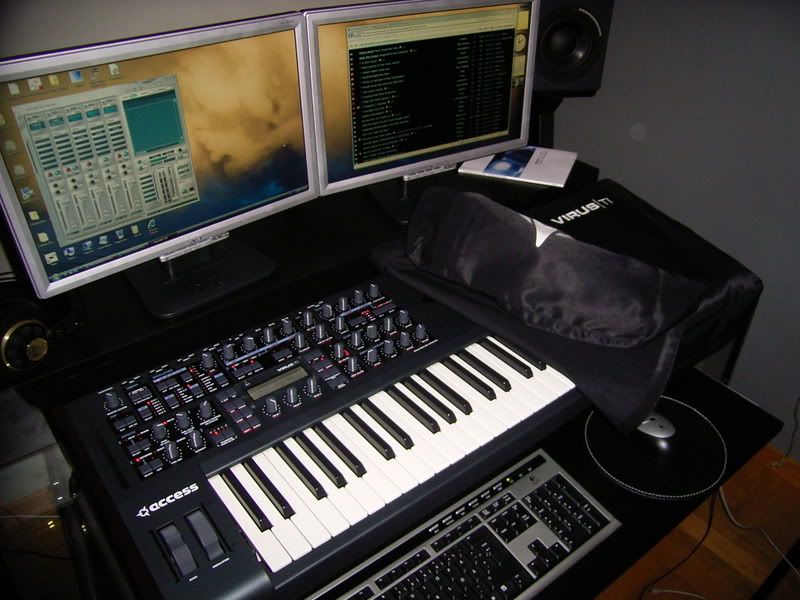
I have the exact same screens, hehe.


They're analog so you will need a DVI-Analog converter for one of the screens. I use a Gainward Bliss 7300GT PCX SilentFX graphics card. It's fanless and actually works pretty well for games too.

Old Post Jun-15-2007 11:02  Sweden
Click Here to See the Profile for Eldritch Click here to Send Eldritch a Private Message Add Eldritch to your buddy list Report this Post Reply w/Quote Edit/Delete Message
Low Profile
Supreme tranceaddict


Registered: Oct 2003
Location: Akureyri

you will always need two outputs on the graphics card.
Most cards today have DVI output (the white connectors), but in case your monitors have VGA (blue connectors) you can get an adaptor for 2$ at any computer store (and usually they also come free in the box with the graphics card).

You can get lower end geforce card with two outputs for 50 bucks these days (hell, even my old Geforce 2 from back in '01 had dual outputs).

things to look out for:
be sure whether you have an AGP or PCI-Express slot on your mainboard (different types of video cards, older PCs have AGP)
If you're thinking about buying a high-def 24" screen (1920x1200 pixels) you'll need a video card with DVI-D High definition capabilities. These look the same as regular DVI connectors, but the card itself needs to support them.

Old Post Jun-15-2007 11:06  Iceland
Click Here to See the Profile for Low Profile Click here to Send Low Profile a Private Message Add Low Profile to your buddy list Report this Post Reply w/Quote Edit/Delete Message
MessiahProject
Supreme tranceaddict


Registered: Nov 2004
Location: Manchester, England

Thanks everyone - thats a great help!

TMP


___________________

Old Post Jun-15-2007 11:48  United Kingdom
Click Here to See the Profile for MessiahProject Click here to Send MessiahProject a Private Message Visit MessiahProject's homepage! Add MessiahProject to your buddy list Report this Post Reply w/Quote Edit/Delete Message
DJ RANN
Supreme tranceaddict


Registered: May 2001
Location: Hollywood....

TMP I think your video card only has a VGA out and an s-video. if I'm right, then you will need to buy a dual output VGA card.

lowprofile is right, if you get a card that has one vga and dvi output on it you can usually configure the dvi out to send a vga (analogue) signal, so all you would need is a cheap dvi male to female vga adaptor.

just make sure you check what two outputs the card has and that it is set up to allow configurable simultaneous output from both.

Old Post Jun-15-2007 12:04 
Click Here to See the Profile for DJ RANN Click here to Send DJ RANN a Private Message Add DJ RANN to your buddy list Report this Post Reply w/Quote Edit/Delete Message
DJ RANN
Supreme tranceaddict


Registered: May 2001
Location: Hollywood....

TMP I think your video card only has a VGA out and an s-video. if I'm right, then you will need to buy a dual output VGA card.

lowprofile is right, if you get a card that has one vga and dvi output on it you can usually configure the dvi out to send a vga (analogue) signal, so all you would need is a cheap dvi male to female vga adaptor.

just make sure you check what two outputs the card has and that it is set up to allow configurable simultaneous output from both.

Old Post Jun-15-2007 12:04 
Click Here to See the Profile for DJ RANN Click here to Send DJ RANN a Private Message Add DJ RANN to your buddy list Report this Post Reply w/Quote Edit/Delete Message
asdfg
Senior tranceaddict


Registered: Jul 2005
Location:

nice setup, Eldrich

Old Post Jun-15-2007 12:25 
Click Here to See the Profile for asdfg Click here to Send asdfg a Private Message Add asdfg to your buddy list Report this Post Reply w/Quote Edit/Delete Message

TranceAddict Forums > DJing / Production / Promotion > Production Studio > What do I need to upgrade to two monitors?
Post New Thread    Post A Reply

Pages (2): [1] 2 »  
Last Thread   Next Thread
Click here to listen to the sample!Pause playbackBig tune played by Lawler! [2007] [0]

Click here to listen to the sample!Pause playbackXallux - Take A Trip (Marc N Ace Remix) [2002]

Show Printable Version | Subscribe to this Thread
Forum Jump:

All times are GMT. The time now is 16:38.

Forum Rules:
You may not post new threads
You may not post replies
You may not edit your posts
HTML code is ON
vB code is ON
[IMG] code is ON
 
Search this Thread:

 
Contact Us - return to tranceaddict

Powered by: Trance Music & vBulletin Forums
Copyright ©2000-2026, Jelsoft Enterprises Ltd.
Privacy Statement / DMCA
Support TA!