Become a part of the TranceAddict community!Frequently Asked Questions - Please read this if you haven'tSearch the forums
TranceAddict Forums > DJing / Production / Promotion > DJ Booth > Connecting a Mixer to PC Speakers
  Last Thread   Next Thread
Share
Author
Thread    Post A Reply
zagury
tranceaddict in training


Registered: Feb 2005
Location:
Arrow Connecting a Mixer to PC Speakers

Hey,

Before Im buying my setup Id like to know how can I
set-up a connection from a mixer to the soundcard so I could hear from my pc speakers.

I saw this thread but I didnt quite understand, Do I need to connect a Twin Phono to 3.5mm Stereo Jack Lead to one of the two Line-In Inputs? , Will I be able to listen simultaneously both from my pc and mixer?

thanks.

Old Post Feb-23-2008 21:54  Israel
Click Here to See the Profile for zagury Click here to Send zagury a Private Message Add zagury to your buddy list Report this Post Reply w/Quote Edit/Delete Message
Gen3r4l1ty
Supreme Fatty


Registered: Jun 2007
Location: So, CA

Do the speakers themselves have a 3.5mm input? If so, it might be easier just to go straight from the mixer to the speakers. [unless you wanted to record it or something.]


___________________
What?

Old Post Feb-24-2008 20:31  United States
Click Here to See the Profile for Gen3r4l1ty Click here to Send Gen3r4l1ty a Private Message Add Gen3r4l1ty to your buddy list Report this Post Reply w/Quote Edit/Delete Message
zagury
tranceaddict in training


Registered: Feb 2005
Location:

Yeah, I do wanna record, and its a 5.1 speaker system.

Old Post Feb-25-2008 00:19  Israel
Click Here to See the Profile for zagury Click here to Send zagury a Private Message Add zagury to your buddy list Report this Post Reply w/Quote Edit/Delete Message
Ray_Chappell
Supreme tranceaddict


Registered: Feb 2007
Location: Dallas, TX

Your mixer will be the input to the interface. Your speakers will be the output. The interface will connect via USB (or Firewire) to your computer.

What kind of speakers are you trying to hook up... a standard PC 5.1 set - green cord plugged into the back of your computer?

I'd recommend getting a decent set of monitors/speakers to hook up, especially if you are going to record.

Old Post Feb-25-2008 01:44  United States
Click Here to See the Profile for Ray_Chappell Click here to Send Ray_Chappell a Private Message Add Ray_Chappell to your buddy list Report this Post Reply w/Quote Edit/Delete Message
zagury
tranceaddict in training


Registered: Feb 2005
Location:

quote:
Originally posted by Ray_Chappell
What kind of speakers are you trying to hook up... a standard PC 5.1 set - green cord plugged into the back of your computer?


creative inspire T5900 5.1, its quite decent until ill buy two seperate speakers. It has green,black & orange cords.

Now, where do I plug these three? in any of the line-outputs? How can I configure the center,front & rear channels so I could be able to use it as a 5.1 system?

Old Post Feb-25-2008 12:47  Israel
Click Here to See the Profile for zagury Click here to Send zagury a Private Message Add zagury to your buddy list Report this Post Reply w/Quote Edit/Delete Message
Gen3r4l1ty
Supreme Fatty


Registered: Jun 2007
Location: So, CA

quote:
Originally posted by zagury
creative inspire T5900 5.1, its quite decent until ill buy two seperate speakers. It has green,black & orange cords.

Now, where do I plug these three? in any of the line-outputs? How can I configure the center,front & rear channels so I could be able to use it as a 5.1 system?


What programs are you using to record/play the mix? You may run into a problem routing the mixer to a 5.1 system. (even with 2 RCA to 3.5mm cords, I believe it will only play out of 2 of the 5 speakers.)
Is it possible to just route the output directly to the PC and have it play through the speakers as well as record?


___________________
What?

Old Post Feb-25-2008 16:52  United States
Click Here to See the Profile for Gen3r4l1ty Click here to Send Gen3r4l1ty a Private Message Add Gen3r4l1ty to your buddy list Report this Post Reply w/Quote Edit/Delete Message
shaw
RIP


Registered: Jan 2005
Location: Intergalactic Mimosa Station

set up the card to output 5.1 analog (as 5.1 stereo). then you'll need:

5 3.5-2.5 adapters
2 male-female 2.5 cables (or 2 male-male & 2 couplers)

green-coupler/female 2.5-3.5 adapters-1/2
orange-coupler/female 2.5-3.5 adapters-3/4
black-3.5 adapter-5

Old Post Feb-25-2008 20:52 
Click Here to See the Profile for shaw Click here to Send shaw a Private Message Add shaw to your buddy list Report this Post Reply w/Quote Edit/Delete Message
zagury
tranceaddict in training


Registered: Feb 2005
Location:

quote:
Originally posted by inconspicuous
set up the card to output 5.1 analog (as 5.1 stereo). then you'll need:

5 3.5-2.5 adapters
2 male-female 2.5 cables (or 2 male-male & 2 couplers)

green-coupler/female 2.5-3.5 adapters-1/2
orange-coupler/female 2.5-3.5 adapters-3/4
black-3.5 adapter-5


I think its too much, what about :
3 (2.5 female-female couplers) along with 2 twin phono to 3.5mm mini jack
and 1 2.5-3.5 adapter

green->female coupler->twin phono to 3.5mm mini jack
black->female coupler->twin phono to 3.5mm mini jack
orange(center)->2.5-3.5 adapter-5

what do u think?

Old Post Feb-25-2008 22:43  Israel
Click Here to See the Profile for zagury Click here to Send zagury a Private Message Add zagury to your buddy list Report this Post Reply w/Quote Edit/Delete Message
shaw
RIP


Registered: Jan 2005
Location: Intergalactic Mimosa Station

only one problem. 2.5 is not the same as rca.

Old Post Feb-26-2008 01:00 
Click Here to See the Profile for shaw Click here to Send shaw a Private Message Add shaw to your buddy list Report this Post Reply w/Quote Edit/Delete Message
Ray_Chappell
Supreme tranceaddict


Registered: Feb 2007
Location: Dallas, TX

Why don't you just wire the two RCA's from the mixer to the computer input (RCA to 1/8" inch), and plug the speakers in like normal (green to green on the back of your computer)?

Select the input as the default device on your computer for recording and go...

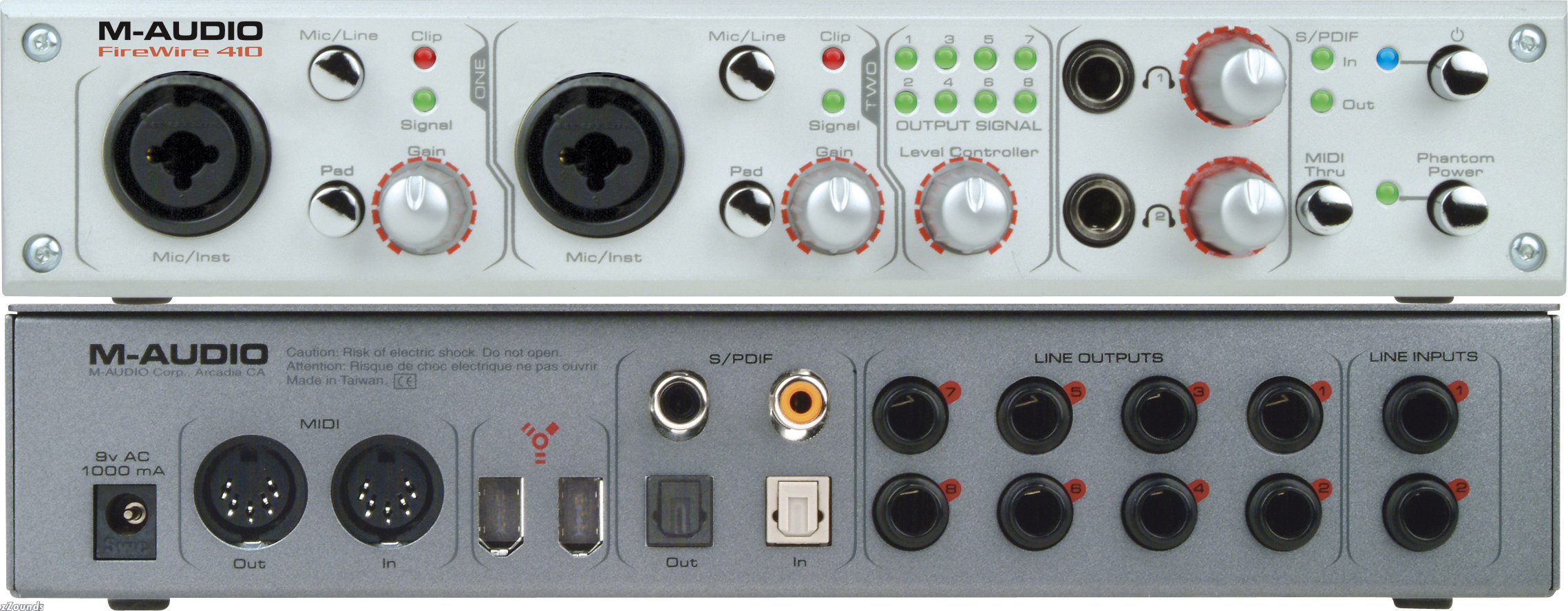
Or you could buy a soundcard like the one you showed.

Old Post Feb-26-2008 04:32  United States
Click Here to See the Profile for Ray_Chappell Click here to Send Ray_Chappell a Private Message Add Ray_Chappell to your buddy list Report this Post Reply w/Quote Edit/Delete Message
zagury
tranceaddict in training


Registered: Feb 2005
Location:

quote:
Originally posted by Ray_Chappell
Why don't you just wire the two RCA's from the mixer to the computer input (RCA to 1/8" inch), and plug the speakers in like normal (green to green on the back of your computer)?

Select the input as the default device on your computer for recording and go...

Or you could buy a soundcard like the one you showed.


Im gonna buy the Presonus FireBox, still Im not sure how to connect it simply.

Old Post Mar-04-2008 12:13  Israel
Click Here to See the Profile for zagury Click here to Send zagury a Private Message Add zagury to your buddy list Report this Post Reply w/Quote Edit/Delete Message

TranceAddict Forums > DJing / Production / Promotion > DJ Booth > Connecting a Mixer to PC Speakers
Post New Thread    Post A Reply

 
Last Thread   Next Thread
Click here to listen to the sample!Pause playbackPaul van Dyk - Eins Live Rocker (23-07-2006) ID [2007] [1]

Click here to listen to the sample!Pause playbackVoodoo & Serano - "Overload" [2002]

Show Printable Version | Subscribe to this Thread
Forum Jump:

All times are GMT. The time now is 21:45.

Forum Rules:
You may not post new threads
You may not post replies
You may not edit your posts
HTML code is ON
vB code is ON
[IMG] code is ON
 
Search this Thread:

 
Contact Us - return to tranceaddict

Powered by: Trance Music & vBulletin Forums
Copyright ©2000-2026, Jelsoft Enterprises Ltd.
Privacy Statement / DMCA
Support TA!