Become a part of the TranceAddict community!Frequently Asked Questions - Please read this if you haven'tSearch the forums
TranceAddict Forums > DJing / Production / Promotion > Production Studio > buying my first pair of monitors, need a bit of help.
Pages (2): [1] 2 »   Last Thread   Next Thread
Share
Author
Thread    Post A Reply
utdarsenal
tranceaddict


Registered: Jan 2011
Location: San Diego
buying my first pair of monitors, need a bit of help.

Ok this isn't another of those threads of "which studio monitors should I get?" but more of a, what else do I need thread.. Since these are about to be my first pair of monitors i'm not sure what I need to start making music with them asap.

I'm buying JBL LSR2325's but i'm not sure what else I need. I'm using a 13" macbook pro (has no firewire ports, just usb). I can't just buy them and plug them into my laptop with some special cord right? or can i? I really don't know.

Do I need to buy some sort of audio interface where I connect the monitors into with XLR cables or something, and then the interface into my mac? if so, what interface do you suggest that is cheap ?

since these are going to be my first monitors ever purchased i'm pretty clueless, so if you guys could help it'd be great! thanks!

Old Post May-23-2011 22:57  United States
Click Here to See the Profile for utdarsenal Click here to Send utdarsenal a Private Message Add utdarsenal to your buddy list Report this Post Reply w/Quote Edit/Delete Message
Evolve140
Only Sidechaining a Bit


Registered: Mar 2005
Location: Denver

Not sure how those sound, but as for an audio interface just get an EMU-0202, it's $100, and works great. It's USB. It has all the interfaces you need, too, including XLR out. Just when you're working on music, try to do it at a moderate volume as a rule, and so you aren't getting a lot of reflection in the room you are in.

Old Post May-23-2011 23:06 
Click Here to See the Profile for Evolve140 Click here to Send Evolve140 a Private Message Add Evolve140 to your buddy list Report this Post Reply w/Quote Edit/Delete Message
utdarsenal
tranceaddict


Registered: Jan 2011
Location: San Diego

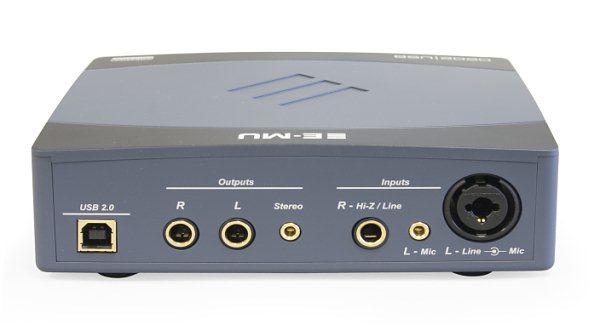
thanks, say I do get one of those EMU-0202's , wouldn't I just be able to connect one monitor to it? there's only one xlr cable input thing..

http://www.sweetwater.com/images/closeup/xl/1600-0202USB_Back.jpg
don't know a lot about cables and such..

Old Post May-23-2011 23:25  United States
Click Here to See the Profile for utdarsenal Click here to Send utdarsenal a Private Message Add utdarsenal to your buddy list Report this Post Reply w/Quote Edit/Delete Message
Evolve140
Only Sidechaining a Bit


Registered: Mar 2005
Location: Denver

quote:
Originally posted by utdarsenal
thanks, say I do get one of those EMU-0202's , wouldn't I just be able to connect one monitor to it? there's only one xlr cable input thing..

http://www.sweetwater.com/images/cl...202USB_Back.jpg
don't know a lot about cables and such..


The monitors are output. There are 2 XLR outputs. L and R. The XLR input is for mics, stuff like that.

Old Post May-23-2011 23:34 
Click Here to See the Profile for Evolve140 Click here to Send Evolve140 a Private Message Add Evolve140 to your buddy list Report this Post Reply w/Quote Edit/Delete Message
Zak McKracken
Trance


Registered: Jun 2003
Location:

the soundcard on macs are decent, i use it all the time when only listening to music. you could try that first, you just need a stereominijack to dual mono 6mm jack or XLR. it works like a charm. once you discover performace issues you can look for soundcards.

as i said most of the time i run my monitors directly from the internal soundcard with great result. i have a passive volume control in the chain though which also "converts" the minijack RCA over to Jack and XLR.

heres what i do:


macbook ->


->


->


->


-> monitors


BUT, instead you could just get this:

Last edited by Zak McKracken on May-24-2011 at 20:23

Old Post May-24-2011 20:13 
Click Here to See the Profile for Zak McKracken Click here to Send Zak McKracken a Private Message Add Zak McKracken to your buddy list Report this Post Reply w/Quote Edit/Delete Message
utdarsenal
tranceaddict


Registered: Jan 2011
Location: San Diego

so you're saying i don't even need an audio interface? Just the xlr cables directed straight from the monitors into my laptop?

Old Post May-26-2011 18:50  United States
Click Here to See the Profile for utdarsenal Click here to Send utdarsenal a Private Message Add utdarsenal to your buddy list Report this Post Reply w/Quote Edit/Delete Message
Zak McKracken
Trance


Registered: Jun 2003
Location:

yes almost, read again. you need a cable with one stereo minijack in one end and dual mono XLR in the other end. you can get soundcard later, you will at some point want it, but its nice to take it one step at the time. monitors first. oh and btw the signal isnt coming from the monitors into the computer, its the other way around: FROM the computer INTO the monitors!

Old Post May-26-2011 19:22 
Click Here to See the Profile for Zak McKracken Click here to Send Zak McKracken a Private Message Add Zak McKracken to your buddy list Report this Post Reply w/Quote Edit/Delete Message
utdarsenal
tranceaddict


Registered: Jan 2011
Location: San Diego

thank you!

so what exactly is the purpose of an audio interface if I can just connect the monitors directly into my laptop?

and also, do you know what I would need to be able to connect the studio monitors to a dj mixer that does not support XLR cables?

thanks!

Old Post May-31-2011 17:25  United States
Click Here to See the Profile for utdarsenal Click here to Send utdarsenal a Private Message Add utdarsenal to your buddy list Report this Post Reply w/Quote Edit/Delete Message
Aurana
Senior tranceaddict


Registered: May 2009
Location: St. Petersburg, FL, United States

I have the JBL 2325's and the EMU 0202 set up.... You can connect to the EMU using 2x 1/4 inch cables... they sound fantastic.. definitely a good buy.

Old Post May-31-2011 17:59  United States
Click Here to See the Profile for Aurana Click here to Send Aurana a Private Message Add Aurana to your buddy list Report this Post Reply w/Quote Edit/Delete Message
utdarsenal
tranceaddict


Registered: Jan 2011
Location: San Diego

ok that sounds very convincing because I was reading up a bit on connecting studio monitors directly into my laptop and supposedly it doesn't give you the clearest sounding signal from the monitors...

so let me get this straight in order (i'm such a noobie )


I connect one end of those ^ , to the little slot next to the XLR cable input where it says 'balanced input' .


Then I connect the other end of the 1/4 inch cable to either of the "R" or "L" outputs in the pic below, and do the same for the 2nd monitor..


...

then just plug in the EMU 0202 to my laptop via USB and bam, done? Hopefully its this simple? haha

thanks!

Old Post May-31-2011 18:28  United States
Click Here to See the Profile for utdarsenal Click here to Send utdarsenal a Private Message Add utdarsenal to your buddy list Report this Post Reply w/Quote Edit/Delete Message
Storyteller
Supreme tracneaddict


Registered: Feb 2005
Location: The Netherlands

No EMU/Creative (ever) for proper audio. Outdated products, and regularly faulty in hardware or drivers. Hope it's not to late. Out of 3 Creative/EMU units I've had hands on experience with, none of them worked properly.

Bad drivers once, dead on arrival once, and one that practically melted when in use. Anyone that has experience here with either midrange or professional audio will agree on staying away from EMU.


___________________

Storyteller Website | Storyteller @ Facebook | Storyteller @ Beatport | Storyteller @ Soundcloud | Stephen J. Kroos - Europa (Storyteller Remix)
Anthony Mea - Get It On (Storyteller Remix)

quote:
If less is more think about how much more more would be.
-Frasier

Last edited by Storyteller on May-31-2011 at 18:40

Old Post May-31-2011 18:34  Netherlands
Click Here to See the Profile for Storyteller Click here to Send Storyteller a Private Message Visit Storyteller's homepage! Add Storyteller to your buddy list Report this Post Reply w/Quote Edit/Delete Message
Zak McKracken
Trance


Registered: Jun 2003
Location:

quote:
Originally posted by utdarsenal
thank you!

so what exactly is the purpose of an audio interface if I can just connect the monitors directly into my laptop?

and also, do you know what I would need to be able to connect the studio monitors to a dj mixer that does not support XLR cables?

thanks!


1. the purpose of an audio interface is better sound, better performance, less noise (from the computer), and more inputs and outputs (for recording for example).

as the inbuild soundcard on a mac is pretty decent, and you work with software only you would only need a audio soundcard for better performace (CPU) as the monitors you are looking at is entry level (though very good) and cant really show the difference between the mac soundcard and a better soundcard. because of this you might just as well wait with a soundcard until you notice performance issues or want better monitors. money saved (for now, you will want one later )

2. depends on the mixers output. if its RCA you need RCA to XLR or Jack (6mm dual mono plugs) cables as your monitors the JBL supports both XLR and Jack. If its Jack (dual 6mm) outputs on the mixer, you would need Jack to XLR or Jack to Jack cables. Its really just to get the right plug. not very complicated. ask the shop to get the right one. RCA to Jack (not minijack, but dual mono 6mm) will cover almost all aplications when it comes to dj mixers and monitors.

btw, RCA is that red and white ones you see behind a normal CD player, your TV, etc etc.

Hope it helps.

edit; this is what you need for a normal mixer to your monitors:


then put these on the RCA connectors when you plan on using a soundcard:


and then finally this when you plan on connecting your computer directly to the monitors:


REMEMBER: Watch the levels when connecting back and forth. Preferably turn everything off when switching. And last but not least, read the manual of the monitors when you get them, its all there.

Last edited by Zak McKracken on May-31-2011 at 21:53

Old Post May-31-2011 21:45 
Click Here to See the Profile for Zak McKracken Click here to Send Zak McKracken a Private Message Add Zak McKracken to your buddy list Report this Post Reply w/Quote Edit/Delete Message

TranceAddict Forums > DJing / Production / Promotion > Production Studio > buying my first pair of monitors, need a bit of help.
Post New Thread    Post A Reply

Pages (2): [1] 2 »  
Last Thread   Next Thread
Click here to listen to the sample!Pause playbackPlease ID - Tech house? [2004] [0]

Click here to listen to the sample!Pause playbackPaul van Dyk - "Beautiful Place" [2003]

Show Printable Version | Subscribe to this Thread
Forum Jump:

All times are GMT. The time now is 11:55.

Forum Rules:
You may not post new threads
You may not post replies
You may not edit your posts
HTML code is ON
vB code is ON
[IMG] code is ON
 
Search this Thread:

 
Contact Us - return to tranceaddict

Powered by: Trance Music & vBulletin Forums
Copyright ©2000-2026, Jelsoft Enterprises Ltd.
Privacy Statement / DMCA
Support TA!