|
Marilyn Monroe effect on Photoshop CS?
|
View this Thread in Original format
| dj_cuba |
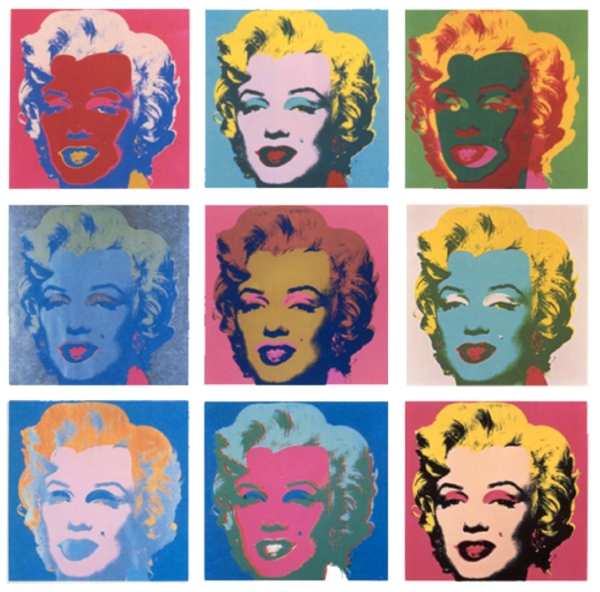
I need to create some pieces of graphic design work for my portfolio which will be used to try and get onto a college course. One of the ideas I have got is to create a piece similar to Andy Warhols pictures of Marilyn Monroe, excepect using my own face instead. How would I go about changing the colours in Photoshop CS to do this?
 |
|
|
| pvdAngel |
You could trying playing around hue and saturation, colour balance, invert or just use the paint bucket to fill in the desired areas.
Photoshop has endless possibilities! :D |
|
|
| igottaknow |
| wig + face makeup then take pictures of yourself |
|
|
| pvdAngel |
| quote: | Originally posted by dj_cuba
I can't seem to find out how to adjust hue/saturation levels :conf: The help file doesn't tell me either, it just points out that you can adjust the levels :whip: |
Click where it says "Master" and you'll see a list where you can change just some of the colours in your photo.
"Posterize" is good if you want the simplicity of your design.
Try the "Gradient Map". That might be easier to use. Go mad with the "Curves" option too, if you like. Remember, you can still use the basics of the paintbrush around certain areas. |
|
|
| Absolut_Vodka |
| quote: | Originally posted by dj_cuba
I need to create some pieces of graphic design work for my portfolio which will be used to try and get onto a college course. One of the ideas I have got is to create a piece similar to Andy Warhols pictures of Marilyn Monroe, excepect using my own face instead. How would I go about changing the colours in Photoshop CS to do this?
|
thats like the least original photoshop idea ive heard |
|
|
| pvdAngel |
| quote: | Originally posted by Absolut_Vodka
thats like the least original photoshop idea ive heard |
I've seen and met a number of students using this idea for a portfolio and there's no harm in it. |
|
|
| igottaknow |
| quote: | Originally posted by Absolut_Vodka
thats like the least original photoshop idea ive heard |
i was thinking that too. its like submitting paint by number art :stongue: |
|
|
| THE_Chris |
Heres another way. May look 'too good' though.
Select the face. New layer. Feather. Fill new layer face with green (say). Set the blending mode for that layer to Colour Dodge or Colour Burn, whichever looks better. Play with Opacity. |
|
|
| pvdAngel |
^^ Yup, that should get you in the right direction. I suck at giving advise. :p |
|
|
|
|

