|
Useful Frequency Tips
|
View this Thread in Original format
| System101 |
Some useful information i found over the internet regarding frequencies.
enjoy..
60Hz-200Hz
· Catches the boom "boom" of tom tom's
· Cut to decrease bass "boom" and increase overtones to help bring out bass lines
80Hz
· Good place to boost kick drums slightly to give it some low end area of the spectrum to cut thru the mix, also advisable to cut other instruments around that area.
· Rolling off the electric guitar in this area is sometimes advisable as well.
80Hz-200Hz
· A decent range to boost the bass instruments. Shuffle your boost around in that area and work to not interfere with other instruments in theis range.
· Boost can help add warmth and fullness to guitars, vocals and horns
100Hz-4kHz
· A subtle and gradual scoop out of toms can emphasize the more highs and lows to still get a good tom sound and provide room in the mix for the other instruments.
120Hz and lower
· These frequencies are generally responsible for warmth in a recording. Too much and the recording will sound muddy.
120Hz-125Hz
· Generally the cut off point for the subwoofer signal in dedicated subwoofer setups like 5.1, 6.1, 7.1 and greater surround sound systems. This provides the rumble of the low frequencies often associated with explosions in the theatre and other dynamic action content.
· Also the low end of music such as kick drums and bass guitar.
· This are also is the bottom of an acoustic guitar and piano, a slight boost or cut here can add good sound quality, which to do kind of depends on the other instruments involved in the piece.
120Hz-600Hz
· These frequencies give depth to a recording, giving vocals and other instruments a strong sense of presence without being clinical. On the other hand, these frequencies are where you're most likely to experience problems with vocal resonance. Too much in this area can be particularly fatiguing.
200Hz
· A finicky area. Be careful bosting in this area as it can guickly muddy up the sound.
· This is a good area to get the "gong" out of cymbals.
240Hz
· Fatten up a snare in this area, varying slightly from snare to snare depending on head type, shell thickness and other factors.
· This are also is a good range to boost acoustic guitars slightly for more fullness to the sound.
· Scoop vocal here if muddy.
350Hz-400Hz
· Common area to cut the kick to remove some of the "cardboard" sound of drums
· Also a decent area to try to scoop the bass guitar a little bit.
600Hz-3kHz
· These frequencies also give presence but of a generally harder nature. High output in this region is fairly common in rock music as it gives it a hard edge that suites the genre.
800Hz
· Boost the bass guitar a little bit at this level to add punch to it's sound.
· Cut the electric guitar in this range to remove the "cheap" sound
2kHz-4kHz
· In this area you can emphasize the "smack" of the kick's beater.
·
2.5kHz
· Good for adding to a dirty guitar for some real sizzle.
· Boost this area for bass guitar if using the pop/slap style.
2.5kHz-5kHz
· For clarity with an acoustic guitar and piano.
3kHz-7kHz
· This is the area where vocal sibilance resides. 3kHz-5kHz is a very common peaking area in rock music because human hearing is pretty sensitive here and extra output here makes it sound louder.
It also adds a harshness that is particularly fatiguing so don't over do it. Because of the high sensitivity in this region you can add warmth without loss of clarity by attenuating this region a bit.
4kHz
· Boost vocal here for presence.
5kHz
· Add a crisp, sharp "crack" to the snare.
· Also a good place to add some attack to the toms.
· Cut on background parts ot make them sink in to the back a bit
7kHz +
· Cymbals etc, and all the other components that add the sense of quality and accuracy. Above 10kHz too much output may make your recordings sound like they are lacking some definition.
· Cut vocals to decrease "s"ing sound
8kHz-12kHz
· Cut or Boost this air to increase or decrease the "shimmer" or brightness or cymbals and hihats
10kHz
· A boosting area for piano at time to give it some clarity. |
|
|
| Zombie0729 |
| am i the only one that boosts kick drums in the 55 - 70 range....? |
|
|
| DJChrisB |
| quote: | Originally posted by System101
Some useful information i found over the internet regarding frequencies... |
Very useful information. Thanks for taking the time to write all that up.
We need more posts like this. ;) |
|
|
| BOOsTER |
| quote: | Originally posted by Zombie0729
am i the only one that boosts kick drums in the 55 - 70 range....? |
you're definitely not, it just depends on what kind of sound you want to achieve...also...many people highpass at 50hz...so this boost becomes irrelevant...but I bet that if you were aiming for that "dubstep" kind of sub-bassy sound you would be pretty good going with EQing the kick this way. |
|
|
| Zombie0729 |
| quote: | Originally posted by BOOsTER
you're definitely not, it just depends on what kind of sound you want to achieve...also...many people highpass at 50hz...so this boost becomes irrelevant...but I bet that if you were aiming for that "dubstep" kind of sub-bassy sound you would be pretty good going with EQing the kick this way. |
note this is just a random image i found on google images:
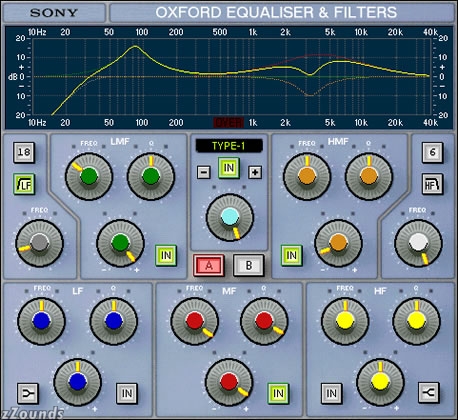
from my understanding of a parametric eq, you can set the roll off on hte low end to about 60hz but its not a straight line down, its a "roll off" for a reason.
i usually set mine around 58-62 hz but you can still hear frequencies in the 40 and 50hz range. thats because again the line isn't straight down.
you want to roll off most of those frequencies anyways but when you roll it off and then put something like RBass on at like 55hz it sounds GREAT. |
|
|
| thecYrus |
actually this picture is defintily not recommended as a reference. for a trance bassdrum the hpf is too high i would cut below 40hz or better no cut at all. and the subbass boost of almost +20db is insane (don't even try to do that :P).
if you work with proper bassdrum samples you don't need to play around with eqs and compressors on them.
but still the most important part is: what sounds good is good ;) but don't think with overprocessing you can compensate bad source material.. |
|
|
| Zombie0729 |
| quote: | Originally posted by thecYrus
actually this picture is defintily not recommended as a reference. for a trance bassdrum the hpf is too high i would cut below 40hz or better no cut at all. and the subbass boost of almost +20db is insane (don't even try to do that :P).
if you work with proper bassdrum samples you don't need to play around with eqs and compressors on them.
but still the most important part is: what sounds good is good ;) but don't think with overprocessing you can compensate bad source material.. |
yeah JUST TO CLARIFY i was just trying to show how a roll off looked not so much this is a model for a kick eq. |
|
|
| BOOsTER |
well yeah I know how a roll-off looks :) you're right...but I still think the boost is un-necessary in most cases...but anyway there's the golden rule...if it sounds good, it is good...
thats all :) |
|
|
| jsyntax |
| If your unsure - just smiley face it :) |
|
|
| phantom limb |
| Please Sticky this. This is some extremely valuable info cuz I suck at mastering!!!!!! Thanks System--awesome material here. |
|
|
| System101 |
| someone sticky this :whip: :tongue3 |
|
|
| echosystm |
Heres a reference sheet I use a fair bit. It's the same kind of thing, just ordered differently. :)
| quote: | General:
20 Hz and below - impossible to detect, remove as it only adds unnecessary energy to the total sound, thereby most probably holding down the overall volume of the track
60 Hz and below - sub bass (feel only)
80(-100) Hz - feel AND hear bass
100-120 Hz - the "club sound system punch" resides here
200 Hz and below - bottom
250 Hz - notch filter here can add thump to a kick drum
150-400 Hz - boxiness
200 Hz-1.5 KHz - punch, fatness, impact
800 Hz-4 KHz - edge, clarity, harshness, defines timbre
4500 Hz - exteremly tiring to the ears, add a slight notch here
5-7 KHz - de-essing is done here
4-9 KHz - brightness, presence, definition, sibilance, high frequency distortion
6-15 KHz - air and presence
9-15 KHz - adding will give sparkle, shimmer, bring out details - cutting will smooth out harshness and darken the mix
Kicks:
60Hz with a Q of 1.4 -- Add fullness to kicks.
5Khz with a Q of 2.8 -- Adds attack to Kicks
bottom (60 - 80 Hz),
slap (4 kHz)
EQ>Cut below 80Hz to remove rumble
Boost between 80 -125 Hz for bass
Boost between 3 - 5kHz to get the slap
PROCESSING> Compression 4:1/6:1 slow attack med release.
Reverb: Tight room reverb (0.1-0.2ms)
General:
Apply a little cut at 300Hz and some boost between 40Hz and 80Hz.
Control The Attack:
Apply boost or cut around 4KHz to 6KHz.
Treat Muddiness:
Apply cut somewhere in the 100Hz to 500Hz range.
kick>> bottom depth at 60 - 80 Hz, slap attack at 2.5Hz
Snares:
100Hz with a Q of 1.0 -- Add fullness to snare
200Hz - 250Hz with a Q of 1.4 -- Adds wood to snares
3Khz with a Q of 1.4 -- Adds atack to snare.
7Khz with a Q of 2.8 -- Adds Sharpness to snares and percussion
fatness at 120-240Hz
boing at 400Hz
crispness at 5kHz
snap at 10kHz
fatness (240 Hz), crispness (5 kHz)
EQ> Boost above 2kHz for that crisp edge
Cut at 1kHz to get rid of the sharp peak
Boost at 125Hz for a full snare sound
Cut at 80Hz to remove rumble
PROCESSING> Compression 4:1 slow attack med release.
Reverb: Tight room reverb (0.1-0.2ms)
snare>> fatness at 240HZ, crispness at 5 KHz
Vocals
General:
Roll off below 60Hz using a High Pass Filter. This range is unlikely to contain anything useful, so you may as well reduce the noise the track contributes to the mix.
Treat Harsh Vocals:
To soften vocals apply cut in a narrow bandwidth somewhere in the 2.5KHz to 4KHz range.
Get An Open Sound:
Apply a gentle boost above 6KHz using a shelving filter.
Get Brightness, Not Harshness:
Apply a gentle boost using a wide-band Bandpass Filter above 6KHz. Use the Sweep control to sweep the frequencies to get it right.
Get Smoothness:
Apply some cut in a narrow band in the 1KHz to 2KHz range.
Bring Out The Bass:
Apply some boost in a reasonably narrow band somewhere in the 200Hz to 600Hz range.
Radio Vocal Effect:
Apply some cut at the High Frequencies, lots of boost about 1.5KHz and lots of cut below 700Hz.
Telephone Effect:
Apply lots of compression pre EQ, and a little analogue distortion by turning up the input gain. Apply some cut at the High Frequencies, lots of boost about 1.5KHz and lots of cut below 700Hz.
vocals>> fullness at 120 Hz, boominess at 200 - 240 Hz, presence at 5 kHz, sibilance at 7.5 - 10 kHz
Hats:
10Khz with a Q of 1.0 -- Adds brightness to hats and cymbals
Hi Hat & Cymbals: sizzle (7.5 - 10 kHz), clank (200 Hz)
EQ> Boost above 5kHz for sharp sparkle
Cut at 1kHz to remove jangling
PROCESSING> Compression use high ratio for high energy feel
Reverb: Looser than Bass n Snare allow the hats and especially the Rides to ring a little
Get Definition:
Roll off everything below 600Hz using a High Pass Filter.
Get Sizzle:
Apply boost at 10KHz using a Band Pass Filter. Adjust the bandwidth to get the sound right.
Treat Clangy Hats:
Apply some cut between 1KHz and 4KHz.
hi hats/cymbals>> clank or gong sound at 200 Hz, shimmer at 7.5 kHz - 12 kHz
Guitar:
Treat Unclear Vocals:
Apply some cut to the guitar between 1KHz and 5KHz to bring the vocals to the front of the mix.
General:
Apply a little boost between 100Hz and 250Hz and again between 10KHz and 12KHz.
Acoustic Guitar
Add Sparkle:Try some gentle boost at 10KHz using a Band Pass Filter with a medium bandwidth.
General:
Try applying some mid-range cut to the rhythm section to make vocals and other instruments more clearly heard.
Other:
Voice: presence (5 kHz), sibilance (7.5 - 10 kHz), boominess (200 - 240 kHz), fullness (120 Hz)
Electric Guitar: fullness (240 Hz), bite (2.5 kHz), air / sizzle (8 kHz)
Bass Guitar: bottom (60 - 80 Hz), attack (700 - 1000 Hz), string noise (2.5 kHz)
Toms: attack (5 kHz), fullness (120 - 240 Hz)
Acoustic Guitar: harshness / bite (2 kHz), boominess (120 - 200 Hz), cut (7 - 10 kHz)
Bass - Compressed, EQ'd with a full bottom end and some mids
rack toms>> fullness at 240 Hz, attack at 5 kHz
floor toms>> fullness at 80 - 120 Hz, attack at 5 kHz
horns>> fullness at 120 - 240 Hz, shrill at 5 - 7.5 kHz
strings>> fullness at 240 Hz, scratchiness at 7.5 - 10 kHz
conga/bongo>> resonance at 200 - 240 Hz, slap at 5 kHz
General Frequencies:
EQ Reference: Frequencies
50Hz
Boost: To thicken up bass drums and sub-bass parts.
Cut: Below this frequency on all vocal tracks. This should reduce the effect of any microphone 'pops'.
70-100Hz
Boost: For bass lines and bass drums.
Cut: For vocals.
General: Be wary of boosting the bass of too many tracks. Low frequency sounds are particularly vulnerable to phase cancellation between sounds of similar frequency. This can result in a net 'cut of the bass frequencies.
200-400Hz
Boost: To add warmth to vocals or to thicken a guitar sound.
Cut: To bring more clarity to vocals or to thin cymbals and higher frequency percussion.
Boost or Cut: to control the 'woody' sound of a snare.
400-800Hz
Boost: To add warmth to toms.
Boost or Cut: To control bass clarity, or to thicken or thin guitar sounds.
General: In can be worthwhile applying cut to some of the instruments in the mix to bring more clarity to the bass within the overall mix.
800Hz-1KHz
Boost: To thicken vocal tracks. At 1 KHz apply boost to add a knock to a bass drum.
1-3KHz
Boost: To make a piano more aggressive. Applying boost between 1KHz and 5KHz will also make guitars and basslines more cutting.
Cut: Apply cut between 2 KHz and 3KHz to smooth a harsh sounding vocal part.
General: This frequency range is often used to make instruments stand out in a mix.
3-6KHz
Boost: For a more 'plucked' sounding bass part. Apply boost at around 6KHz to add some definition to vocal parts and distorted guitars.
Cut: Apply cut at about 3KHz to remove the hard edge of piercing vocals. Apply cut between 5KHZ and 6KHz to dull down some parts in a mix.
6-10KHz
Boost: To sweeten vocals. The higher the frequency you boost the more 'airy/breathy' the result will be. Also boost to add definition to the sound of acoustic guitars or to add edge to synth sounds or strings or to enhance the sound of a variety of percussion sounds. For example boost this range to:
Bring out cymbals.
Add ring to a snare.
Add edge to a bass drum.
10-16KHz
Boost: To make vocals more 'airy' or for crisp cymbals and percussion. Also boost this frequency to add sparkle to pads, but only if the frequency is present in the original sound, otherwise you will just be adding hiss to the recording. |
|
|
|
|
|

