|
Sound Card, Recording sets/decks
|
View this Thread in Original format
| Shanez |
Hi All,
I need to hook my Mac Pro up to my decks to record my sets buts heres where i am stuck...
Ive never done anything like this before (bout time really)
How do i check if i have a sound card (for those that know macs), and if dont have one do i need a specific one?
Which application should i use to record these sets?
Do i hook to Mac to the Decks up with a normal optical input in and out?
Shane |
|
|
| n3lly |
| quote: | Originally posted by Shanez
Hi All,
I need to hook my Mac Pro up to my decks to record my sets buts heres where i am stuck...
Ive never done anything like this before (bout time really)
How do i check if i have a sound card (for those that know macs), and if dont have one do i need a specific one?
Which application should i use to record these sets?
Do i hook to Mac to the Decks up with a normal optical input in and out?
Shane |
How's it goin?
What mixer have you got?
Depending on the outputs i personally would just use the master out/rec out on your decks.
Hook that up to your Line in on your mac. And then you'll just need software like audacity (free) to record your sets.
By the way, Yes, your mac has a soundcard.
Only reason you would need to buy a new sounds car would be if you were to start Dj'ing with a laptop only setup.
nelly |
|
|
| Shanez |
| quote: | Originally posted by n3lly
How's it goin?
What mixer have you got?
Depending on the outputs i personally would just use the master out/rec out on your decks.
Hook that up to your Line in on your mac. And then you'll just need software like audacity (free) to record your sets.
By the way, Yes, your mac has a soundcard.
Only reason you would need to buy a new sounds car would be if you were to start Dj'ing with a laptop only setup.
nelly |
Thanks man,
My mixer is a Pioneer DJM-3000 |
|
|
| n3lly |
| quote: | Originally posted by Shanez
Thanks man,
My mixer is a Pioneer DJM-3000 |
Looking at the back of your mixer on the left hand side you'll see the Rec Out RCA inputs.
Attach one of these into it.

or this
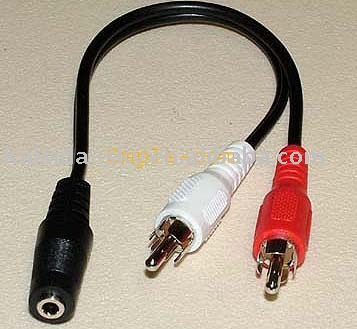
And then use a 3.5mm male to male (line in cable) to hook it up to your Mac.
Hope that helps.
There are a tone of threads on here asking what software to use to record our mix with. Have a search/look and you'll find other software if you're not quite happy with Audacity. |
|
|
|
|

