|
Having A Problem.
|
View this Thread in Original format
| mfitterer1 |
I'm getting crackles and hisses throughout my mixes now. I notice this happens when using the channel gains during track play. I know about restoration and all that but I just don't want to deal with that.
Where is this coming from? Is it another issue with my DJM-800 or is it somewhere else in the recording chain? It's doing this in both Live and Audactiy so I'm nearly sure my computer, and audio kontrol have nothing to do with this.
Is it something I can fix or do I need to take my mixer into the shop...(AGAIN!)
Thanks for any help you can give! |
|
|
| djkopernikus |
| Maybe bad cables? Is the soundcard installed ok? Maybe the power source is making those interferences? Try diff cables first mate. |
|
|
| KiNeTiC ENeRgY |
| check cables as suggested. This can also be due to drivers, or a ground loop. |
|
|
| mfitterer1 |
I use monster cables...and I switched a new one to see if it was just a bad cable etc, no luck.
Only happens on channel 1 at the moment, so I guess I'll just use the other channels for the time being.
You said about a ground loop? What is that? |
|
|
| mfitterer1 |
| Also I just tried it without recording and this doesn't occur when I don't have my computer hooked up to my decks. So what does that leave as a possibility? |
|
|
| djkopernikus |
If the sound is normal when the comp isn't connected, then the computer causes the problem. Check the cables between comp/mixer and you also should try to connect the mixer to a different power plug than the computer is.
I have had buzzin interferences when my computer was plugged with my amplifier in the same power plug.
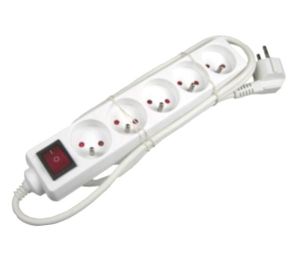
Added photo to clear things out. I used this kind of power distributor to plug everything together. I had the buzzing sound, but it disappeared when i plugged my amp to a power source which comes out of the wall.
Edit: Oh... you are from US. Then the european power distributor system doesn't apply to your system. Maybe.. |
|
|
| Ciaran Fox |
| As someone already said i would suggest a ground loop. That should solve the problem |
|
|
| djimmersion |
| you might also want to try cleaning your equipment, dust and dirt can get stuck inside the faders and cause the interferance you are describing, a can of air goes a long way! |
|
|
|
|

