|
How do I hook up my monitors to my mixer?
|
View this Thread in Original format
| Joeydav |
My mixer is a Behringer DJX750 and my speakers are Yamaha HS 50M. On the speakers there are two input locations, a larger circle one with holes in it, the other is a circle metal one which is smaller. I have no idea what cables ill need, was hoping you could help me? Thanks a lot!
Ill try and get a picture if it helps. |
|
|
| Juan Paulino |
Your mixer has only RCA (unbalanced outs) so you wan to go RCA Male to TRS 1/4 Male into your monitors which would be the smaller hole in your speaker.
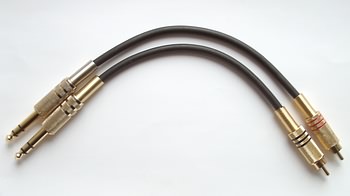 |
|
|
| Joeydav |
| quote: | Originally posted by clay
read the manual |
Second hand. |
|
|
| clay |
u have internet i see.
ill help:
http://download.yamaha.com/api/asset/file/?language=en&site=usa.yamaha.com&asset_id=7262
http://www.behringer.com/assets/DJX750_M_EN.pdf
page 6 of the yamaha should teach you what you need.
| quote: | | XLR-type Connector (Balanced) This is the type of connector most commonly used in professional equipment and installations. 3-pin XLR-type connectors like the ones provided on the HS-series monitors are primarily intended for use with balanced signals, and their solid design and construction ensures maximum electrical and mechanical reliability. Phone Jack (TRS, Balanced or Unbalanced) RCA Pin Jack The HS-series studio monitors also feature 1/4-inch phone jack connectors that can be used for either balanced or unbalanced connections. For balanced connection via these jacks you’ll need to use balanced cables fitted with TRS phone plugs — three- contact phone plugs that are basically the same as standard stereo phone plugs with tip, ring, and sleeve contacts (thus the “TRS” designation — see the illustration on the left.) The phone jacks will also accept unbalanced signals —simply plug in a standard mono phone plug. But what if you want to connect equipment that only provides RCA- type pin connector outputs? The solution is simple enough: use either RCA-to-phone plug adaptors or RCA- to-phone cables, and plug into the speaker’s phone-jack inputs. |
your welcome, next time read the manual before asking |
|
|
| Dykes_on_Jay |
stick a piece of wet metal in your urethra (franklin) and stick it in to a power source.
then google it. |
|
|
| Joeydav |
| quote: | Originally posted by Dykes_on_Jay
stick a piece of wet metal in your urethra (franklin) and stick it in to a power source.
then google it. |
Just tried that and it didn't work, ill troubleshoot it. |
|
|
|
|

