|
CUE file tutorial (pg. 12)
|
View this Thread in Original format
| Disney |
| quote: | Originally posted by dukes
nero recons there is a problem with line 3....
the file is called "Dukes_Trance_Vol_24.mp3"
i would love to get this to work just once!
is it just being or is there a problem here?
and yes ive read all this through and a million other sites but yet i still cant get the damn things working. ive heard some people say nero works and others say it dont. if it dont does blindwrite? or is there a DECENT burning prog that does.... DECENT!
chears for any help... |
Try MP3 in stead of wave on line 3...
| quote: | | FILE "Dukes_Trance_Vol_24.mp3" MP3 |
|
|
|
| Disney |
| quote: | Originally posted by fitom tiel
i got a stupid question.
exaclty HOW do you burn your CUES using Nero?
i've tried before, only to end up with either the CUE file, or the audio and the CUE file, but never an audio file split up into single tracks. i did read the tutorial before every single trial, and i've read different sources, but none has been completely didactic or direct as to exactly what file to burn or in what order. or maybe i'm just not reading right. and, yes, i'm a total CUE n00b. any help, though.
cheers |
Recorder -> Burn image -> select cue file
Max sure the cue refers to the mp3.
Example:
mix.mp3
mix.cue
Line 3 in the cue file must be something like:
code:
FILE "mix.mp3" MP3
|
|
|
| Disney |
| quote: | Originally posted by Disney
Same problem here...
Reinstalled my comp so I also had to reinstall winamp and the mp3cue plugin. It doesn't show like it hasn't been installed but the files are in the winamp plugin dir.
I had this problem before and solved it, but I can't remember how. If I do, I'll let you know! |
Really strange...
The plugin is working again... after I installed Office 2000 :S |
|
|
| cornelius |
Hello :)
I eventually pulled my head out of the pint glass, and decided to contribute once again to all yee trancelovers that make cuesheets.
so here i took most of the code from tracklist2cue v1.2 (C version) and made a PHP version which is alot more user friendly!
you can access the script at the address below
http://www.tracklist2cue.tk
the old C version (a More powerfull standalone tool) of the program is still available at ]http://www.tracklist2cue.tk
happy converting!
its still a bit buggy at the moment but dont worry im working on it,
i had to disable tracklist support for tracklists with tracktimes as i got an unexpected error when running of the free server :(
also the submit to database is disabled untill i get a cusheet database up and running
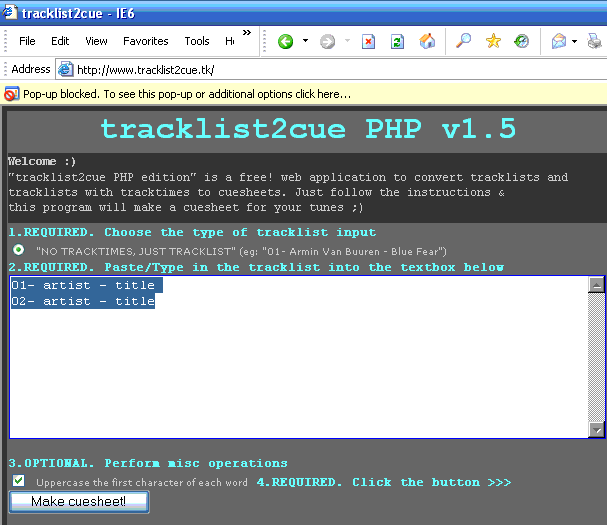
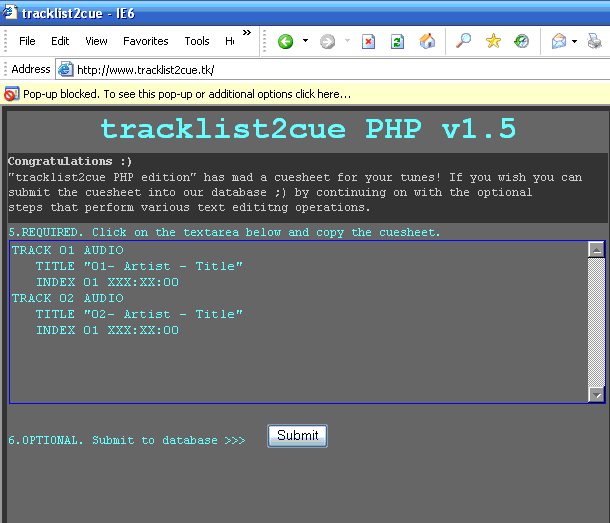 |
|
|
| 3xx3r7 |
| quote: | Originally posted by dj_lane
Ack!!!
my cue sheet must be messed up,
it wont load in nero, or cdr-win
================================
PERFORMER DJ Lane
TITLE Dad's Birthday 04
FILE C:\Documents and Settings\Owner\Desktop\CD\DJ_Lane_-_A_Little_More_Laid_Back_Than_Usual_(07-11-04).wav WAVE
TRACK 01 AUDIO
TITLE Sahara (Original Mix)
PERFORMER Solid Globe
INDEX 01 00:00:00
TRACK 02 AUDIO
TITLE Monkey Forest (Greg Murray Remix)
PERFORMER Midway
INDEX 00 07:36:00
INDEX 01 07:36:00
TRACK 03 AUDIO
TITLE E.O.S. (Positive Ways Mix)
PERFORMER Ronski Speed
INDEX 00 15:05:00
INDEX 01 15:05:00
TRACK 04 AUDIO
TITLE Clear Blue (Original Mix)
PERFORMER Markus Schulz
INDEX 00 20:12:00
INDEX 01 20:12:00
etc..
==================================
the error message cdrwin says is:
Error: Invalid CUE SHEET command at line 5 illegal filetype specified.
i dont know what is up :/
someone please help |
You forgot to put titles and performers in quotes. |
|
|
| th33f |
| quote: | Originally posted by 3xx3r7
You forgot to put titles and performers in quotes. |
same goes for FILEname, if you want to be able to use spaces in it. |
|
|
| cornelius |
new version of tracklist2cue :)
you can access the script at the address below
http://www.tracklist2cue.tk
happy converting!
STEP 1
type in liveset name and paste in the tracklist

STEP 2
fill in the tracktimes as you are listening to set
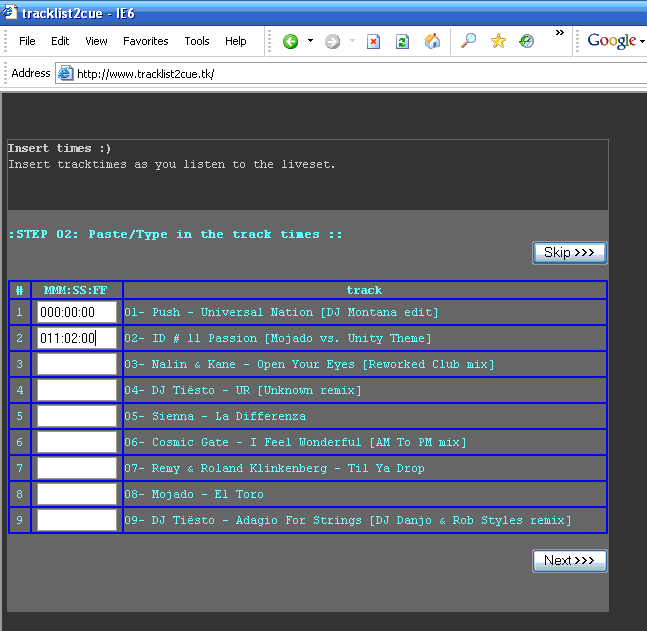
STEP 3
your cuesheet is made (also optioanaly a file_id.diz file)
 |
|
|
| m2j |
I have a question.
Currently I am using "mp3 cue" the plug-in for Winamp.
But when it generates the cue file, instead of having "01" beside the "INDEX" it gives a longer number.
example
TRACK 04 AUDIO
TITLE "2day"
PERFORMER "Ronski Speed"
INDEX 0541803329 18:57:00
Does anyone know why this happens, and what it means?
Thanks. |
|
|
| Feador |
| i used to have this program which splits up livesets into smaller individual mp3s through a .cue file, but i changed my comp recently and forgot which program is that does anyone know? i dont want to burn the liveset, just want to split it into smaller files |
|
|
| m2j |
I think the program you're talking about is "MP3 DirectCut 1.33."
It's a pretty straight foreward program and gets the job done fast.
you can download it here: http://www.tranceaddict.com/software.shtml
Cheers, |
|
|
| migito888 |
| I have an album broken into 20 MP3 files. Is there a program that can combine these into a single file and generate a cue file? I also noticed that when mp3 files are combined, a very very small gap is still audible. |
|
|
| Disney |
| quote: | Originally posted by Feador
i used to have this program which splits up livesets into smaller individual mp3s through a .cue file, but i changed my comp recently and forgot which program is that does anyone know? i dont want to burn the liveset, just want to split it into smaller files |
Musicutter |
|
|
|
|

