|
Pictures of your Home studio (pg. 181)
|
View this Thread in Original format
| Energy_3 |
| Awesome I love seeing peoples set ups. tops:gsmile: |
|
|
| alanzo |
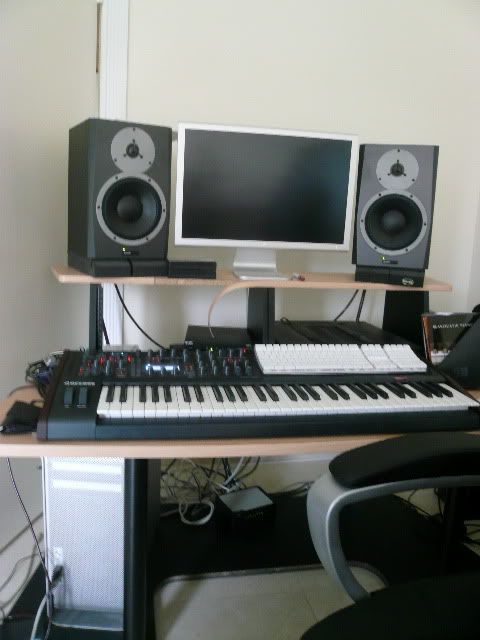
Another minor update thanks to DJ RANN who suggested putting the two racks under my LCDs. Nice. The screens are a little high, but I still like this a lot better than having the instruments on top of my speaker monitors.
Unfortunately, my picture isn't as awesome as Cryo's.... but my Nikon digicam also only cost $100. I believe Cryo's said that he now has *two* expensive hobbies. :D

That's my cat Oreo taking a rest on the Andromeda. Cat-dromeda? |
|
|
| MrJiveBoJingles |
I got a kitten recently and she likes to sleep next to the Moog:
|
|
|
| sonic dolphin |
| Hey Alanzo - I drool everytime I see your setup. I was thinking of getting a desk like yours to have the racks right in front of me but am worried the LCDs would be too high - did you get a sore neck with your set up? (before you raised them even higher that is) |
|
|
| alanzo |
| quote: | Originally posted by sonic dolphin
Hey Alanzo - I drool everytime I see your setup. I was thinking of getting a desk like yours to have the racks right in front of me but am worried the LCDs would be too high - did you get a sore neck with your set up? (before you raised them even higher that is) |
No, not at all. Even with them higher now, I used the computer for 6 hours straight with no issues. It's a great desk, the best one I could find for having the racks right in front of you. There's a similar one out there but it was more expensive and looked like the racks were too far back. The only thing I don't like about this desk is it has no keyboard/mouse tray. |
|
|
| orTofønChiLd |
| quote: | Originally posted by alanzo
The only thing I don't like about this desk is it has no keyboard/mouse tray. |
yeah same here |
|
|
| alanzo |
| quote: | Originally posted by orTofønChiLd
 |
You should think about getting some monitor stands like mine. I had my monitors in that exact position not long ago. Once I got the stands ... WOW. It's as if I never actually heard my monitors before. The stereo image gets SQUASHED when the speakers are that close together. |
|
|
| orTofønChiLd |
| quote: | Originally posted by alanzo
You should think about getting some monitor stands like mine. I had my monitors in that exact position not long ago. Once I got the stands ... WOW. It's as if I never actually heard my monitors before. The stereo image gets SQUASHED when the speakers are that close together. |
really? I have the stands, i'll give it a try
Edit: i just tried it and the sound is fuller, too bad i only have 0.5 Meter 200$ cables |
|
|
| coolestrl |
| quote: | Originally posted by floyd741
you have to put the xbox on its side, if its vertical then you increase the chances of it overheating and scratching discs.
I know from experience. :( |
will fix it thanx for the heads up. did u get the RROD? |
|
|
| josh |
| Been a long time since I last posted. kaa! |
|
|
| cryophonik |
| quote: | Originally posted by alanzo
Unfortunately, my picture isn't as awesome as Cryo's.... but my Nikon digicam also only cost $100. I believe Cryo's said that he now has *two* expensive hobbies. :D
|
Yeah, my wife and I have invested a lot on camera gear over the past 15 years or so, but it's not the cost of the equipment that makes the photo. You can get similar results with your camera just by doing two things:
1) Change your white balance or, better yet, use a custom white balance if your camera has it (most cameras do nowadays). Your photo has too much yellow in it, but you can either use a white balance setting for indoor lighting, or, preferably, use a custom setting. Most of them work by taking a picture of something that is white (e.g., a piece of paper) in the same light as the photo (make sure it fills most of the frame), then setting the camera to reference that photo for the white balance. This tells the camera what white should like and it will make the necessary compensation internally. Check your manual - it's pretty simple and quick to do and will drastically improve the color of your photos.
2) Monitor screen wash-out is a common problem with studio photos, so I use a somewhat more involved, but simple, process to solve that problem. You'll need a tripod (or something solid to place your camera on where it won't move) and some basic photo-editing software. Put your camera on manual or aperture priority mode and mount it on the tripod. Get a good photo that is exposed for the room (the monitors will be washed out). Then, without moving the camera (VERY IMPORTANT), turn the exposure down by one or two full stops so that it exposes the monitors correctly (the rest of the room will be dark). You may want to take a few underexposed photos (e.g., 1, 1.5, 2 stops under-exposed) just to make sure you get a usable one. Put both photos in your photo editing software with the correctly exposed one as the top layer and the one with the monitors properly exposed as the bottom layer (make sure they are perfectly aligned by turning the top layer off/on.). Then, just erase the washed-out monitors from the top layer using your polygon tool (draw a box within the video screen of the top layer and delete the contents from the top layer) and/or erase tools. This will leave the correctly exposed monitor screens showing through. Flatten the image and export it. Done.
That's exactly what I did for the photo above and it only took about 10 minutes total time from taking the photos to processing them.
| quote: | Originally posted by alanzo
That's my cat Oreo taking a rest on the Andromeda.
|
You should've named him "Patches". Hehe. He programs your sounds, doesn't he? |
|
|
| chuckluis |
alanzo sick setup!
am i seeing things or did you take off the back part of the m-audio keystation on your desk? |
|
|
|
|

