|
TOTA - APPLE iPHONE & iPAD & Mobile News Thread PT1 (CLOSED) (pg. 128)
|
View this Thread in Original format
| Abercrombie |
| quote: | Originally posted by haqq
Guys I need some help...
I got my iphone 2g and I want to jailbreak it I've done it before with my ipod touch so I'm not totally n00b.
Where can I find the latest ipsw/firmware for the 2g
and what should I use pwnagetool? Or is there anything better?
Thanks! |
If you scroll through the last 10-20 pages, I believe you'll find someone who with an iPhone 2G who after a dozen hours finally figured out what worked doing it himself. He even was able to downgrade his OS from 3.12 that bricked it solid.. |
|
|
| Toyo |
| quote: | Originally posted by Jer
I was a tester for this App before it released, believe me when I say it's . |
Thanks, Jer! |
|
|
| Stilez |
| quote: | Rogers/Fido Release “My Account” iPhone App
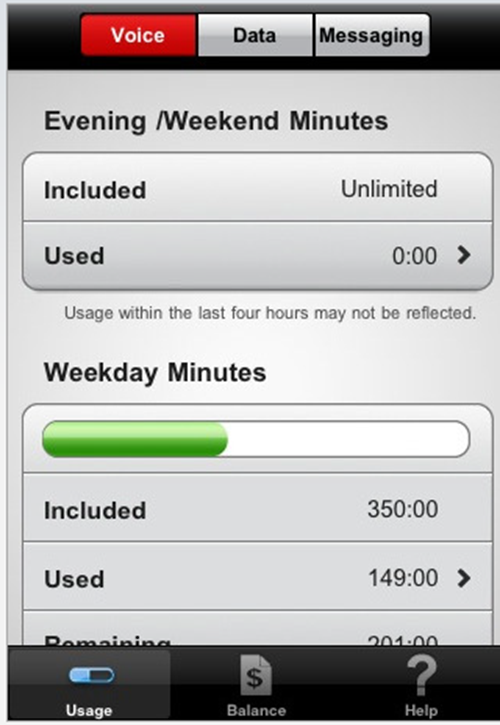
A few months ago, Rogers/Fido updated their websites to provide customers with the ability to view their wireless usage in almost real-time. The information was updated every four hours and gave users a great tool to track wireless usage.
To expand on that functionality and to set themselves apart from the other two Canadian iPhone carriers, Rogers and Fido have released new apps called “My Account”. The apps require no inputting of account credentials and simply pull everything from your iPhone network connection and SIM card.
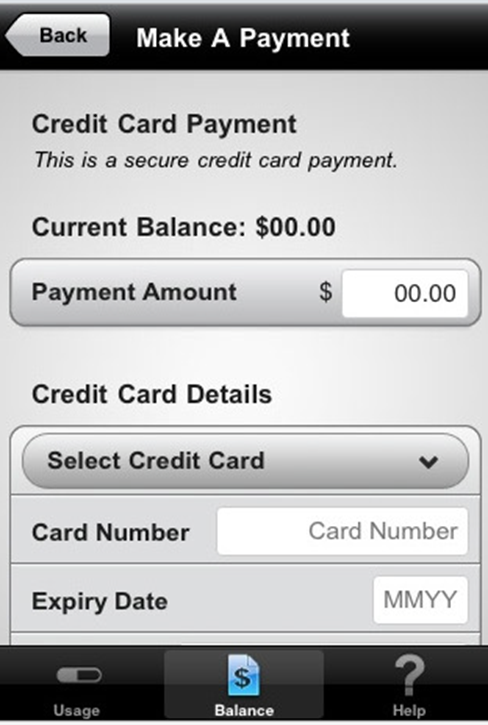
Both Rogers and Fido each have their own version of the app and both apps provide customers with their wireless usage. Like the website, users can see minutes, messages and data usage right from their iPhone, which updates every 20 minutes instead of four hours as on the Rogers/Fido websites. The apps also allow customers to view their current balance and make a payment via credit card.
A few things to note:
- 1.) The apps do not support Corporate Accounts.
- 2.) The apps do not support Prepaid accounts.
- 3.) You must have a data plan with Rogers/Fido, whether contracted or not.
- 4.) You must be on 3G or EDGE for the apps to retrieve your account information. If you are on WiFi, you will have to turn WiFi off and connect to 3G or EDGE. (This is annoying)
- 5.) The app icons are really weird.
Both of the Rogers My Account and Fido My Account apps are available on the iTunes App Store for free.
|
  |
|
|
| E2EK1EL |
Roger's data counter is always off .... they claimed if i used 320mb on their system, my unit says 210mb.
I doubt I'll use this |
|
|
| Playa24_7 |
| quote: | Originally posted by E2EK1EL
Roger's data counter is always off .... they claimed if i used 320mb on their system, my unit says 210mb.
I doubt I'll use this |
How do you know it isn't the other way around and the iPhones data counter is off?
I'd much rather go by what Rogers has in their system about my account, than the actual iPhone itself, as I don't have to pay in regards to what my iPhone says I've used, I have to pay in regards to what Rogers has in their system. Rogers app actually connects to your account on their system and pulls data from within the last 4 hours, how can that be wrong and not useful?
The only reason we used to use the iPhone counter is because there wasn't anything else to get an estimate of the usage. Now there is, and a correct one. |
|
|
| malek |
| quote: | Originally posted by Stilez
|
this is absolutely great news!! Finally I'll be able to know how many damn SMS I sent without going over.
Same for day minutes. |
|
|
| E2EK1EL |
| quote: | Originally posted by Playa24_7
How do you know it isn't the other way around and the iPhones data counter is off?
I'd much rather go by what Rogers has in their system about my account, than the actual iPhone itself, as I don't have to pay in regards to what my iPhone says I've used, I have to pay in regards to what Rogers has in their system. Rogers app actually connects to your account on their system and pulls data from within the last 4 hours, how can that be wrong and not useful?
The only reason we used to use the iPhone counter is because there wasn't anything else to get an estimate of the usage. Now there is, and a correct one. |
That's the point ... someone is wrong here, I've screenshot my data count and called Rogers once to get my month credited.
What if I did over my data limit and the usage don't match here ... and Rogers claim it's Apple and Apple Claims it Rogers? |
|
|
| Playa24_7 |
| quote: | Originally posted by E2EK1EL
That's the point ... someone is wrong here, I've screenshot my data count and called Rogers once to get my month credited.
What if I did over my data limit and the usage don't match here ... and Rogers claim it's Apple and Apple Claims it Rogers? |
I don't see how you can blame ROGERS for what your Apple iPhone says on data usage. It's a feature that comes with the iPhone and works the same regardless of what carrier. It's not meant to tell you what your account usage is under the carrier the phone is with, it's to give you an estimate of the PHONES usage.
The actual Rogers app, Rogers made it, it connects directly to YOUR Rogers account, and displays the actual information from YOUR account in ROGERS system. This data is correct (from within the last 4 hours of account usage), and is to be used as such. If the app usage doesn't match up to what Rogers is billing you, then I can see your issue, but it should be the same because it connects to their system the same way.
Ditch the iPhone usage meter, and use this app instead. |
|
|
| LKD |
| so Telus just released Storm 2 9550....cdma (199 on a 3 yr contract) |
|
|
| E2EK1EL |
| quote: | Originally posted by Playa24_7
I don't see how you can blame ROGERS for what your Apple iPhone says on data usage. It's a feature that comes with the iPhone and works the same regardless of what carrier. It's not meant to tell you what your account usage is under the carrier the phone is with, it's to give you an estimate of the PHONES usage.
The actual Rogers app, Rogers made it, it connects directly to YOUR Rogers account, and displays the actual information from YOUR account in ROGERS system. This data is correct (from within the last 4 hours of account usage), and is to be used as such. If the app usage doesn't match up to what Rogers is billing you, then I can see your issue, but it should be the same because it connects to their system the same way.
Ditch the iPhone usage meter, and use this app instead. |
Everyone has this meter problem, wont be ditching it ... it's a good reason to get credits on your bill from time to time ;) Just put the blame to the carrier and they will be more then happy to please you with customer service LOL |
|
|
| slingshot |
| so when I installed the facebook app on my BB, it automatically imported all of my events into my caleder.....does anybody know how to get rid of this? It's super annoying, all these stupid idiots creating 4 month long events for release dates....my calender is now full of all this garbage. |
|
|
| Playa24_7 |
| quote: | Originally posted by E2EK1EL
Everyone has this meter problem, wont be ditching it ... it's a good reason to get credits on your bill from time to time ;) Just put the blame to the carrier and they will be more then happy to please you with customer service LOL |
lol you're always sticking it to the carrier haha. Maybe one day I will try it lol |
|
|
|
|

