|
TOTA - APPLE iPHONE & iPAD & Mobile News Thread PT1 (CLOSED) (pg. 304)
|
View this Thread in Original format
| E2EK1EL |
Fido IP4 Data Connection Fix
Here's a fix for that horrific data lost Fido IP4's are having. Download the iPhone Configuration Utility 3.0 (Windows & Mac vers) from Apple and place these settings for the APN changes.
APN: internet.fido.ca
Username: fido
Password: fido
Carrier: Fido
iPhone Configuration Utility 3.0 (Windows & Mac vers)
iPhone Configuration Utility (IPCU) lets you easily create, maintain, encrypt, and install configuration profiles, track and install provisioning profiles and authorized applications, and capture device information including console logs. Recommended for those managing devices running iOS 4.0 or later.
Configuration profiles are XML files that contain device security policies, VPN configuration information, Wi-Fi settings, APN settings, Exchange account settings, mail settings, and certificates that permit iPhone and iPod touch to work with your enterprise systems.
IPCU version 3.0 adds support for new Mobile Device Management (MDM) features introduced in iOS4 and enables wireless delivery of configuration profiles. It also includes support for Cisco AnyConnect and Juniper Networks SSL VPN clients, CardDAV, multiple Exchange accounts and SAN support using Simple Certificate Enrollment Protocol (SCEP).
For information on how to integrate iOS devices with your enterprise systems, visit http://www.apple.com/support/iphone/enterprise/.
*Windows*
http://support.apple.com/kb/dl926
*Mac*
http://support.apple.com/kb/DL851
Here's another how to fix it:
1. Update to latest iOS and carrier settings. Plugging into iTunes and clicking Update will do.
2. From your phone, go to http://www.unlockit.co.nz
3. Create a new APN setting profile
4. For Fido, see above
5. Save
6. Click Install in the confirmation
7. Reboot the phone
Visual voicemail and MMS also work fine. If it fails, try getting a new SIM card, and call a CSR to get a credit for the SIM card ($11.30). This fix also saves your battery life. |
|
|
| E2EK1EL |
IP4 & 3GS Speed Up (legit & jailbroken)
The Multitasking Dock gets clogged up with too many Apps idling in the "frozen state", this will take a toll after a few days or weeks. I wish Apple would apply a rule to all those 3rd Party devs to properly flush all the memory when moved multitasking dock. I only noticed a slow down when I'm trying to edit a project in iMovie, since it's using a lot of resources.
Legit - Kill off all apps in the multitasking dock and reboot at least once a day
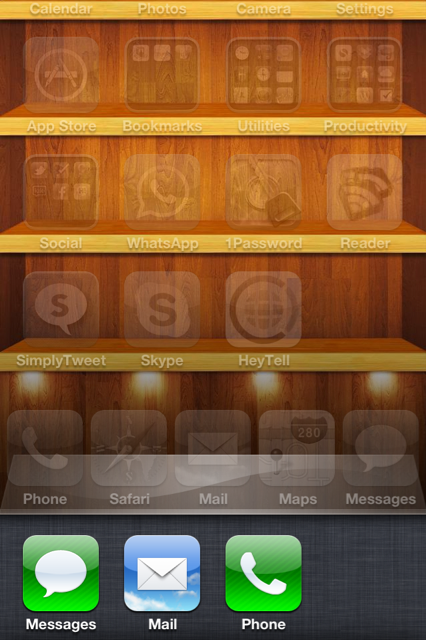
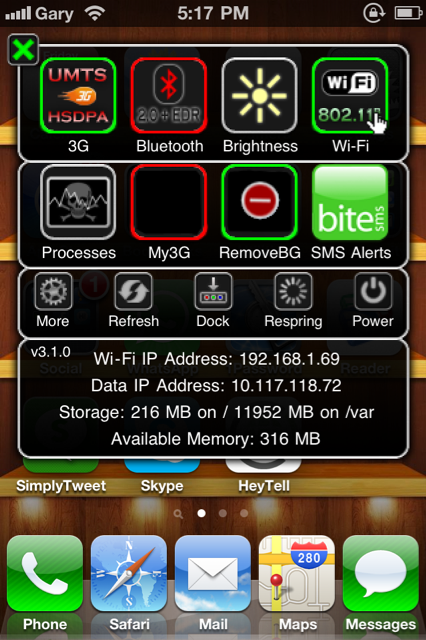
Jailbreakers - Cydia App "Remove Background & Remove Background SBS Settings Toggle"
  |
|
|
| patpicos |
just upgraded to itunes 10. Im happy they brought back the time elapsed/remaining for tunes.
The library display is quite better for albums and groups them.
However, I hate the new system tray icon. its ugllyyyyyy |
|
|
| Playa24_7 |
| quote: | Originally posted by E2EK1EL
IP4 & 3GS Speed Up (legit & jailbroken)
|
Yeah I've been using this for 2 weeks now and it works great. I guess I should have posted it up before lol. Oops. Good job on the post. |
|
|
| E2EK1EL |
Complete iOS 4.1 Walkthrough
With iOS 4¡äs launch only days away, we thought it would be interesting to provide a complete walkthrough of the new operating system. iOS 4.1 will be a free upgrade to all iPhone 4, iPhone 3GS, iPhone 3G, iPod touch 2G, and iPod touch 3G users. It will also come standard on Apple¡¯s newly announced 4th generation iPod touch.
Bug Fixes:
As promised, Apple will be providing fixes for the three major well-known issues in iOS 4.0/4.01/4.02. The first, which for me is worse than the antenna issue, deals with the iPhone 4¡äs proximity sensor issues. Many users find they are accidentally inputing commands into the iPhones screen while on a phone call. 4.1 promises to rectify this issue.

The update also promises a fix for bluetooth connection issues as well as a bug that makes the iPhone 3G very sluggish while running iOS 4.0. Initial tests conclude that the update lives up to its word, especially in the Google Maps and Messages applications.
Enhanced Bluetooth audio playback:
As we reported back in mid-July, iOS 4.1 brings full AVRCP bluetooth playback. This enhanced bluetooth protocol allows for more audio controls via bluetooth such as skipping forward, back, and volume. Before iOS 4.1 only volume controls were supported by bluetooth car stereo systems and such.
Click ¡®Read More¡¯ to read the software walkthrough.
Game Center:
Game Center is Apple¡¯s social gaming network that brings players of similar skill sets together in multiplayer games. The service initially introduced in April of this year is now ready for primetime with a slew of supported games ready to launch.


HD Video Uploading:
A long requested feature is finally available on iOS 4.1 and that is the ability to upload HD videos directly from your iPhone 4 or 4th generation iPod touch. Though the feature only works on WiFi, it is better than having to sync to your computer in order to upload.

High Dynamic Range Photography (HDR):
One new feature that nobody really saw coming in iOS 4.1 was HDR. This photo mechanism snaps three stills and combines them to create the perfect photo depending on lighting, shadows, and other photo-altering elements. To enable HDR just click the HDR button on top of the Camera apps¡¯ interface. You can choose whether the camera will save just the HDR version of the photo or the standard version as well. (Note: HDR Photography is only supported on the iPhone 4. Sorry iPhone 3G/3GS users ¨C remember your antennas work, though. )

FaceTime in Phone Favorites:
A new handy feature that Apple added to iOS 4.1 was the addition of FaceTime in phone favorites. You can now easily add FaceTime numbers and e-mail address to the favorites bar for quick access to you pal¡¯s faces.

E-Mail Based FaceTime:
As you know the new iPod touch has FaceTime, yet they obviously don¡¯t carry phone numbers. Because of this, Apple turned to E-Mail addresses as the point of FaceTime connection for their new iPod touch. Below is the interface for sending a FaceTime request to an E-Mail address.

Landscape Camera and FaceTime Call Controls:
Apple tends to port some of their portrait features to the landscape orientation from time-to-time and in iOS 4.1 they made FaceTime controls as well as the controls in the camera app easier to navigate in landscape.


$.99 TV Show Rentals in iTunes:
As you may know, Apple announced 99 cent TV show rentals for the United States in iTunes, and renting from your iOS device will be a go. Simply head to the TV Show section, then to your favorite show, then double click on an individual episode. From there you can now choose to own it, or rent it for 48 hours (you must watch it within 30 days) for less than a buck

Ping support in iTunes:
Apple¡¯s newly announced music social network will be making its way to the mobile iTunes, but doesn¡¯t lose a beat. You can follow (stalk), comment, and read up your feed.


Disable Spell Check:
Here is another handy addition from Apple in iOS 4.1. For those who don¡¯t like Apple¡¯s spell check (this is different than auto-correction) you can disable it under Settings/General/Keyboard.

FaceTime and Multiplayer/Game Center Restrictions:
This one¡¯s for all the awesome parents out there. You can place restrictions on your kid¡¯s iOS device so they can¡¯t FaceTime or play games with people over the internet. Simply go to the restrictions menu, set a password, and disable them like you see below.


AT&T Carrier settings shift to version 8.0:
iOS 4.1 now includes an updated version of the AT&T (not sure about other carriers) carrier firmware. This may or may not improve cellular service, data connections, and text message sending, but at least they¡¯re trying.
 |
|
|
| E2EK1EL |
^^^
iMovie editing, playback and rendering won't allow your IP4 to dim or lock up. |
|
|
| malek |
| what I really need is that the iphone memorize which keyboard i used for each sms/email/web session and not make me toggle between each every time. It's 2010, people speak more than one language at once! |
|
|
| Prometheus Xex |
| quote: | Originally posted by Nerologic
+1
MiWi is why I wouldn't update either. |
I was watching TV on the weekend. Two phones on different commercials were showing how they could become cellular WIFI hotspots.
Damn... Crapple doesn't allow that option... unless it's jailbroken. |
|
|
| E2EK1EL |
No HDR photography for iPhone 3G/iPhone 3GS?

While we won’t know for absolutely certain until the final release version of iOS 4.1 for iPhone arrives sometime this week (maybe Wednesday), it’s looking like HDR photography will be exclusive to iPhone 4 and not available for iPhone 3G and iPhone 3GS users.
EDIT: If this is the case, the guys from Cydia has just confirmed they will hack it and enable it for those two units. |
|
|
| Prometheus Xex |
| quote: | Originally posted by E2EK1EL
No HDR photography for iPhone 3G/iPhone 3GS?
EDIT: If this is the case, the guys from Cydia has just confirmed they will hack it and enable it for those two units. |
Damn straight !!! |
|
|
| E2EK1EL |
| quote: | Originally posted by Prometheus Xex
Damn straight !!! |
Don't jump the gun yet, let's see what happens when it comes out.
So far 95% of Apple's reasons are the turth, I don't like to admit TBH.
HDR Photo on the 3GS may not work due to hardware issues, could be the lens or it's not fast enough. For example, i know for a fact iMovie can't be runned on the 3GS. It takes a tons of resources and after a while (approx 30 mins of usage) it does get slow on the IP4.
We'll see what happens when everything is ready for the public. |
|
|
| E2EK1EL |
TinyUmbrella Updated Ahead Of iOS 4.1 Release; Includes Baseband Protection For iPhone 4

A new version of TinyUmbrella, the tool that allows you to take backups of SHSH blobs (ECID SHSH) has just been released in anticipation of iOS 4.1, which is expected to be released tomorrow, September 8.
The new version of TinyUmbrella will also protect your iPhone from baseband updates when you update it with iOS 4.1.
The ‘baseband’ is the generic nickname given to the internal components of the iPhone that handle the phone calls and Internet access. This ‘baseband’ is a tiny and unique independent computer system that runs inside your iPhone, it is separate to the main system that handles the applications (such as email and google maps) and it talks to the main part of the phone over an internal communications network.
Think of it like a cable modem or other peripheral that is attached to your home PC that needs occasional updates. When a software update is released and presented to you within iTunes the baseband is sometimes updated (to fix bugs or add new features).
Based on the beta version and Golden Master of iOS 4.1 that has been seeded to developers of iOS Developer Program, iOS 4.1 also includes a baseband update. So users who want to unlock their iPhone as there is no software method available currently that can unlock the new baseband included in iOS 4.1, which is where TinyUmbrella can be very useful.
The new version of TinyUmbrella includes the following new features:
•Baseband Protection - Updating to 4.1 using TinyUmbrella will protect your baseband from update. THIS ONLY APPLIES TO IPHONE 4!!!!! If you have a 3G or 3GS and you update to 4.1 your baseband will likely be updated.
•SHSH Retrieval from Cydia - If you don't have your SHSH locally, TinyUmbrella will request them from Cydia on-demand; allowing the restore to continue
•Automatically point hosts to Cydia - Once you close TinyUmbrella, it points your hosts file to Cydia (for further baseband protection and update/restores without TinyUmbrella)
•iPod Touch 4G 4.1 support
You can checkout our step-by-step guide on how to take a backup of SHSH blobs:
•How To Backup SHSH Blobs (ECID SHSH) Using Firmware Umbrella for Mac users
•How To Backup SHSH Blobs (ECID SHSH) Using Firmware Umbrella for Windows users
Note: If you have jailbroken your iPhone then Cydia will automatically store the SHSH blobs (ECID SHSH) when you launch it so you don’t need to use TinyUmbrella to take a backup.
Meanwhile, iPhone Dev Team has advised users who want to jailbreak and/or unlock their iPhone to avoid upgrading to iOS 4.1 when it is released.
We’ll let you know as soon as we’ve any further updates. So stay tuned here at iPhone Hacks or follow us on Twitter or subscribe to our RSS feed. |
|
|
|
|

