iPhone 4S line at flagship KT store in South Korea
iPhone 4S lines were also long in South Korea, as reported by Yonhap, with carriers KT and SK Telecom serving as the primary launch locations given the absence of any official Apple retail stores in the country. SK Telecom invited the first 100 pre-order customers to a midnight launch event with local hip-hop artists and other fanfare, while KT opted to focus on the more traditional customer lineup for the morning launch of the device.
(The motherland of Samsung???)
Orko
quote:
Originally posted by E2EK1EL
(The motherland of Samsung???)
Good thing it is built from so many Samsung parts.
E2EK1EL
We know, I expected the Koreans would support Samsung more then Apple.
LightsOut
Why? Your Canadian and you don't support RIM, why should they be any different?
E2EK1EL
Adobe product manager fingers Apple for death of Flash Player for mobile
Adobe's battles with Apple haven't exactly been a secret over the past couple of years, but the death of Flash Player for mobile has once again brought that drama to the fore. Mike Chambers, a lead product manager for Flash, took to his personal site today to shed some light on Adobe's rapid decent, pointing the finger squarely at Apple's refusal to adopt the player in its mobile OS. He had this to say:
This one should be pretty apparent, but given the fragmentation of the mobile market, and the fact that one of the leading mobile platforms (Apple's iOS) was not going to allow the Flash Player in the browser, the Flash Player was not on track to reach anywhere near the ubiquity of the Flash Player on desktops... Just to be very clear on this. No matter what we did, the Flash Player was not going to be available on Apple's iOS anytime in the foreseeable future.
That combined with the "strong support for HTML5 across modern devices," was apparently enough to drive the final nail into Flash's coffin. Among other things, Chambers cited the use of apps instead of browsers for media consumption and the complexity of the mobile market as further reasons for Adobe's decision. He went on to say that Adobe has a "long term commitment to the Flash Player on desktops," but concluded by encouraging Flash developers to diversify their skill sets. For the very lengthy full-form version of Chambers' explanation, hit the source link below, but we'd suggest grabbing a drink before you do so.
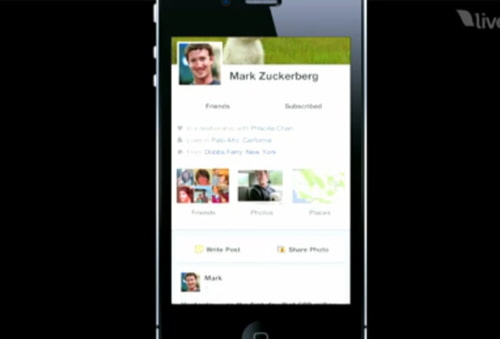
Facebook Timeline for iPhone is 'Incredible'
Facebook's new Timeline feature is coming to the iPhone and it looks 'incredible', according to Ellis Hamburger from Business Insider who had a chance to see the interface at press function in New York yesterday.
Just wait until you see Timeline in action on a touch screen device. It's so good it will make you want to skip the desktop experience and just use Facebook on your iPhone. Timeline is built to be manipulated on a touch screen.
Swiping through the years of your life is effortless, and Flynn even showed me a slick new feature that lets you take pictures "in line" inside your Timeline. In this way, you can see exactly how the pictures will look once they're posted.
Joe Flynn, lead designer for Facebook's mobile Timeline interface, told Hamburger that timeline is launching "soon," but not until it's completely finished.
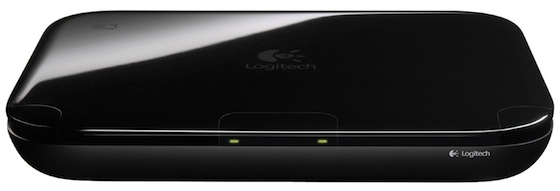
Logitech Acknowledges Google TV Set-Top Box a 'Big Mistake'
Google made waves last year for its introduction of Google TV, new software intended to integrate the Internet with television content and revolutionize the TV-watching experience. One of the key hardware launch partners for Google TV was Logitech, which offered its "Revue" set-top box for Google TV at a price of $299.
Google TV failed to catch on with consumers, and by July of this year Logitech had slashed pricing on the Revue box to just $99 and taken an accounting charge on the loss related to the below-cost sale price. The lack of consumer interest in Google TV reminded observers of comments made by Steve Jobs just after Google's announcement of its Google TV project.
Subsidized set-top boxes have squashed innovation because no one wants to pay for separate boxes...ask TiVo, Roku, us, Google in a few months. The set-top box needs to be torn up and redesigned to get people things they way they want them. And there's no go-to-market strategy for that. With the iPhone, and now the iPad, we could partner with carriers, but television is very balkanized...everything is local.
Just two weeks ago, Google announced a significant update to the Google TV platform, but Logitech apparently has no interest in being burned twice, as The Verge reports that the company has sworn off any further Google TV work and acknowledged that the original effort was "a big mistake". According to Logitech CEO Guerrino De Luca:
To make the long story short, we thought we had invented [sliced] bread and we just made them. [We made a commitment to] just build a lot because we expected everybody to line up for Christmas and buy these boxes [at] $300 [...] that was a big mistake.
De Luca notes that Logitech "executed a full scale launch with a beta product", a decision that resulted in a $100 million loss for the company when consumer demand failed to meet expectations. De Luca admits that Google TV may yet have success in the market but that any such developments are some time away and will not involve Logitech.
Google is of course only one of the companies seeking to change the way users interact with and experience television. Apple's current Apple TV set-top box primarily serves to integrate iTunes Store content with television sets, but the company is said to be working on a revolutionary new Siri-based interface for an actual television set product that could launch by 2013. And Sony has also acknowledged its efforts in the field, seeing the need to step up and address Apple's success so far with its iTunes ecosystem as well its future television plans.
E2EK1EL
quote:
Originally posted by LightsOut
Why? Your Canadian and you don't support RIM, why should they be any different?
The Koreans have great pride in the country, it's a diff culture over there.
It's pretty much 50/50 over here, some Koreans only use Samsung and the other half will use Apple.
E2EK1EL
Mind-controlled Siri hack uses brain activity to initiate calls using only your thoughts
Apart from a press of the home button to initiate Siri, this prototype Siri hack first spotted by IntoMobile is completely thought-controlled. The guys behind Project Black Mirror have recorded brain wave activity with ECG pads, matched the incoming patterns to pre-saved digital patterns saved on a MacBook, then fed the matched commands to a speech synthesizer chip that translates the command to Siri. The video above shows the developers initiating a call, but they say they’ve linked approximately twenty-five brain wave patterns to various Siri-controlled functions, and hope to bypass having to physically press the home button with a fully automated solution in the future. IntoMobile breaks down the intricacies:
Read more
Jeff Button
Dropped my iPhone 4S in the toilet.
It was completely submerged, albeit for 2 seconds tops.
It set the 'water damage' indicators off, which voids my warranty - but it WORKS.
The only 'defect' is when playing music with no headphones, it thinks it's connected to a dock.
E2EK1EL
quote:
Originally posted by Jeff Button
Dropped my iPhone 4S in the toilet.
It was completely submerged, albeit for 2 seconds tops.
It set the 'water damage' indicators off, which voids my warranty - but it WORKS.
The only 'defect' is when playing music with no headphones, it thinks it's connected to a dock.
Turn it off!
You're suppose to ...
Turn it off
Dry it (as much as you can)
Put the phone into a container with rice (to absorb the condensation and water inside)
Leave the container in sunlight for at least a week.
I've witness many water damaged iPhones, it takes about 4 hours to completely die. You've already have the first signs of malfunctioning.
Best of luck
E2EK1EL
How Siri Knows When You're There
I'm pretty sure this is causing some of the batt drain.
(Speaking of which, I honestly think the IP4 wouldn't be able to handle Siri well also. There are things I've done; that uses a lot of resource, such as broadcasting a personal hotspot for almost an hour and the phone becomes super hot. This causes some major malfunctions; which gave me processing delays, home button being non-responsive (I've tested 2x to make sure) and etc. Also multitasking in and out while the phone is doing some major processing will cause the same symptoms.
Siri uses a lot of resources, it may run fine for the first day or week; but after a long period of time, I think it slowdown the IP4. Just like how mobilesubstrate extension (from the jailbreaking scene) handles over time, something gets really clogged inside and you're force to restore the phone. Plus Siri has it's own mini OS within iOS5, all those animation and graphics are totally new)
E2EK1EL
I honestly didn;t expect the camera is be like this, these photos were uploaded to FB and it's been down sized for their servers.
The iPhone 4S intelligent antenna switching.
(It really does work)
GF bought a Factory Unlocked IP4S today, I wish one day I can afford on these.
E2EK1EL
How To Create Custom Home Screen Shortcuts For Settings Toggles Without Jailbreaking
SBSettings is one of our favorite jailbreak apps. It offers a faster way to access iPhone Settings from any app without going through the hassle of exiting the app and launching the Settings app. It is probably one of the top reasons why users jailbreak their iOS Device.
But if you don't want to go through the hassle of jailbreaking your iOS device just for it then Clay Russell of iPhone Addict have figured out a clever way to create custom shortcuts for settings toggles that can be accessed directly from your iOS device's home screen without the need to jailbreak the device.
It is nowhere close to a replacement for SBSettings, but if you've not jailbroken your iOS device then it is neat solution to quickly access the relevant Settings toggles.
Here's a step-by-step guide to create the custom home screen shortcuts for settings toggles:
1. Download the App "Icon Project" (iTunes link) available in the App Store for only $0.99.
2. Launch the app.
3. Create a custom icon using the options available in the app such as selecting the icon, the background etc.
3. Next tap on Select Type and select URL(Homepage) from the options.
4. You will then be prompted to enter the URL. Here you need to enter the shortcut URL of the appropriate settings toggle:
You can use the shortcut URLs for the various Settings toggles as mentioned below:
About — prefs:root=General&path=About
Accessibility — prefs:root=General&path=ACCESSIBILITY
Airplane Mode On — prefs:root=AIRPLANE_MODE
Auto-Lock — prefs:root=General&path=AUTOLOCK
Brightness — prefs:root=Brightness
Bluetooth — prefs:root=General&path=Bluetooth
Date & Time — prefs:root=General&path=DATE_AND_TIME
FaceTime — prefs:root=FACETIME
General — prefs:root=General
Keyboard — prefs:root=General&path=Keyboard
iCloud — prefs:root=CASTLE
iCloud Storage & Backup — prefs:root=CASTLE&path=STORAGE_AND_BACKUP
International — prefs:root=General&path=INTERNATIONAL
Location Services — prefs:root=LOCATION_SERVICES
Music — prefs:root=MUSIC
Music Equalizer — prefs:root=MUSIC&path=EQ
Music Volume Limit — prefs:root=MUSIC&path=VolumeLimit
Network — prefs:root=General&path=Network
Nike + iPod — prefs:root=NIKE_PLUS_IPOD
Notes — prefs:root=NOTES
Notification — prefs:root=NOTIFICATIONS_ID
Phone — prefs:root=Phone
Photos — prefs:root=Photos
Profile — prefs:root=General&path=ManagedConfigurationList
Reset — prefs:root=General&path=Reset
Safari — prefs:root=Safari
Siri — prefs:root=General&path=Assistant
Sounds — prefs:root=Sounds
Software Update — prefs:root=General&path=SOFTWARE_UPDATE_LINK
Store — prefs:root=STORE
Twitter — prefs:root=TWITTER
Usage — prefs:root=General&path=USAGE
VPN — prefs:root=General&path=Network/VPN
Wallpaper — prefs:root=Wallpaper
Wi-Fi — prefs:root=WIFI
5. Then tap "Create"
6. You will then be taken to a web page that displays your icon.
7. Tap on the share button and then tap on Add to Home Screen to add the custom toggles to your iOS device's home screen.
8. You will be prompted to add the name for your home screen icon and that's it you're done (it may be a good idea to put all the custom settings toggle in a folder). When you tap on the icon it should take you directly to the Settings page where you can enable or disable the toggle.