Barrel: Jailbreak App Brings 3D-Cube Effect To iPhone Homescreen
Playa24_7
quote:
Originally posted by VDub
Dec 17...
About ing time...
Speaking of this, where the fack is a Bank Of Montreal banking app?! They need to get on this and get in the game.
E2EK1EL
You gotta realize the fear all these banks have with the iPhones, security isn't the greatest on them and RBC was the first to be hacked the digital era.
That's why RBC Ebanking has such a high security, compared to the rest.
Playa24_7
quote:
Originally posted by E2EK1EL
You gotta realize the fear all these banks have with the iPhones, security isn't the greatest on them and RBC was the first to hacked the digital era.
That's why RBC Ebanking has such a high security, compared to the rest.
That's true, but this is the digital age and this is the next step. I'm sure they were also hesitant to setup online banking using their website because of security, but they figured it out and set it up. They make billions of dollars, so putting money towards this effort, making an app, and figuring out proper security measures isn't a big thing to do really.
E2EK1EL
quote:
Originally posted by Playa24_7
That's true, but this is the digital age and this is the next step. I'm sure they were also hesitant to setup online banking using their website because of security, but they figured it out and set it up. They make billions of dollars, so putting money towards this effort, making an app, and figuring out proper security measures isn't a big thing to do really.
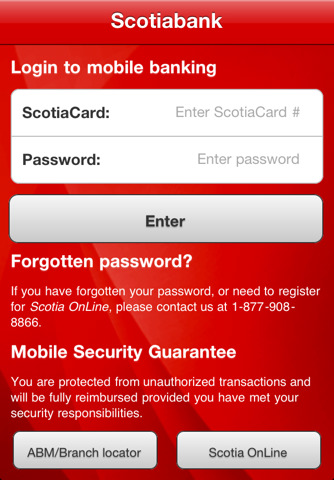
Scotiabank App - take a look of the warning.
(Sometimes it's not about the money, could be the reputation they fear the most)
Even with iOS 4; the Enterprise division has being revamped by 80%, still it's not enough confidence for corporations and business to jump on the iPhone "yet". The data that's transmitting OTA is not encrypted and there's been warning about it from many sources. Even I won't do any type of E-Banking / Financial transaction, web or app wise. They all want maximum security, but soon that will all change in the next few years as iOS gets more R&D. As we speak, many of the big firms are testing and allowing the IP4s to be used for their business. The ones that are testing the iPhones, don't really care about security issues. Slowly but surely, the Blackberrys will be phased out and replaced by Apple in the business world. Windows Phone 7 is also fighting for this market and maybe this could be their chance for the triumphant return.
That was one of Blackberry's strongholds in the business world, but now businesses are slowly heading over to Apple. Regardless if it's IP4 or the iPad, you'll see more and more King St. clowns jumping over in the next few years.
Blackberry Stronghold List - Before & After
1) Enterprise (iOS 4 revamped Enterprise by 80% and recently, Apple stole Blackberry's top 5 Enterprise sales team)
2) Push Email (Even in 2007 w/ firmware 1.0 we had Push Email & EAS; just recently it got really big, since Google & Microsoft is offering free. *Which was not meant for our benefits tbh*)
3) BBM (Soon to be the new ICQ; since many ppl are jumping ship, everyone's list is slowly shrinking)
4) UberTwitter (I'm not into Twitter, but UberTwitter accounts for 10 million BB tweets a day and the final ver is coming mid Dec)
5) Physical Keyboard (The 2006-2007 paranoia is now over and virtual keyboards, proven to be faster once the users get over the stupid editing paranoia. There's still a niche, girls and long nails don't play well with virtual keyboards)
Jer
quote:
..virtual keyboards, proven to be faster once the users get over the stupid editing paranaio
Sorry dude, but I lol'ed :stongue:
E2EK1EL
quote:
Originally posted by Jer
Sorry dude, but I lol'ed :stongue:
It true though, we all went through it when we first used the virtual keyboard. We were editing more then typing and no allowing our confidence to be applied with the predictive spelling.
hardcore trancer
quote:
Originally posted by VDub
Dec 17...
About ing time...
:eyes: :eyes: :eyes: :eyes: no way!! it took them what? 10 years to do this?:p
jester
quote:
Originally posted by Playa24_7
Speaking of this, where the fack is a Bank Of Montreal banking app?! They need to get on this and get in the game.
If and when BMO app comes out it better have an investment option. I am happy with RBC finally going to have an app... I can finally transfer my money to CIBC to pay my visa. Now for CIBC to have an app for my Blackberry (seeing I have it on my iPod Touch).
E2EK1EL
ULTRA RECYCLE (Advance users only)
Today we’re pleased to announce our free carrier unlock for iPhone3G/3GS owners with a baseband later than 05.13.04. The unlock for that baseband exploited the AT+XAPP command, thanks to a crash initially discovered by @sherif_hashim (@Oranav also found this crash). So what hole are we exploiting today, since Apple closed that AT+XAPP hole? Well, we’re exploiting the exact same hole!
It turns out that the very first iPad firmware 3.2.2 has baseband version 06.15.00 still vulnerable to AT+XAPP. The iPad baseband is built for the exact same baseband chip as the iPhone3G/3GS — they’re fully compatible! Some of us have been running 06.15 for weeks now on our iPhones in preparation for this release. (And some have known about this possibility of 06.15 on the iPhones for a while — kudos to @w1kedZ and @DHowett for keeping it hush!)
SIMPLIFIED ROUTE #1 (redsn0w for OSX + Windows):
1.Read and fully understand the warning below.
2.If you have an old-bootrom 3GS and are already unlockable but want to get to 4.2.1, please wait til we release an “unofficial” bundle for you. Read no further.
3.Use redsn0w (see update #2) for OSX or Windows. Enable the “Install iPad baseband” option and accept the warning.
4.When the redsn0w ramdisk is finished, install ultrasn0w via Cydia.
5.Enjoy!
SIMPLIFIED ROUTE #2 (PwnageTool for OSX):
1.Read and fully understand the warning below.
2.If you have an old-bootrom 3GS and are already unlockable but want to get to 4.2.1, please wait til we release an “unofficial” bundle for you. Read no further.
3.Read update #1 for an updated 3GS bundle.
4.Download this IPSW
5.Run PwnageTool to create a custom 4.1 IPSW. Tell it you want to use the iPad baseband you just downloaded. Restore to this custom IPSW.
6.Install ultrasn0w through Cydia
7.Enjoy!
FULL VERSION:
Since 06.15 is a higher version than 05.14 or 05.15 (where AT+XAPP is gone), anyone stuck at those versions can simply upgrade to 06.15 to unlock again! Luckily for us, Apple *still* provides the iPad FW 3.2.2 with this vulnerable baseband right from their own servers. (Grab it now, before they take it down!)
We’ve been busy updating both PwnageTool and redsn0w to make the baseband update as seamless as possible.
1.First up is “PwnageTool 4.1.3 Unlock Edition”. It has a special dialog box which will ask you if you want to update to the iPad baseband. You must already have the iPad 3.2.2 IPSW on your computer (see the above link)….so just point PwnageTool at it (or let it find it on its own if you’re in “simple” mode).
2.Directly after PwnageTool 4.1.3 is available, the official ultrasn0w repo http://repo666.ultrasn0w.com will be updated with ultrasn0w 1.2, which covers iPhone 4 baseband 01.59.00 and iPhone 3G/3GS basebands 04.26.08, 05.11.07, 05.12.01, 05.13.04 and now 06.15.00.
3.Finally, we’ll release an update to redsn0w today for those without Macs and can’t run PwnageTool. The new redsn0w will give you the option to update your baseband to 06.15 too.
WARNING — YOU DO THIS AT YOUR OWN RISK! PLEASE UNDERSTAND THE CONSEQUENCES OF UPDATING TO 06.15.
1.There is no way to come back down from 06.15, and there’s no hiding the baseband version from Apple. You’ll be voiding your warranty in a very obvious way.
2.If some future baseband comes out with a critical fix, you won’t be able to update to it if it remains down in the 05.xx sequence (then again, you wouldn’t update to it if you wanted to keep your unlock anyway).
3.Starting with FW 4.2.1 if you have 06.15 on your iPhone you won’t ever be able to restore to stock firmware (it will fail). You’ll need to only restore to custom IPSWs (then again, if you’re unlocker you should already be doing that).
Certainly don’t update to 06.15 if you don’t need to! Only do this if you need the unlock and you’re stuck on 05.14 or 05.15, and you’re willing to assume the above risks.
This PwnageTool also contains a 4.2.1 bundle for iPhone3G owners…for all else, it’s still only 4.1. If you have an iPhone3GS with an old bootrom, use redsn0w for an untethered 4.2.1 jailbreak (it can now install the iPad baseband too). For all other devices, the 4.2.1 jailbreak is tethered only (use redsn0w for it), until @comex can work some untethering magic.
Please feel free to use our comments section for questions. We have some very knowledgeable and helpful moderators: angiepangie, Confucious, dhlizard, and Frank55!